Finding “safe” music for YouTube shouldn’t be this difficult. You need background music that fits seamlessly with your video’s pacing, supports your voice, and avoids potential issues—especially when monetizing or working with brand partnerships.
This guide clarifies the true meaning of royalty-free music, compares traditional music libraries to AI music generation, and offers an easy-to-follow workflow that ensures you stay on track with every project. If you’re looking for a quick solution to generate music on demand, start here: AI Music Generator.
What Does Royalty-Free Music Really Mean for Creators?
Many creators misunderstand “royalty-free.” It doesn’t necessarily mean “free,” and it doesn’t guarantee “no copyright issues forever.”
Here’s what royalty-free music generally means in real terms:
- No per-view royalties: Typically, you pay a one-time fee (or subscription) for a track’s use based on a specific license, with no ongoing fees tied to views.
- Still bound by a license: Royalty-free music often comes with conditions, such as:
- Where you can publish (e.g., YouTube, TikTok)
- Use for commercial vs personal projects
- Attribution requirements
- Restrictions on paid ads, client work, resale, or redistribution
- Content ID claims may occur: Even with licensed tracks, automated systems like Content ID might trigger claims due to reasons like re-uploads, registration issues, or frequent use by multiple creators.
Practical takeaway: While royalty-free reduces risks, the safest approach includes keeping records of rights and having a strategy if a claim arises.
Traditional Libraries vs AI Music Generation
Both approaches offer solutions, but your best choice depends on your upload frequency, editing style, and the uniqueness you want in your music.
Simple rule:
- If you value predictability and don’t mind browsing for the right fit, use traditional libraries.
- If you need speed, uniqueness, and a repeatable workflow, opt for AI-generated music.
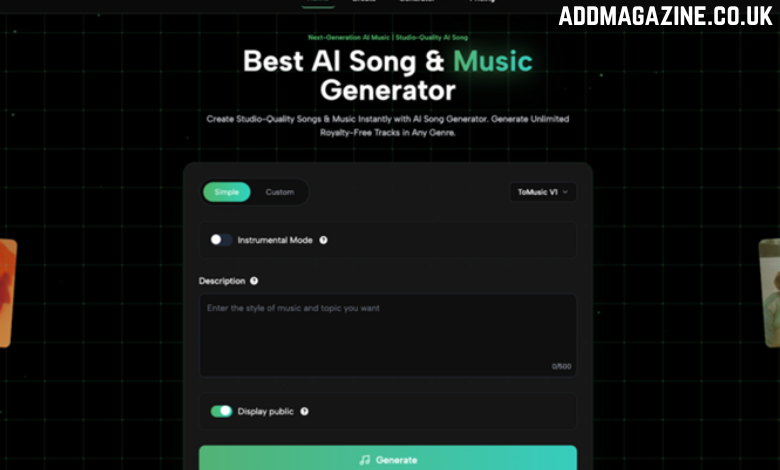
How to Create a Song Using ToMusic
Follow these steps to streamline your music creation process with AI. This is the fastest way to get music that fits your video and avoids copyright issues.
Step 1) Choose Simple or Custom + Pick a Model
- Simple: Best for quick background music (ideal for most creators)
- Custom: Use this for more control over structure or specific creative input.
Choose a model (e.g., ToMusic V1), or stick with the default if you’re unsure. Pro tip: If you’re doing voiceover, activate Instrumental Mode to ensure the track doesn’t overpower your voice.
Step 2) Write a Description
This is key! Be specific but simple. Use this formula:
Video Type + Scene + Mood + Tempo + Instruments + Purpose
Step 3) Click Generate & Use Variations
Once you’ve written your description, click Generate. For better results, create at least 3 variations with slight adjustments (e.g., tempo, mood, instruments).
Step 4) Preview, Download, and Use
Once you find the track that fits, download it and add it to your editor. Ensure it complements your video—music should support, not overpower.
Quick habit: If you’re concerned about claims, upload your video as unlisted first and check YouTube’s Content ID.
Prompt Templates + Generator Recommendations
Here are some ready-to-use prompts for common video types:
Tech Reviews & Product Videos (Modern + Polished)
Generator: Mood / Relaxing Prompts
Travel & Lifestyle Vlogs (Uplifting Vibes)
Generator: Vlog / Weather Prompts
Documentaries & Storytelling (Emotional, Spacious)
Generator: Story/Mood Prompts
Sports/Shorts Edits (High Energy)
Generator: Motion/Slowed & Reverb Prompts
FAQs About ToMusic AI Music Generator
Will royalty-free music prevent all YouTube claims?
No, claims can still occur, especially with automated systems like Content ID. However, having proper licensing and records helps dispute wrongful claims.
Can I monetize videos using royalty-free or AI-generated music?
Yes, provided you follow the provider’s license terms and are using the music for commercial purposes, client projects, etc.
Do I need to credit the music?
Check the provider’s license; when in doubt, crediting the music with a brief mention is a safe practice.
How do I avoid my channel sounding inconsistent?
Maintain a consistent sound by:
- Reusing the same generator
- Using consistent keywords (e.g., “lo-fi,” “cinematic piano”)
- Keeping a similar tempo across videos
Conclusion
When it comes to finding the right music for YouTube, you can either sift through traditional libraries or use AI to generate the perfect tracks quickly. The most effective process involves understanding licensing, keeping proof, testing before publishing, and using a consistent approach with repeatable prompts.