The rise of AI technology has transformed how we create and edit photos. Among the many innovations, AI headshot generators stand out, offering a way to produce polished, professional images without the hassle of studio appointments. With so many tools now available, it can be tough to decide which one is best for your needs. In this article, we’ll explore the leading options, making it easier for you to choose the one that fits your workflow.
TL;DR
Here’s a quick summary of the best AI headshot generators based on their standout features:
- HeadshotMaster: best for quick, no-login use with a variety of scenes.
- Photoeditorai.io: best for flexibility with multiple editing models.
- Pixlr: best for users needing layer support and AI background removal.
- Deepai.org: best for users looking for a basic, free tool with no sign-in required.
Comparison Table
| Feature | HeadshotMaster | Photoeditorai.io | Pixlr | Deepai.org |
| Generation speed | ~1 minute | ~1 minute | ~1 minute | ~1 minute |
| Pricing / free tier | Free, no account | 10 free credits | 50 free credits | Free, limited calls |
| Input requirements | Upload photo | Upload + text prompt | Upload photo | Upload photo |
| Output quality | Matches reference | Up to 4K resolution | Up to 720p | Up to 720p |
| Key limitation | No fine-tuning, photo-dependent | Needs account for full access | Free tier output limited to 720p | Basic editing only |
How AI Headshot Technology Has Improved
AI headshot generators have come a long way in recent years. Initially, these tools struggled with accuracy, often producing results that looked artificial. Today, they can generate high-quality headshots that closely resemble professional photos. Advances in AI understanding of human features and the subtleties of facial expressions have made these tools far more reliable. What once required a dedicated studio session can now be accomplished with a simple upload and a few seconds of processing.
When evaluating the best AI headshot generator, there are a few key factors to consider:
- Generation Speed – How fast can the tool generate your image?
- Pricing / Free Tier – Is the tool affordable? What limitations come with the free offering?
- Input Requirements – Is the process easy? Does it only require a photo or additional information?
- Output Quality – Does the final image closely match the reference photo? What resolution is available?
- Key Limitations – Are there any major restrictions, such as the need for an account or lack of customization?
By comparing these factors, you’ll be able to find the tool that best aligns with your specific needs, whether you’re looking for speed, customization, or simply a free option.
Competitor Analysis
Photoeditorai.io
Photoeditorai.io is a flexible platform that offers a range of editing models, including those designed for headshots. Users start with 10 free credits, which can be used for photo edits, with each edit costing between 2–4 credits. For full access, a login is required, but registered users receive additional credits. The tool supports output up to 4K resolution, making it a great choice for those looking for higher-quality images. However, it does require an account for continued access, which may not be ideal for users seeking a quick, anonymous experience.
Pixlr
Pixlr is a popular photo editor that supports various features like layers, background removal, and AI editing. The free tier offers 50 credits, with each edit costing 5 credits. While it provides up to 720p resolution on the free tier, it may fall short for users needing higher-resolution results. Despite the flexibility of its editing tools, Pixlr has a mixed reputation, with a low Trustpilot rating of 1.5 stars, which could suggest some customer dissatisfaction, particularly among free-tier users.
Deepai.org
Deepai.org offers a straightforward headshot generator with no login required. The free tier includes limited daily calls, ideal for those with minimal needs. Registered users can access more daily calls, though the free version only supports basic editing and does not allow for multi-model selection. Output is limited to 720p resolution, which might not satisfy users looking for more advanced features or higher-quality images. For basic, no-fuss headshot generation, however, this tool can be a good option.
HeadshotMaster
Scene Variety is the standout feature of HeadshotMaster. In less than a minute, you can generate high-quality headshots that closely match your reference photo. The best part? There’s no need to sign up or enter any credit card details. This tool is completely free and available for anonymous use. The process is incredibly simple: upload your photo, let the AI work its magic, and download your headshot—all in under a minute.
Advantages:
- Fast, with results usually ready in under a minute.
- Simple and user-friendly process: upload, generate, and download.
- The final result closely matches your reference photo, though output quality is dependent on the input image.
Limitations:
- No fine-tuning or advanced customization available.
- Output quality can be inconsistent, depending on the quality of the input photo.
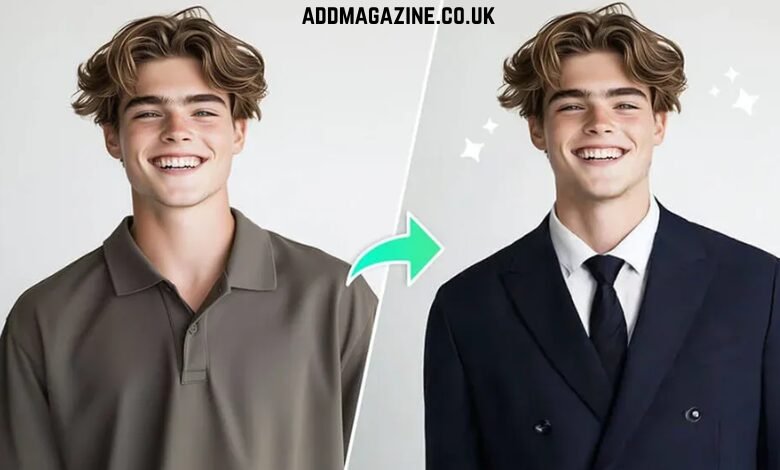
The AI Image/Photo Editor is a great tool within HeadshotMaster, enabling you to quickly edit and enhance your headshots. For those looking for more customization, the AI Clothes Changer offers a unique way to modify your attire, providing an extra layer of variety in your headshot creation.
Who Benefits from HeadshotMaster?
HeadshotMaster is best suited for anyone who needs a quick, straightforward headshot without the hassle of creating an account or paying for a subscription. Whether you’re updating your LinkedIn profile, preparing for a job application, or just want a polished image for a project, HeadshotMaster offers a fast, no-commitment solution. Its simplicity makes it perfect for users who need high-quality results without any added complexity.
Conclusion
Choosing the right AI headshot generator depends on your specific requirements. If you’re looking for something quick and free with a variety of scene options, HeadshotMaster is a great fit. For those who need more flexibility with multiple editing models, Photoeditorai.io might be a better choice. If advanced editing tools like layers and background removal are important to you, Pixlr could be the tool to try—though keep in mind its free tier limitations. Deepai.org is an excellent choice for users seeking a basic, free option with no login required.
HeadshotMaster stands out as one of the best free, fast tools available for generating polished headshots, with the added benefit of not requiring any sign-up. You can explore its full capabilities through the AI Photo editor or try out the AI Clothes Changer to customize your photos even further.