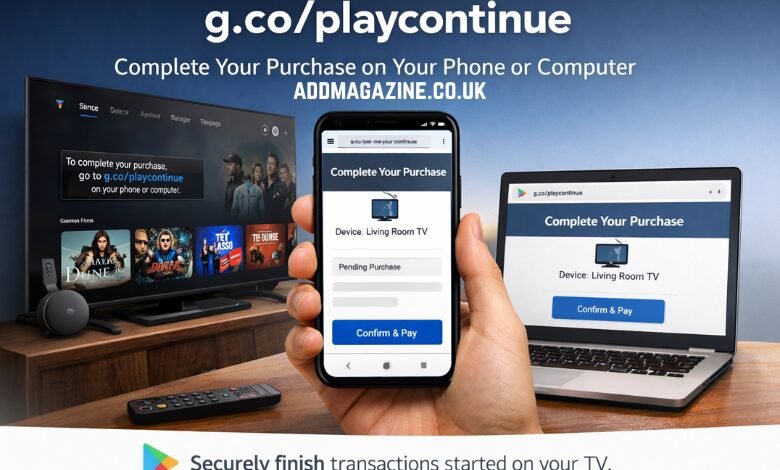
In today’s digital world, buying content and managing subscriptions across devices has become increasingly common. However, not every device is equipped to handle every step of the purchasing process. This is where g.co/playcontinue comes into play. It is a URL that serves as a bridge between devices like TVs, Google Chromecast, and phones or computers, ensuring seamless purchases and subscriptions within the Google Play ecosystem. Let’s break down what g.co/playcontinue is, how it works, and why it’s an important tool for users.
What Is g.co/playcontinue?
g.co/playcontinue is an official Google link designed to complete Google Play purchases or subscriptions that were started on a device such as an Android TV, Google TV, or a similar streaming device. These devices, while excellent for content consumption, have limitations when it comes to handling tasks like entering payment information or verifying accounts. Google Play, the digital marketplace for apps, movies, games, and subscriptions, allows users to initiate purchases on one device but may require additional steps that can’t be completed on that device. When such a situation occurs, g.co/playcontinue allows users to continue their transaction on a device better suited for these tasks, like a smartphone or computer.
For example, let’s say you’re browsing for a new movie on your Android TV and initiate a purchase. When you reach the point where you need to input payment details or verify your identity, the TV might not be able to process those actions securely. Instead of abandoning the transaction, you can use g.co/playcontinue to move the final steps to your phone or computer, where entering credit card details or completing an account verification is much easier and safer.
Why Is g.co/playcontinue Necessary?
The need for g.co/playcontinue arises from the limitations of streaming devices. While these devices are designed for effortless content playback, they are not ideal for tasks requiring secure authentication, such as:
- Entering passwords
- Typing sensitive payment details (credit card information, etc.)
- Verifying identity via two-factor authentication
- Updating billing information
These tasks are more conveniently managed on devices like smartphones and computers, which provide a full keyboard, biometric security options (such as fingerprints or face recognition), and a clearer interface. By redirecting users to g.co/playcontinue, Google ensures that these tasks are handled securely and efficiently.
Additionally, many households use shared TVs, where multiple Google Accounts may be active. g.co/playcontinue helps confirm which account is making the purchase and receiving access to the content, ensuring that the right account is used for the transaction.
How Does g.co/playcontinue Work?
Using g.co/playcontinue is straightforward, but it involves several steps to ensure a smooth and secure transaction:
- Starting the Purchase on a Streaming Device:
You start exploring content on your Android TV, Google TV, Chromecast, or another comparable streaming device. After selecting what you want to purchase or subscribe to, you will be prompted to continue the process on a different device, typically your phone or computer. - Using the Link:
The prompt will ask you to open g.co/playcontinue on your smartphone or computer. It’s important to type this URL directly into the browser’s address bar. - Linking to Your Google Account:
Once you access the g.co/playcontinue link, make sure to use the same Google Account that is logged into the streaming device. This step ensures that the transaction is linked to the correct account and prevents errors. - Completing the Transaction:
You will be redirected to a secure Google Play continuation page, where you can review the pending transaction. At this point, you’ll be asked to confirm your payment method, verify your account, or enter any additional details required to complete the purchase. - Automatic Completion on the Original Device:
After confirming everything on your phone or computer, the transaction will be completed automatically on the streaming device. You’ll receive access to your content without any further steps required on the TV or streaming device.
Common Scenarios for g.co/playcontinue Usage
The g.co/playcontinue link is typically used in specific situations where the device handling the initial part of the transaction is not suitable for completing it. Here are a few examples:
- Purchasing Content on Google TV or Chromecast:
Let’s say you start a purchase on Google TV or Chromecast but reach a point where you need to enter sensitive payment details. Instead of struggling with a remote to enter your card number, g.co/playcontinue allows you to finish the transaction on your smartphone or computer. - Verifying Payments for Subscription Services:
Services like Paramount Plus, Hulu, Peacock, and Disney Plus may require additional verification steps when subscribing or renewing subscriptions. Using g.co/playcontinue, you can easily approve these payments on your phone or computer, streamlining the entire process. - Two-Step Verification:
If Google requires a two-step verification for the payment method or account, this action cannot be completed on most TV devices. g.co/playcontinue ensures that this security step is handled on a personal device with better security features, reducing the risk of fraud or errors. - Account Switching:
Sometimes, users realize they are signed into the wrong Google Account. g.co/playcontinue helps resolve this by allowing users to sign in with the correct account on their phone or computer, ensuring the right account completes the transaction.
g.co/playcontinue on Different Platforms
Here’s how g.co/playcontinue functions on various platforms:
g.co/playcontinue on iPhone
Using g.co/playcontinue on an iPhone works the same way as on other devices. When a transaction is started on a device like Android TV or Google TV, and it requires additional verification or information, simply open g.co/playcontinue in your mobile browser, log in with the same Google Account, and complete the steps to finish the transaction.
g.co/playcontinue on Google Play
The g.co/playcontinue link is directly tied to the Google Play ecosystem, meaning it works with purchases made through Google Play, whether on a TV, phone, or computer. If a purchase begins on a streaming device, g.co/playcontinue allows users to securely complete the process on another device.
g.co/playcontinue for Streaming Services
The link is often seen in the context of popular streaming platforms such as HBO Max, Discovery Plus, Paramount Plus, Peacock, and Disney Plus. Whether you’re subscribing to a new service or renewing an existing one, g.co/playcontinue allows you to complete the transaction securely on a phone or computer, ensuring the process is fast, secure, and accurate.
g.co/playcontinue for Google Services
It also works seamlessly within other Google services, especially Google Play services. When users make purchases, such as buying movies, apps, or digital subscriptions, on devices that can’t handle verification tasks, g.co/playcontinue bridges the gap, ensuring the transaction is completed safely.
Security Considerations and Best Practices
While g.co/playcontinue is a secure Google-owned URL, users should always practice good security hygiene. This includes:
- Use a secure device: Ensure the phone or computer you’re using to complete the transaction is secure, with up-to-date software and a strong password.
- Log out of unused accounts: Make sure you are logged into the correct Google Account on both the streaming device and the device used to complete the transaction.
- Beware of phishing links: While g.co/playcontinue is legitimate, always be cautious when clicking on links. Ensure you’re accessing the URL directly and not from suspicious sources.
Google’s design for g.co/playcontinue ensures that users have a smoother, more secure purchasing experience. With a focus on usability and safety, it helps ensure that important steps in the transaction process are handled on devices suited to the task, without compromising security.
How g.co/playcontinue Enhances User Experience
One of the most significant advantages of g.co/playcontinue is its ability to provide a more seamless and user-friendly purchasing process. It allows users to initiate purchases on devices with limited input capabilities, like TVs or streaming devices, and then finish them on more convenient platforms such as smartphones or computers. This flexibility ensures that the user’s experience remains smooth and hassle-free, without being interrupted by technical limitations of certain devices.
Additionally, g.co/playcontinue integrates well with other Google services and accounts, reinforcing Google’s overarching goal of offering cross-device continuity. Users are not bound to a single device for the entire process, making the overall experience less restrictive. If you’re watching a show or purchasing a movie on your smart TV and are prompted to provide payment information, you don’t need to worry about fiddling with an on-screen keyboard or remote. Instead, you can quickly finish the transaction on your phone or computer, which often feels more natural and less frustrating.
This design also reduces the chances of making errors while entering sensitive data. When users are forced to type credit card details on a remote or through a TV interface, there’s a higher chance of mistakes, such as incorrect entries or inputting the wrong information. With g.co/playcontinue, users can verify and input details on their phone, which offers a much clearer interface, better accuracy, and greater ease of use.
g.co/playcontinue and Payment Security
Security is another major factor that g.co/playcontinue addresses effectively. Handling sensitive information like credit card details or personal identification data requires a high level of security, and TVs and streaming devices are not designed with this in mind. With g.co/playcontinue, users are redirected to their phone or computer, where they can use biometric authentication, such as fingerprint or facial recognition, to approve payments. This is a much safer and more efficient way to verify transactions compared to using a remote control or on-screen keyboard.
Moreover, g.co/playcontinue reduces the likelihood of fraud by ensuring that payment methods are confirmed on personal devices. Since shared devices like TVs may have multiple user accounts, it’s essential to verify which account is making the purchase, especially when multiple people use the same TV. This ensures that purchases are made by the right person and prevents unauthorized transactions.
Google also employs several measures to protect users during the handoff process. When you access g.co/playcontinue, you are prompted to sign in with the same Google Account that is active on the original device. This account-based authentication ensures that you’re completing the transaction on the correct account. Furthermore, Google ensures that these transactions are routed through a secure connection, adding another layer of protection for users when completing sensitive financial activities.
Key Benefits of g.co/playcontinue
- Streamlined Transactions: The link offers a smoother transaction process when you’re unable to complete purchases on devices with limited input options.
- Enhanced Security: The feature allows for more secure payment verifications, reducing the risk of fraudulent activities.
- Cross-Device Continuity: You can move between devices without interruption, offering flexibility and convenience.
- Reduced Errors: By moving sensitive tasks like payment confirmation to a device with a proper keyboard and clearer interface, users experience fewer errors and a more intuitive experience.
- Account Verification: It helps ensure that the right account is used for completing transactions, especially in households with multiple users.
The Role of g.co/playcontinue in Modern Streaming Services
Today, streaming services are more than just platforms for watching TV shows and movies. They are subscription-based ecosystems with diverse payment models, ongoing billing cycles, and complex user profiles. Services like Paramount Plus, Hulu, Peacock, and Disney Plus have millions of subscribers worldwide, and managing these subscriptions involves regular billing, renewals, and payment updates.
For users engaging with these services through devices like Google TV, g.co/playcontinue offers a streamlined way to manage purchases and subscriptions. Many times, these devices have limited input capabilities that make it difficult to confirm payments or update subscription information. In these scenarios, g.co/playcontinue redirects users to a more suitable device, where they can input payment details and finalize subscriptions securely and with ease.
Furthermore, the importance of secure payment handling becomes even more apparent when subscribing to premium streaming services. With features like two-step verification, g.co/playcontinue ensures that payments are authorized by the correct person, reducing the likelihood of accidental charges or unauthorized access.
Troubleshooting Common Issues with g.co/playcontinue
While g.co/playcontinue is generally a seamless tool, there are a few common issues users may encounter. Here’s a quick guide on how to troubleshoot if things don’t go as planned:
- Incorrect Google Account Logged In:
If you’re not signed into the correct Google Account on your TV or streaming device, g.co/playcontinue may not work as expected. Always ensure you’re using the same account on both your streaming device and the device you’re using to complete the transaction. - Transaction Not Completing After Confirmation:
Sometimes, even after confirming the transaction on your phone or computer, the purchase might not show up on the original device. In this case, you can sign out and sign back into the Google Account on the TV, then restart the transaction. - Using a Private Browser Window:
If you encounter issues with your active Google Account, try opening the link in a private or incognito browser window. This can help resolve issues related to account caching or conflicts between multiple accounts. - Payment Method Issues:
Ensure that your payment method is up to date and properly linked to your Google Account. If you’re facing issues, try updating your payment details through Google Play on your phone or computer. - Incompatible Devices:
While most devices that support Google Play services are compatible with g.co/playcontinue, some older models may not work as intended. If you’re experiencing difficulties, try using a different device or ensure that your current device is updated with the latest software.
How g.co/playcontinue Fits into Google’s Ecosystem
The development of g.co/playcontinue is part of Google’s broader strategy to improve cross-device functionality. Google has always been focused on creating a seamless experience across its ecosystem of devices and services, and g.co/playcontinue is an important piece of this puzzle.
By offering users the ability to switch devices during the purchasing process, Google enhances user experience by reducing friction and minimizing errors. This also plays into the company’s broader focus on security and usability, ensuring that users can confidently make purchases and manage subscriptions across devices without worrying about potential security breaches.
Moreover, g.co/playcontinue aligns well with Google’s push for more personalized and secure interactions. With more devices connected to the internet and more services requiring sensitive information, Google’s efforts to streamline these processes without compromising on security are vital. The g.co/playcontinue feature helps to centralize user control while maintaining a high level of protection, making it easier to navigate the increasingly complex digital marketplace.
Conclusion
g.co/playcontinue is a simple yet essential feature for users of Google Play, Android TV, Google TV, and streaming services. By allowing users to complete transactions that started on a device with limited input capability, it improves the overall user experience. It ensures security, smooths out the transaction process, and minimizes errors, all while maintaining the ease of use that many Google services are known for. Whether you’re purchasing a movie, subscribing to a streaming service, or updating billing information, g.co/playcontinue is the solution that helps you complete the process swiftly and securely.