Ever notice how content delays rarely come from writing itself? Most slowdowns happen in the quiet space between “it’s ready” and “who approved this?” A study by McKinsey found that knowledge workers spend nearly 20 percent of their time searching for information or waiting on approvals. That adds up quickly when content passes through multiple hands.
If your team publishes articles, documentation, or product content, a clear approval workflow is not optional. It keeps quality high, prevents version confusion, and protects teams from last-minute chaos. Tools like Notion and Confluence already sit at the center of many tech teams, which makes them ideal platforms for structured content approval.
The key is not adding more steps, but designing a flow that feels natural, visible, and easy to maintain as your content volume grows.
Why content approval workflows break down without structure
Content workflows often start simple, then quietly fall apart as teams grow. One editor tracks feedback in comments, another uses chat, someone else sends emails. Before long, no one is sure which version is final.
This breakdown usually comes from unclear ownership and invisible decision points. When approval stages live only in people’s heads, the process becomes fragile and inconsistent. Notion and Confluence work best when the workflow is explicit and shared.
Common causes of workflow friction include:
- Approval responsibilities that are implied rather than documented.
- Multiple feedback channels that fragment decisions.
- No clear signal for when content is approved or blocked.
- Manual follow-ups that depend on memory.
A good workflow removes ambiguity. It tells everyone what happens next, who owns the decision, and where the current status lives.
Early in the workflow, teams often want reassurance that content meets baseline standards. This might include originality, tone consistency, or compliance checks. Integrating AI checker free option can support this stage by flagging potential issues before human review begins.
Quality checks work best when they:
- Happen before formal review stages.
- Are advisory rather than blocking.
- Produce clear, actionable signals.
- Do not require manual reporting.
By front-loading quality signals, reviewers focus on substance instead of surface issues. This keeps the approval stage fast and meaningful rather than tedious.
Choosing between Notion and Confluence for approvals
Both tools can support strong approval workflows, but they shine in different environments. Choosing the right one depends on how structured your content and teams already are.
Notion works well for flexible teams that create varied content types and want lightweight customization. Confluence fits teams that value rigid documentation standards and tighter permissions.
A quick comparison helps clarify the difference:
| Feature | Notion | Confluence |
| Custom workflows | Flexible databases and properties | Page statuses and add-ons |
| Permissions | Page and database level | Space and page level |
| Automation | Built-in rules and integrations | Automation rules and macros |
| Best for | Editorial and content teams | Engineering and internal docs |
Neither tool is better by default. The best choice is the one your team already trusts and opens daily. Adoption matters more than features.
Defining approval stages before building anything
Before creating templates or automations, the approval stages must be clear. This is where many teams rush and later regret it.
Approval stages should reflect real decision points, not aspirational ones. If a step exists but no one actively reviews content there, it does not belong in the workflow.
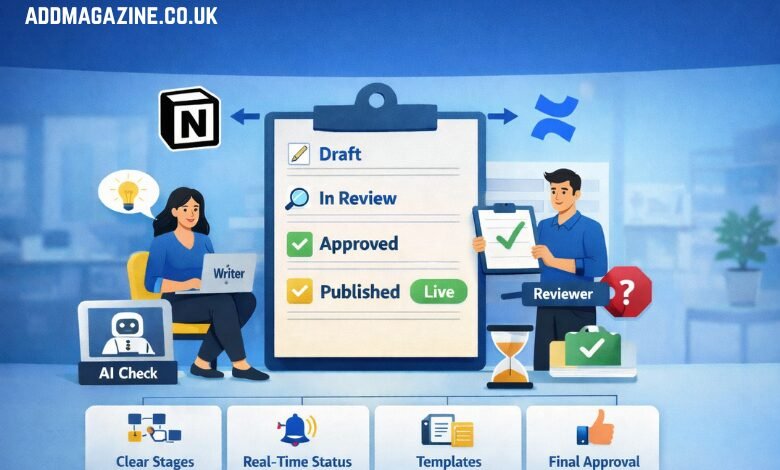
Most content workflows include stages such as:
- Draft in progress, owned by the writer.
- Internal review for clarity and accuracy.
- Final approval for publishing or distribution.
- Published or archived state.
Each stage should answer one question: who acts here, and what decision do they make? Avoid vague labels like “reviewing” or “checking.” Specific language reduces back and forth.
Once stages are defined, they become the backbone of your system. Everything else, templates, notifications, permissions, builds on this clarity.
Setting up a status driven workflow in Notion
Notion excels at visual, status-based workflows when databases are used properly. Each content item becomes a row with properties that drive visibility and responsibility.
Start by creating a database with a status property that mirrors your approval stages. Add fields for owner, reviewer, due date, and content type. These properties allow filtering, sorting, and automation later.
Helpful status practices include:
- Limiting status options to only real stages.
- Using consistent names across all content databases.
- Locking templates to prevent accidental changes.
- Creating filtered views for writers and reviewers.
Once set up, the workflow lives in plain sight. Writers know when to stop. Reviewers know what needs attention. Managers can see bottlenecks without asking. That visibility alone often reduces delays by more than half.
Managing approvals in Confluence with page statuses
Confluence approaches approvals through structure rather than flexibility. Page statuses, restrictions, and space rules work together to guide content through review.
Page statuses such as Draft, In Review, Approved, and Archived act as visible signals. Combined with permissions, they prevent premature publishing and protect finalized content.
Effective Confluence setups often include:
- Required page templates for all new content.
- Restricted edit access once content reaches review.
- Comments used only for actionable feedback.
- Approval macros or automation for final sign off.
A clear approval status is not just a label. It is a contract between the writer and the reviewer about what action is expected next.
When used consistently, Confluence becomes a reliable source of truth. Teams stop asking which version is final because the system makes it obvious.
Using templates to enforce consistency automatically
Templates are the quiet enforcers of good workflows. They remove guesswork and ensure every piece of content enters the system in a predictable shape.
In Notion, templates can prefill properties, checklists, and guidance text. In Confluence, page templates define structure, headings, and required sections.
Strong templates usually include:
- A brief checklist for the writer before submission.
- Clearly marked sections for required information.
- Notes explaining what reviewers will look for.
- Default status and ownership fields.
Did you know? Teams that standardize content templates often reduce revision cycles by over 30 percent because reviewers stop asking for missing elements.
Templates do not limit creativity. They protect time and attention, which makes better work possible at scale.
Avoiding common approval workflow mistakes
Even well designed workflows fail if small habits undermine them. Most issues come from inconsistency rather than tool limitations.
Watch out for these common mistakes:
- Skipping status updates because “everyone knows.”
- Using comments for final approvals instead of statuses.
- Letting side conversations override documented decisions.
- Adding new approval steps without updating templates.
The fix is not stricter rules, but shared discipline. Workflows only work when everyone agrees to trust the system instead of work around it.
A short monthly review of workflow health can help. Look at where content stalls, where approvals pile up, and which steps feel unnecessary. Adjust deliberately rather than reactively.
Measuring and improving your workflow over time
A content approval workflow is never finished. As teams grow, content types multiply, and priorities shift, the system needs adjustment.
Both Notion and Confluence offer signals you can track:
- Time spent in each approval stage.
- Number of revisions per item.
- Reviewer workload distribution.
- Missed deadlines or stalled content.
Use this data to refine, not punish. If reviews take too long, the issue may be unclear criteria or overloaded reviewers, not poor performance.
The best workflows feel invisible. Content moves smoothly, approvals feel fair, and no one wonders what happens next. When your system reaches that point, it stops being a process and starts being support.