How fast can an ecommerce team really move when every campaign needs fresh video creative? Product launches, paid ads, social content, landing pages, and seasonal promotions all compete for the same limited creative bandwidth. For years, manual editing has been the default way to turn visuals into motion. But is it still the fastest option when brands need more variations, shorter turnaround times, and better testing speed? With insMind Image to Video, ecommerce teams can transform static product visuals into video content far more efficiently.
Part 1: Why ecommerce creative demands speed more than ever
Ecommerce content moves fast because shopper attention moves fast. A product creative may only have a short window to perform before audiences scroll past it or ad fatigue sets in. That means brands are no longer producing one polished asset and using it everywhere for weeks. They are expected to create multiple versions for paid social, product detail pages, email campaigns, remarketing ads, and marketplace listings.
This is where time becomes a strategic issue, not just a production issue. If a creative team spends too long building each video asset, they lose the ability to test enough hooks, formats, and product angles. They may end up publishing fewer variations, reacting more slowly to campaign performance, and missing chances to improve conversion.
That is why the speed of production matters so much in ecommerce. It affects not only how much content gets made, but also how quickly a team can learn what works. And in a performance-driven environment, faster learning often leads to better results.
Part 2: What manual editing still does well, and where it slows teams down
Manual editing still has clear strengths. It gives skilled editors detailed control over timing, transitions, motion treatment, brand presentation, and overall visual rhythm. If a brand wants a carefully art-directed hero video with layered storytelling and custom movement, manual editing can absolutely be the right choice.
But ecommerce creative is not always about building one perfect showpiece. More often, it is about producing useful, persuasive, platform-ready content quickly. That is where manual workflows begin to feel heavy. Even when all the source images are already prepared, someone still needs to organize the assets, build the sequence, decide how each shot should move, refine the pacing, export multiple sizes, and revise the final outputs based on feedback.
This process also creates dependency. A manual workflow often relies on an editor, a designer, or an external freelancer. If that person is busy, the content pipeline slows down. If the campaign suddenly needs five new variants instead of one, the workload expands immediately. So while manual editing is powerful, it is not always efficient for the daily pace of ecommerce production.
Part 3: How insMind Image to Video works in a practical ecommerce workflow
This is where Image to Video becomes especially relevant. At its core, the tool is designed to convert static images into dynamic video content, which makes it highly practical for ecommerce teams that already work with product photos, campaign stills, packaging shots, or lifestyle visuals.
In a typical workflow, the user starts with an image that already represents the product well. That could be a clean product-on-white shot, a detail-rich hero image, or a styled brand visual. Instead of manually building motion frame by frame inside editing software, the user uploads the image and lets the AI generate movement from that visual foundation. With insMind, users can also choose from multiple advanced models to better match different creative goals and achieve higher-quality video results. The result is a more dynamic asset that feels better suited for modern ad placements, social feeds, and other motion-first environments.
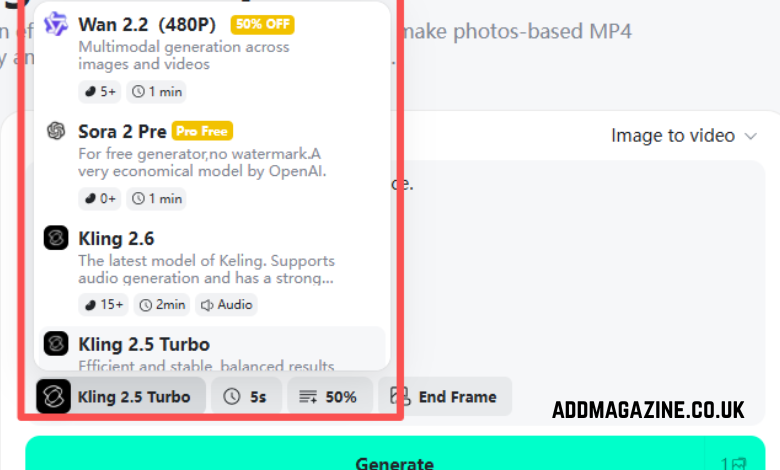
What makes this useful is not just convenience. It is how the tool reduces the need for traditional editing labor. The user does not need to think like a timeline editor or motion designer to begin creating video. The process is much more accessible because the AI handles the heavy lifting involved in turning a still image into something more engaging.
From a working-principle perspective, the system uses the uploaded image as the visual anchor for the video output. Rather than asking the user to manually animate every transition or movement, it interprets the image and generates a motion-based result from it. For ecommerce teams, that is a meaningful shift. A product photo is no longer just a static asset for a catalog or PDP. It becomes the starting point for richer creative output.
This also fits naturally into the way many ecommerce brands already operate. After a photoshoot, they usually have a library of approved visuals. Some are used for product pages, some for banners, and many remain underused. Image to Video helps repurpose those existing assets into promotional videos without requiring a separate video shoot or a long manual editing cycle. That makes it especially useful for brands that want to produce more creative from the same asset pool.
Part 4: When AI image-to-video is faster than manual editing
So where does AI actually outperform manual editing in a real ecommerce setting? Usually, it happens in situations where speed, variation, and reuse matter most. If a team already has a set of approved product images and needs to launch new ad creatives quickly, AI image-to-video is often the faster option.
Think about a product launch, flash sale, or seasonal campaign. The brand may already have strong visuals ready to go, but still needs motion content for paid social or homepage placements. A manual editor can certainly create that content, but the process still involves assembling, animating, revising, and exporting the material by hand. AI shortens that journey by turning static assets into motion-based creative more directly.
The difference becomes even clearer when multiple versions are needed. Ecommerce teams rarely stop at one video. They want alternate openings, different endings, fresh creative angles, and updated cuts for testing. Manual editing treats each variation as additional production work. AI makes variation easier to scale because the starting point is already much more efficient.
That does not mean AI replaces manual editing in every case. If the goal is a highly customized brand film or a visually complex campaign asset, manual control may still be worth the extra time. But for everyday product promotion, fast-turnaround content, and continuous testing, AI usually offers the more practical speed advantage.
Part 5: How other insMind video tools strengthen the workflow
One reason this workflow works so well is that it does not have to depend on a single tool alone. Ecommerce content production is often stronger when several tools support different stages of the process.
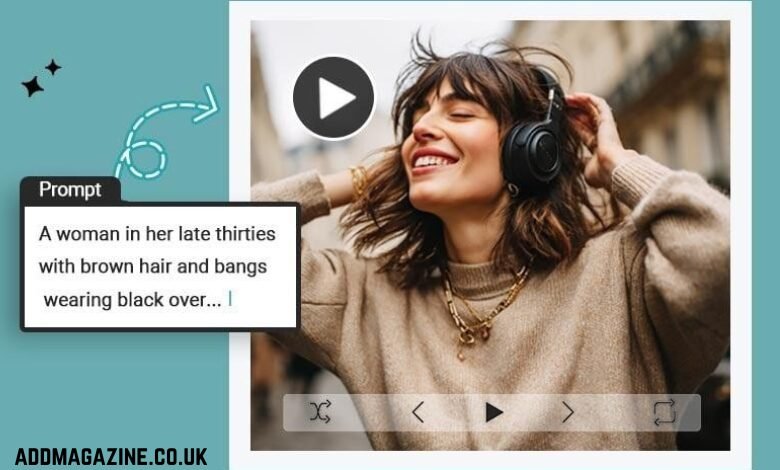
For example, some campaigns begin with a concept before a full photo set is ready. In those cases, Text to Video can help teams turn an idea into visual motion content from a prompt. That makes it useful for early concept exploration, quick campaign ideation, and testing creative directions before full asset production is finalized.

Then there is control over sequence design. If a team wants to shape how a video starts and finishes more intentionally, Start and End Frame Generator adds another layer of flexibility. This is especially helpful when the opening frame needs to hook the viewer or the final frame needs to reinforce a product, message, or brand impression more clearly.
Conclusion
So what is faster for ecommerce creatives: manual editing or AI image-to-video? In most day-to-day production scenarios, AI has the edge. Manual editing still matters for high-touch, highly customized brand work, but it often demands more time and more labor than fast-moving ecommerce teams can afford.
For brands that need to repurpose product visuals quickly, create more video variations, and keep pace with constant testing, AI image-to-video is usually the smarter workflow. And when that process is supported by tools like Text to Video, Start and End Frame Generator, the entire production pipeline becomes even more flexible. For ecommerce teams looking to create better video content without adding more friction, insMind offers a toolkit built for exactly that reality.