1. 3DAI Studio
When you’re looking for the best AI for 3D modeling in 2026, 3DAI Studio really stands out. It’s not just another tool; it’s a whole platform designed for creators and teams. What makes it special is that it gives you access to pretty much all the major AI models out there – think Meshy, Rodin, Tripo, and others. This means you’re not stuck with just one AI’s interpretation of your prompt or image.
This multi-model approach is a big deal. Different AI engines work better for different things. Rodin is great for super realistic stuff, Meshy is quick and flexible, and Tripo often gives you clean geometry that’s good for games. Instead of trying to force one AI to get it right, you can just try your input with a few different ones and pick the best result. Our tests showed this boosted success rates significantly, saving a lot of time on prompt tweaking.
3DAI Studio is the only platform that truly brings everything together for AI 3D creation. It handles text-to-3D, image-to-3D, and even video generation. Plus, the pricing is pretty sweet. For $14 a month, you get a lot of credits, which works out to be way cheaper per generation than most other services. It’s a really smart choice if you want flexibility and the best possible outcome for your 3D projects.
2. Rodin AI
Rodin AI, also known by its other names like Deemos and Hyper3D, is a tool that really focuses on making things look as real as possible. If you’re all about photorealism and want your 3D models to look like they were actually photographed, Rodin AI is a strong contender. It’s known for its high-quality textures, specifically 4K PBR textures, and it pays close attention to how materials should look and behave. This makes it a top pick for product visualization where every detail matters.
Rodin AI is on the more expensive side, with a monthly cost that can be a barrier for some creators. While it excels in photorealism, it doesn’t offer the broader creative suite that some other platforms do. You’re essentially paying for a specialist, and that specialization means fewer extra features.
For those who need the absolute best in photorealistic output and have the budget to match, Rodin AI is a powerful option. It’s particularly suited for enterprise users who might need dedicated support and service level agreements. But for many, especially those looking for more versatility or cost-effectiveness, exploring other options might be more practical.
3. Luma AI
Luma AI is a fascinating option, especially for those just starting out or looking to experiment without a big financial commitment. It offers a free tier that really lets you get a feel for what AI can do in 3D.
What sets Luma AI apart is its use of NeRF (Neural Radiance Fields) and Gaussian Splatting technology. This approach is different from many other tools, focusing on capturing scenes with incredible detail from multiple viewpoints. It’s not the fastest tool out there, with generation times that can stretch to five or even ten minutes, but the quality for learning and testing purposes is quite good.
For creators on a budget or students, Luma AI provides a solid entry point into AI-powered 3D asset creation. It’s a great way to understand the underlying tech before diving into more complex, paid platforms. The Luma AI platform is definitely worth checking out if you want to play around with advanced rendering techniques without spending a dime.
4. Meshy
Meshy is a pretty decent option if you’re looking for a general-purpose AI for 3D modeling. It’s known for being pretty fast, usually spitting out models in about 30 to 60 seconds, which is great for quick iteration. It handles both text-to-3D and image-to-3D, and they’ve got plugins for popular software like Blender and Unity, which is a nice touch.
The biggest drawback is that you’re stuck with Meshy’s specific AI model. If your prompt or image doesn’t quite hit the mark with their AI, you don’t really have other options to try. Also, the pricing, at $16 for 200 credits, isn’t the best value out there compared to some others. It’s a solid tool, but maybe not the most flexible if you need to experiment a lot.
Meshy offers a straightforward workflow for creators needing quick 3D assets. It’s a good starting point, especially if you’re already using Blender or Unity and want something that integrates easily. Just be aware of the credit system and the single-model limitation when you’re planning your projects.
5. Tripo
Tripo AI is a tool that focuses on generating 3D models, often with a quicker turnaround than some of its competitors. It’s known for producing clean geometry, which can be a big plus for game development where efficient topology is important. While it might not always hit the photorealistic mark perfectly, it often leans towards a more stylized, game-ready aesthetic.
One thing to note about Tripo is its approach to input. It’s primarily an image-to-3D platform, meaning you’ll feed it visuals to get your 3D assets. This can be great for quickly turning concept art or reference photos into models, but it’s not a text-to-3D solution. This limitation means you’re working within the bounds of what the AI can interpret from an image, rather than describing your vision with words.
When considering Tripo, think about its specific strengths. If you need game-style assets with good base geometry and auto-rigging capabilities, it’s definitely worth a look. However, for those needing absolute photorealism or the flexibility of text prompts, other tools might be a better fit. It’s a solid option for a particular niche within the 3D creation workflow.
6. NVIDIA Omniverse
NVIDIA Omniverse is a powerful platform for 3D design collaboration and simulation. It’s built for creators and teams working on complex projects, offering a way to connect different 3D tools and workflows. Think of it as a virtual world where your 3D assets can live and interact.
This platform really shines when it comes to connecting disparate software. If your team uses Maya, Blender, or other DCC tools, Omniverse can act as a central hub. It allows for real-time collaboration, meaning multiple users can work on the same scene simultaneously, seeing each other’s changes as they happen. This is a game-changer for production pipelines.
NVIDIA Omniverse isn’t just about connecting tools; it’s also about simulation and rendering. With its physically accurate rendering capabilities, it can produce stunning visuals. For creators, this means a more streamlined process from concept to final output, all within a collaborative environment. The platform is designed to handle large-scale scenes and complex simulations, making it suitable for professional use.
7. Adobe Substance 3D
Adobe Substance 3D is a suite of tools that really helps 3D artists out. It’s not just one thing; it’s a collection of software designed to make creating and texturing 3D assets much smoother. Think of it as a professional toolkit for anyone serious about 3D.
One of the standout features is its AI-powered texturing capabilities. This means you can get incredibly realistic materials without spending ages painting them by hand. The AI can generate textures from simple descriptions or even photos, speeding up the workflow significantly. This is a big deal for projects that need a lot of detailed surfaces, like game environments or product visualizations.
Adobe Substance 3D really shines when it comes to material creation and application. It offers a vast library of pre-made materials, but the real power comes from its ability to let you customize and generate new ones. The integration of AI here means that creating variations or entirely new looks is faster than ever before. It’s a tool that helps bridge the gap between artistic vision and technical execution for 3D modeling.
8. Houdini
Houdini is a powerhouse for procedural 3D content creation, and its AI capabilities are growing. While not a direct text-to-3D generator like some others, Houdini integrates AI in smart ways, especially for complex tasks. Think of it as a sophisticated toolkit where AI assists rather than replaces the artist.
Its strength lies in its node-based workflow, allowing for incredible control and iteration. This makes Houdini a go-to for VFX and game development where complex systems and dynamic environments are key. The AI features here are about augmenting existing processes, not just generating assets from scratch. For instance, AI can help with tasks like intelligent scattering of assets or optimizing geometry.
For creators who need deep control and are already in a complex pipeline, Houdini offers a way to incorporate AI without losing artistic direction. It’s about making the already powerful Houdini even smarter. The future of Houdini will likely see even tighter AI integrations, making it a more compelling option for teams looking for advanced procedural generation.
9. ZBrush
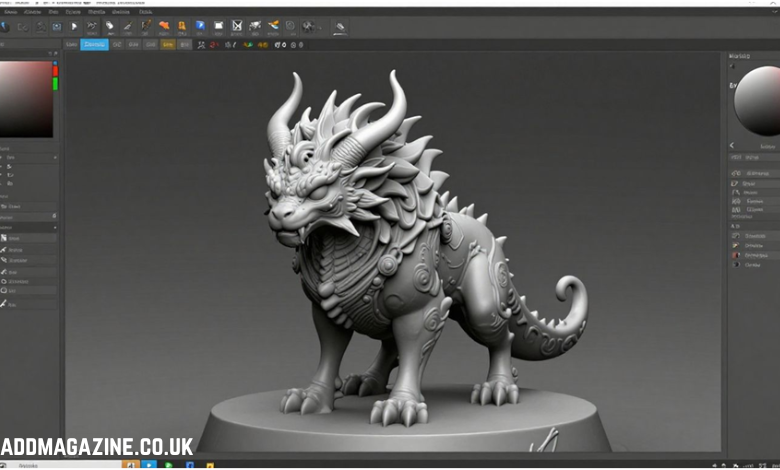
ZBrush has long been a go-to for digital sculpting, and its integration of AI is making it even more powerful for creators. The software now uses AI algorithms to help refine meshes and smooth out rough spots, which can save a lot of time. It’s like having a digital assistant that knows how to clean up your sculpts.
The AI features in ZBrush are designed to speed up the initial stages of modeling. For instance, an artist can feed a 2D sketch into the system, and ZBrush can generate a basic 3D model to work from. This means less time spent on the foundational blocking and more time for the detailed artistic touches that make a model unique. This AI assistance is a big deal for anyone working on complex character designs or rapid prototyping.
While ZBrush is known for its deep sculpting capabilities, its AI enhancements are making it more accessible. It’s not just for seasoned pros anymore; these tools help bridge the gap for those looking to create intricate models without getting bogged down in technicalities. The focus remains on artistic control, but with a helpful AI nudge.
10. Blender
Blender is a powerhouse in the 3D world, and while it’s not an AI generation tool itself, its role for creators working with AI-generated assets is huge. Think of it as the ultimate finishing studio for your AI creations. You can import models generated by tools like Meshy or Tripo directly into Blender.
This is where you can really refine those AI models. Want to combine a character generated by one AI with a prop from another? Blender is your go-to. You can clean up geometry, adjust textures, rig characters for animation, and set up complex scenes. It’s the place where raw AI output becomes a polished final product.
For teams, Blender offers robust collaboration features, making it easier to share projects and work together on refining AI-generated assets. Knowing Blender, even at a basic level, significantly expands what you can do with AI 3D models, turning quick generations into professional-grade assets for games, films, or visualizations.
Wrapping Up: The AI-Powered Future of 3D Modeling
So, looking at everything in 2026, it’s pretty clear that AI isn’t just a passing trend in 3D modeling; it’s become a core part of how things get done. For creators working solo or in big teams, these AI tools are making complex tasks way simpler and faster. We’ve seen how they can help with everything from making game worlds to showing off products online. The big takeaway is that the best AI for 3D modeling isn’t just one single program anymore. It’s about having options, being able to mix and match different AI models and tools, and finding what works best for your specific project. Embracing these advancements means you can spend less time on the tedious stuff and more time on the creative side, ultimately bringing your ideas to life more effectively.