The gap between spoken content and searchable, shareable text has been closing for years, but for most people who work with audio and video every day — content creators, journalists, educators, knowledge workers — the process of turning recordings into usable transcripts remains surprisingly painful. Enterprise transcription platforms are powerful but come with annual contracts, per-seat pricing, and onboarding processes designed for procurement departments. Consumer-grade tools often compromise on accuracy, language support, or export flexibility.
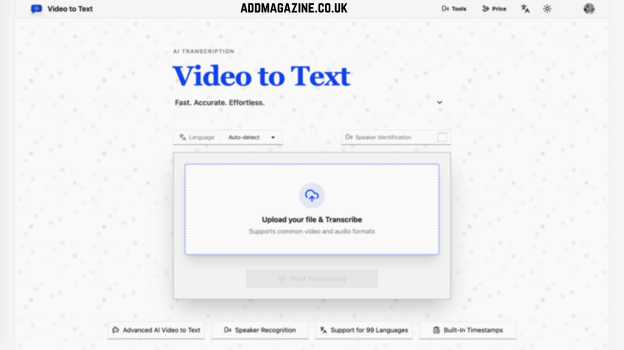
Video to Text is a web-based AI transcription service that aims to occupy the space between these extremes. The tool converts uploaded video and audio files into clean, structured text in seconds, supports 99 languages, identifies individual speakers in multi-person recordings, and exports results in four different formats. There is no subscription, no software to install, and no technical configuration required. Users upload a file, wait for the AI to finish processing, and download the result.
The product positions itself as a utility rather than a platform. It does one thing — transcribe video to text and transcribe audio to text — and aims to do it faster, more accurately, and with broader language coverage than the alternatives that most individual users and small teams can practically access.
The Speed Gap: What 35 Seconds Per Hour Actually Means
Transcription speed is usually measured by the Real-Time Factor, or RTF — the ratio of processing time to the duration of the source media. An RTF of 0.1x means the system processes audio ten times faster than it plays back, finishing a one-hour file in about six minutes. Older CPU-based transcription engines often operate somewhere between 0.1x and 1.0x, meaning users are accustomed to waiting anywhere from several minutes to overnight for a long recording to finish.
Video to Text operates at an RTF of 0.008x. This means the AI transcription engine processes audio approximately 125 times faster than real-time playback. An hour-long recording does not take an hour. It does not take ten minutes. It takes about 35 seconds.
Concrete performance benchmarks from the service’s test suite illustrate what this means in practice:
- A three-hour, fifteen-minute podcast episode completes in approximately 133 seconds — just over two minutes.
- An eight-hour, twenty-one-minute video course finishes in roughly 300 seconds — five minutes flat.
These numbers are not marketing approximations. They are the measured output of the speech recognition models that power the service, and they fundamentally change how speech-to-text conversion fits into a content production workflow.
Consider a journalist who has just finished a 45-minute interview for a story. In a traditional workflow, transcribing that recording manually might take two to three hours of pausing, rewinding, and typing. With Video to Text, the journalist uploads the file, opens a notes application to start outlining the article, and has a complete, searchable transcript before they finish drafting their first paragraph. The transcription step disappears into the background of the workflow rather than dominating it.
For a content creator publishing multiple videos per week, the time savings compound aggressively. Across a schedule of three videos per week, that represents two to three hours of captions alone. With automated transcription that finishes in seconds, those hours convert directly into additional production capacity — more time for filming, editing, scripting, or audience engagement.
The speed also changes how users think about transcription as a resource. When transcription requires a significant time commitment, it becomes a decision: “Is this recording important enough to transcribe?”
Language Coverage That Reshapes the Addressable Market
Tools optimized for English often perform poorly in other languages. Tools that claim multi-language support often deliver acceptable results in the five or ten most commonly spoken languages and deteriorate rapidly beyond that threshold.
Video to Text supports 99 languages, a breadth of coverage that spans the vast majority of global media production. The list includes English with four regional variants (American, British, and Australian), Spanish, French, German, Italian, Portuguese, Dutch, Chinese, Japanese, Korean, Arabic, Hindi, Russian, Turkish, Vietnamese, Thai, Indonesian, Polish, Swedish, Norwegian, Danish, Finnish, Greek, Hebrew, Czech, Romanian, Hungarian, Ukrainian, Catalan, and many more. It extends to less commonly served languages including Afrikaans, Amharic, Basque, Hawaiian, Kannada, Latvian, Malagasy, Nepali, and Yoruba.
The practical implications of this language breadth go beyond a marketing checklist. A YouTube creator producing content in Indonesian can use the same tool as a podcaster recording in German. A multinational corporation with offices in Tokyo, São Paulo, and Berlin can standardize on a single transcription tool across all regions.
Automatic language detection is built into the transcription pipeline as a default behavior. The system analyzes the audio, identifies the language or languages present, and applies the appropriate recognition model. This eliminates a step that, in many competing tools, is both mandatory and a common source of user error — selecting the wrong language model and receiving garbled output as a result.
Automatic detection serves two distinct use cases. The first is the straightforward scenario: a user receives a recording from a colleague or source in a language they do not recognize and needs a transcribe audio to text solution that works without requiring them to first identify what they are listening to. The second is multilingual content.
Multi-language content handling is perhaps the more technically challenging problem. When a single file contains speech in more than one language — an international conference panel where panelists switch between English and French, a bilingual podcast where hosts code-switch, a business meeting where participants speak different native languages — the system is designed to recognize and transcribe all languages present without requiring the user to segment the audio manually or run separate transcription passes. This capability makes Video to Text particularly well-suited for international media production, global business communication, and academic research involving multilingual source material.
For users searching for tools to transcribe video to text free or convert video to text transcription at no cost, the combination of 99-language support with a 30-minute free tier (discussed in the pricing section below) provides a substantial evaluation window — enough to test the service on real content in multiple languages before committing any payment.
Speaker Diarization: Turning Conversations Into Usable Documents
Transcribing a single speaker presents one set of engineering problems. Transcribing a conversation with two, three, or more speakers presents an entirely different one. When multiple voices overlap, interrupt, or speak at different volumes and distances from the microphone, a raw transcript without speaker attribution becomes difficult to parse. The reader encounters a wall of undifferentiated text and must mentally reconstruct who said what — precisely the kind of cognitive overhead that transcription is supposed to eliminate.
Speaker diarization is the technical term for the process of identifying and labeling distinct speakers throughout a recording. Video to Text includes this capability as a standard feature. The system analyzes vocal characteristics, turn-taking patterns, and acoustic context to cluster segments of speech by speaker identity. The resulting transcript labels each utterance with a speaker tag — Speaker A, Speaker B, Speaker C, and so on — creating a structured document that preserves the conversational architecture of the original recording.
The feature transforms transcription from a raw data extraction process into a document that is immediately useful in collaborative and professional contexts. For a journalist transcribing a one-on-one interview, speaker diarization separates questions from answers, making the transcript browsable and quotable without manually tracing who is speaking at each turn. For a product manager documenting a team meeting, it attributes action items, decisions, and concerns to specific individuals. For a researcher analyzing focus group recordings, it makes the data sortable by participant — a capability that fundamentally changes what can be done with the transcript in downstream analysis.
When combined with timestamped output, the speaker-labeled transcript becomes a fully navigable document. Each segment of text carries a time marker indicating its position in the original recording. Readers can jump from a particular sentence in the transcript to the corresponding moment in the source media with precision. This is the technical foundation for subtitle generation — timestamp formats align directly with the SRT and VTT standards used by video editing platforms — but it also enables search, citation, and verification workflows that go beyond subtitling.
A journalist fact-checking a claim can locate the exact second in a recording where it was made. A student reviewing a recorded lecture can skip directly to the portion covering a specific topic. An editor checking a transcript against source material can audit accuracy segment by segment without scrubbing through hours of audio.
Format Flexibility: From Raw Media to Ready-to-Use Text
The service accepts a wide range of media file types on input. For video to transcript conversion, supported video formats include MP4, MOV, M4V, WebM, and MKV — collectively covering the output of DSLR cameras, mirrorless cameras, screen recording software, drone cameras, and virtually every smartphone on the market. For audio to text conversion, supported audio formats include AAC, FLAC, M4A, MP3, OGA, OGG, Opus, and WAV — spanning compressed and lossless formats, voice memo apps, podcasting software exports, and professional recording devices.
Files can be up to 5 gigabytes in size and up to 10 hours in duration. The 10-hour cap is designed to accommodate long-form content: full-day conference recordings, multi-hour webinar sessions, extended podcast episodes, audiobook drafts, and lecture series. The 5 GB file size limit provides generous headroom for high-bitrate video files while remaining practical for browser-based uploads over consumer internet connections. These limits position the service as viable for professional media workflows, not just short-form or casual use.
On the export side, four text-based formats are available, each serving a distinct downstream purpose:
- SRT (SubRip Subtitle): The standard subtitle format for video editing platforms including Adobe Premiere Pro, DaVinci Resolve, Final Cut Pro, and online platforms like YouTube and Vimeo. SRT files pair timestamps with text segments in a format that imports directly into editing timelines. For content creators who need to add captions to finished videos, the SRT export eliminates the manual captioning step entirely — upload the video, wait seconds for the transcript, download the SRT file, and drop it into the editing project.
- VTT (Web Video Text Tracks): A web-native subtitle format used by HTML5 video players, online course platforms, and streaming services. VTT supports additional styling and metadata options beyond what SRT offers, making it the preferred format for web-based video delivery and accessible media.
- TXT (Plain Text): A clean, unformatted text file containing the full transcript. TXT exports are ideal for note-taking, archival, integration with word processors and text editors, and any workflow where the transcript will be read, annotated, or further processed as prose. For a student turning a recorded lecture into study notes, or a journalist filing an interview transcript to an editor, TXT is the most straightforward and universally compatible option.
- CSV (Comma-Separated Values): A structured, columnar format where each row represents a transcript segment and columns contain the timestamp, speaker label, and text content. CSV exports open directly in spreadsheet applications like Microsoft Excel, Google Sheets, and Apple Numbers, and import cleanly into databases, data analysis tools, and project management platforms. For a researcher coding interview data, a project manager tracking meeting action items, or a data analyst processing call transcripts, the CSV format transforms the transcript from a document into structured data.
The ability to export the same transcript in multiple formats means the tool serves different stages of the same workflow. A content creator might download the SRT file for immediate use in video editing, the TXT file for their content archive, and the CSV file for a metadata database — all from a single transcription pass.
Six Workflows, One Tool
Its feature set maps onto multiple distinct workflows, each with different inputs, outputs, and success criteria.
Content Creators
For YouTubers, TikTokers, course creators, and video-first content producers, the subtitle workflow is the primary driver. A creator finishing a video edit can upload the file, wait under a minute for processing, download an SRT file, and import subtitles directly into their editing timeline. The time saved compared to manual captioning — which can consume 30 to 60 minutes for a 10-minute video — compounds across a weekly publishing schedule. Speaker diarization adds value for interview-format or co-hosted content, where captions that identify who is speaking improve viewer comprehension and retention. Beyond subtitles, transcripts are increasingly valued as a secondary content asset: a full text version of a video can be repurposed as a blog post, newsletter content, or social media thread.
Journalists and Researchers
For reporters and academic researchers, the core value proposition is searchability and quotability. An hour-long interview recording becomes a text document that can be searched by keyword, skimmed for relevant sections, and quoted with confidence. The timestamps provide an audit trail: every quote in a published story or paper can be traced back to its exact moment in the original audio, supporting fact-checking and editorial review processes. With support for 99 languages, the tool is viable for international reporting, multilingual research projects, and field work in regions where dedicated transcription services are unavailable or impractical.
Students and Educators
For students, the primary use case is converting recorded lectures into searchable study notes. A student who records a 90-minute class session can upload the file afterward and receive a complete, timestamped transcript — a study resource that is both more detailed and more navigable than handwritten notes. For educators and online course creators, providing transcripts alongside video lectures serves dual functions as an accessibility aid and a learning resource. Research in educational technology has consistently demonstrated that the availability of transcripts improves comprehension outcomes, particularly for non-native speakers and students with learning differences. In an era where recorded lectures and video-based courses have become standard in both higher education and professional training, video-to-text transcription is transitioning from a nice-to-have to a baseline expectation.
Knowledge Workers
For professionals in knowledge-intensive roles — product managers, consultants, executives, legal professionals — the meeting-to-structured-notes pipeline is the daily workflow. Instead of splitting attention between active listening and detailed note-taking during a meeting, participants can record the session (with consent), upload it afterward, and receive a speaker-labeled transcript that captures every decision, action item, and discussion point. The CSV export option makes this data directly actionable: a product manager can import the transcript into a project management tool and extract action items by speaker, a consultant.
Language Learners
For anyone learning a new language, the combination of listening and reading is a well-established technique for building comprehension. Video to Text enables learners to upload audio content in their target language — a podcast episode, a news broadcast, a YouTube video — and receive a transcript they can read alongside the audio. For educators teaching language courses, the ability to generate transcripts from authentic media materials opens up a richer set of instructional resources than scripted textbook dialogues alone can provide.
Podcasters and Broadcasters
For podcast producers, transcripts serve multiple strategic functions. A full transcript published alongside each episode improves discoverability — search engines can index the text content of an episode in ways they cannot index audio files — and provides an accessibility option for deaf and hard-of-hearing audiences. Transcripts also enable content repurposing: pull quotes for social media promotion, blog post adaptations of episode content, and newsletter material. The speaker diarization feature is particularly relevant for interview-format and panel shows, where attributing statements to the correct speaker is essential for both readability and editorial accuracy. For broadcasters operating under regulatory requirements that mandate closed captioning or transcripts for certain types of content, automated transcription provides a compliance path that does not require a dedicated transcription team.
Pricing Without the Subscription Trap
The transcription market has gravitated toward subscription-based pricing, where users pay a fixed monthly fee for a set number of transcription hours. This model works well for heavy users who transcribe consistently every month. It works poorly for everyone else — the occasional user who needs to convert a single two-hour meeting into text once a quarter, the content creator whose publishing schedule varies
Video to Text operates on a pay-as-you-go model with no recurring charges. There is no monthly commitment, no automatic renewal, and no penalty for periods of inactivity.
New users receive 30 free minutes upon sign-up — enough to transcribe several short recordings or one substantial file at no cost and evaluate whether the service meets their needs before making any purchase. This free transcribe video to text tier provides a meaningful trial rather than a token gesture. A 30-minute allowance could cover a short interview, a team standup meeting, a lecture segment, or a podcast episode, giving users direct experience with the accuracy, speed, and workflow before they commit funds.
- Lite: $9.90 for 200 minutes — approximately $0.05 per minute.
- Pro: $19.90 for 600 minutes — approximately $0.03 per minute. Designed for regular users with weekly transcription needs.
- Ultra: $99.00 for 6,000 minutes — approximately $0.017 per minute, or roughly one dollar per hour of processed audio. Built for heavy users, teams, and organizations with continuous transcription requirements.
For context, the Lite plan at $9.90 provides enough minutes to transcribe approximately six 30-minute podcast episodes, ten 20-minute meetings, or a full semester of recorded study sessions for a student. The Ultra plan at $99 provides enough capacity to transcribe eight hours of content every day for nearly two weeks — or, framed differently, over 100 hours of content at a per-hour cost that is competitive with hiring human transcribers in regions where professional transcription services cost $15 to $30 per audio hour.
There is also a 14-day refund policy for unused credits. If a user purchases a plan and decides the product does not meet their requirements, they can request a full refund provided the purchased minutes have not been consumed. This policy reduces the risk of commitment for first-time buyers and aligns with the product’s overall approach of minimizing friction in both the product experience and the purchasing decision.
Roadmap: Beyond Transcription
The current release covers the core transcription workflow — upload, process, export — at a level of speed, accuracy, and language coverage that positions the product competitively against established alternatives. The developer has shared plans for several features that would extend the product’s capabilities beyond straightforward speech-to-text conversion.
Automatic translation is the most significant of these planned features. Users would be able to generate translated versions of their transcripts, enabling cross-language content distribution — a creator publishing a video in Spanish could provide English subtitles, a business with multinational teams could generate meeting summaries in multiple languages, and a researcher could produce translated versions of interview data for international collaborators. The feature would also enable translated audio exports, opening the door to audio dubbing workflows.
PII redaction — the automatic detection and removal of personally identifiable information such as phone numbers, email addresses, and social security numbers from transcription output — addresses a growing compliance and privacy concern across industries. For legal professionals, healthcare workers, and anyone handling sensitive recorded material, the ability to produce clean, de-identified transcripts without manual redaction represents a significant workflow improvement and risk reduction measure.
Multi-channel audio support would enable the system to leverage separate audio tracks when they are available — a common scenario in professional recording setups where each speaker is recorded on their own microphone channel. When individual channels are available, speaker attribution becomes deterministic rather than probabilistic, which would improve accuracy beyond what speaker diarization from a mixed track can achieve.
The availability timeline for these features depends on development progress and user feedback. The product’s roadmap reflects a development philosophy that prioritizes expanding the service’s capabilities in directions that solve real workflow problems rather than adding features for feature parity with enterprise platforms.
A Focused Alternative in a Fragmented Market
The transcription tool market is fragmented in ways that create real gaps for users who fall between the available options. At the low end, free tools offer basic audio to text or video to text functionality but typically limit file size, duration, language support, or export format — or monetize through ads and data collection. At the high end, enterprise platforms offer comprehensive features but come with minimum commitments, per-seat licensing, procurement processes, and price points designed for departmental budgets rather than individual users or small teams.
Video to Text occupies a deliberate middle ground. It provides professional-grade transcription — 99-language support, speaker diarization, timestamped output, multiple export formats — at usage-based pricing that scales from $9.90. There is no minimum commitment, no subscription, and no feature gating behind enterprise tiers. The user experience is intentionally simple: a three-step flow of upload, wait, and export, with optional controls for users who want to configure language settings or processing options.
For the independent creator producing content across platforms, the journalist working on deadline, the student navigating a semester of recorded lectures, the knowledge worker managing a calendar of meetings, or the language learner building comprehension through authentic media — Video to Text offers a clear proposition: turn any video or audio file into clean, accurate, exportable text in seconds, in any of 99 languages, with no subscription required.