In today’s digital landscape, simply dragging files to the Recycle Bin or pressing ‘Delete’ is no longer enough to keep your private information safe. Modern file systems don’t actually destroy data when you delete a file; they merely remove the index pointer and mark that space as available for future use. Until that storage space is overwritten, powerful data recovery software tools can easily reconstruct and restore your sensitive documents, personal photos, financial records, and stored browser passwords.
Whether you are planning to sell your old computer, donate a USB flash drive, recycle an SSD, or simply clean up confidential enterprise files, ensuring that deleted data is 100% unrecoverable is paramount. That is where Donemax Data Eraser comes in. Built with military-grade and certified international data erasure algorithms, Donemax Data Eraser provides a comprehensive solution for permanently wiping data from Windows and Mac storage devices. In this detailed 2026 review, we will explore its core features, wiping modes, international erasure standards, pros and cons, and step-by-step functionality.
What Should You Look for in Data Erasure Software?
With numerous file shredders and privacy tools available on the market, choosing the right data erasure utility requires careful evaluation of safety, efficiency, and compliance standards. Here are the essential criteria to consider before selecting a data wiping solution:
- Certified Data Sanitization: A reliable data-wiping solution should comply with recognized security frameworks, including DoD 5220.22-M, NIST 800-88, and the Gutmann method, providing rigorous deletion procedures designed to make sensitive information effectively unrecoverable, even through sophisticated forensic techniques.
- Flexible Erasure Modes: Different situations demand different erasure strategies—ranging from shredding individual files to completely wiping an entire hard drive or safely cleaning unallocated free space without disturbing existing operating system files.
- Broad Storage Device Compatibility: The software should seamlessly support a wide range of media, including internal HDDs, high-speed NVMe/SATA SSDs, external hard drives, USB flash drives, memory cards (SD/CF), and digital camera storage.
- User-Friendly Interface: An intuitive and clean design is essential so that everyday users, business professionals, and IT administrators can execute complex data wipes with complete confidence and zero risk of accidental misstep.
Donemax Data Eraser: Essential Tools & Capabilities
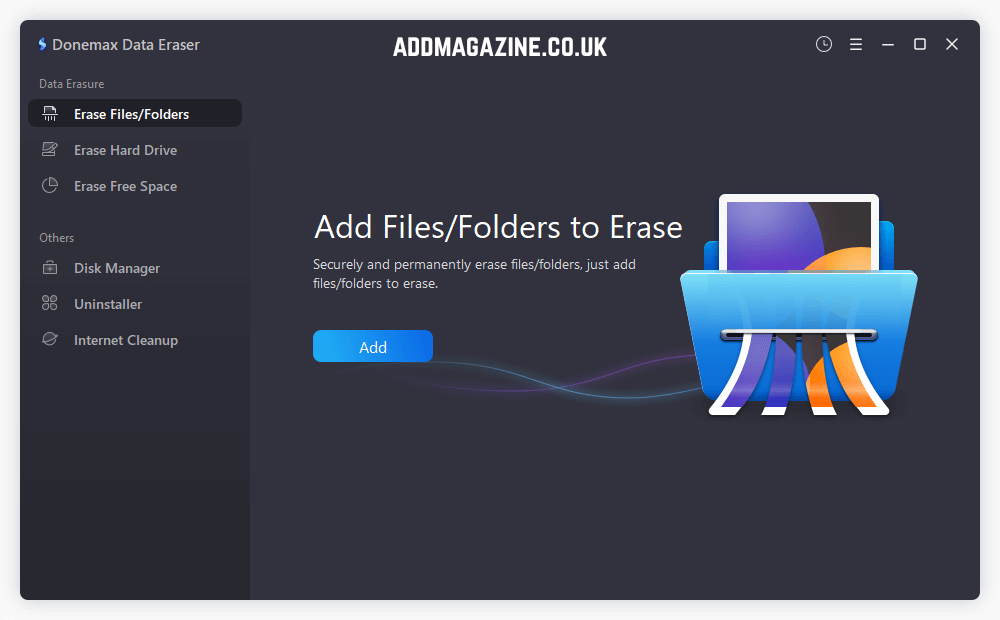
Donemax Data Eraser is designed as an all-in-one data destruction suite. It offers three versatile data wiping modes alongside extra system privacy utilities to keep your computer operating securely and cleanly.
Mode 1 – Targeted File & Folder Removal
This mode allows you to target and shred specific files or folders. Whether safeguarding sensitive corporate files, financial data, customer records, or private media, simply choose what you want removed and select “Erase Now” for secure, permanent deletion. The software permanently shreds the selected files, leaving no lingering data fragments behind.
Mode 2 – Full Hard Drive Wiping
Designed for comprehensive drive sanitization, this mode completely wipes an entire non-system hard disk partition or external storage drive. It permanently destroys all existing files, hidden partition data, and previously deleted items on the drive. This mode is the perfect choice when selling, donating, or recycling a hard drive, SSD, USB flash drive, or SD card.
Mode 3 – Wipe Free Disk Space
When you delete files through Windows Explorer or empty your Recycle Bin, the actual file contents remain hidden in the ‘free space’ of your hard drive until overwritten. Mode 3 scans and overwrites only the unallocated free disk space with random data characters. It permanently destroys all previously deleted or formatted files without affecting your active, intact files or operating system.
Additional Built-In Privacy & Disk Utilities
- Internet Activity Traces Cleaner: Scans and permanently clears browsing history, cookies, cache, temporary internet files, auto-fill entries, and saved passwords across major web browsers (Chrome, Edge, Firefox, Safari) to safeguard online privacy.
- Disk Manager: Provides built-in disk management capabilities allowing users to format drives, repair corrupted file systems, check drive health, and safely eject external storage devices in a secure environment.
- App Uninstaller: Helps users completely uninstall unnecessary software programs and forcefully purge all residual registry keys, leftover configuration files, and system traces.
Certified International Erasure Standards Supported
Donemax Data Eraser complies with rigorous international, government, and defense data destruction standards. Users can select and adjust data-erasure methods to achieve the right balance between protection level and processing efficiency.
| Data Sanitization Method | Overwrite Cycles | Best-Fit Application / Protection Level |
|---|---|---|
| NIST SP 800-88 Clear Method | 1 Pass | Suitable for routine sanitization of reusable storage devices where standard data removal is required. |
| Two-Cycle Random Overwrite | 2 Passes | Provides additional overwrite assurance for removable media, external drives, and general business data. |
| DoD 5220.22-M Style Overwrite | 3 Passes | Multi-pass sanitization approach traditionally associated with higher-security organisational and legacy government environments. |
| Extended Seven-Pass Overwrite | 7 Passes | Intended for highly confidential information where organisations require several overwrite verification cycles. |
| Gutmann 35-Pass Method | 35 Passes | Legacy intensive overwrite technique originally designed for older magnetic storage technologies requiring extensive data-pattern overwriting. |
Pros & Cons of Donemax Data Eraser
To determine whether Donemax Data Eraser is the right choice for secure data removal, consider the following overview of its key advantages and potential drawbacks:
Pros:
- Provides 100% permanent data destruction; wiped files cannot be recovered by any third-party data recovery software.
- Includes three versatile erasure modes (Files, Full Drive, Free Space) for flexible privacy protection.
- Supports certified government and military erasure algorithms ranging from 1-pass to 35-pass overwrites.
- Designed for SSDs with drive-safe sanitization methods that securely erase data while preserving hardware integrity and long-term performance.
- Bonus built-in privacy tools: Internet Activity Cleaner, Disk Manager, and residual App Uninstaller.
- Extremely easy-to-navigate graphical user interface suitable for non-technical users and IT pros alike.
- Works seamlessly across Windows 11, 10, 8, 7, Vista, Windows Server, and macOS, with full support for Apple Silicon M1 through M5 chips.
Cons:
- Cannot erase the active operating system drive directly while Windows is running (system drive must be connected externally to another PC to wipe).
- High-pass erasure algorithms (such as 35-pass Gutmann) on multi-terabyte drives can take several hours to complete.
- The free trial allows shred a few files, but full unrestricted wiping across unlimited files and hard drive requires upgrading to a licensed version.
Step-by-Step Guide: How to Erase Data with Donemax Data Eraser
Erasing data with Donemax Data Eraser requires no complex technical knowledge. Follow these simple steps to ensure your confidential files are destroyed permanently:
Step 1: Download & Install Software
Download Donemax Data Eraser for Windows or macOS from the official Donemax website. Install the software on a separate drive from the one being recovered, preventing installation files from overwriting potentially recoverable data.
Step 2: Choose Your Desired Erasure Mode
Launch the application and select one of the three primary modes from the main panel: ‘Erase Files/Folders’, ‘Erase Hard Drive’, or ‘Erase Free Space’.
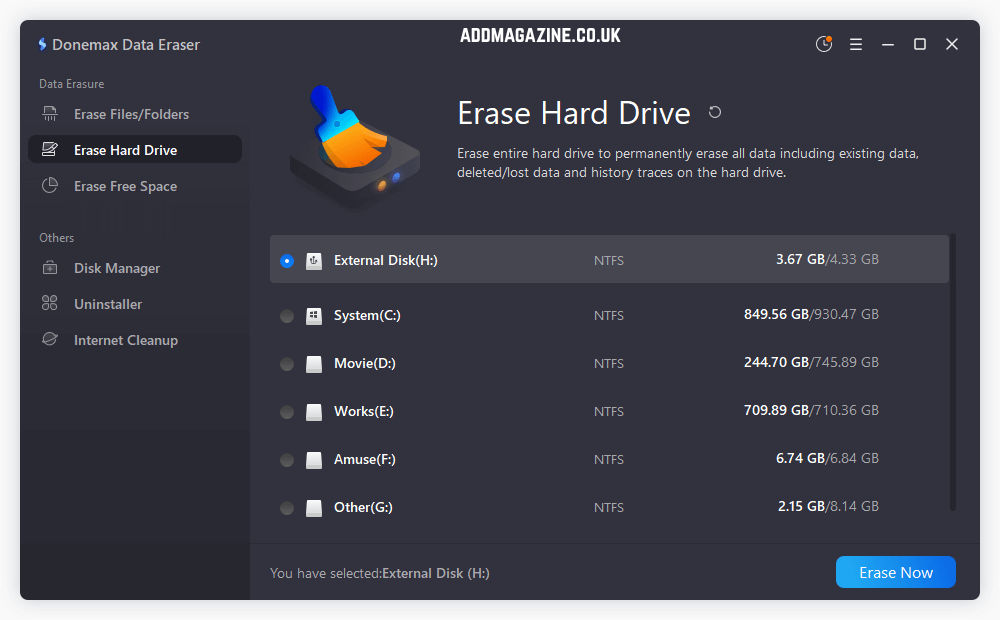
Step 3: Select the Data Erasure Algorithm
Browse and select the specific files/folders, external hard drive, USB flash drive, SD card, or free space partition that you wish to wipe. Click the Erase Now button. A warning prompt will pop up asking for data erasure standard and final confirmation.
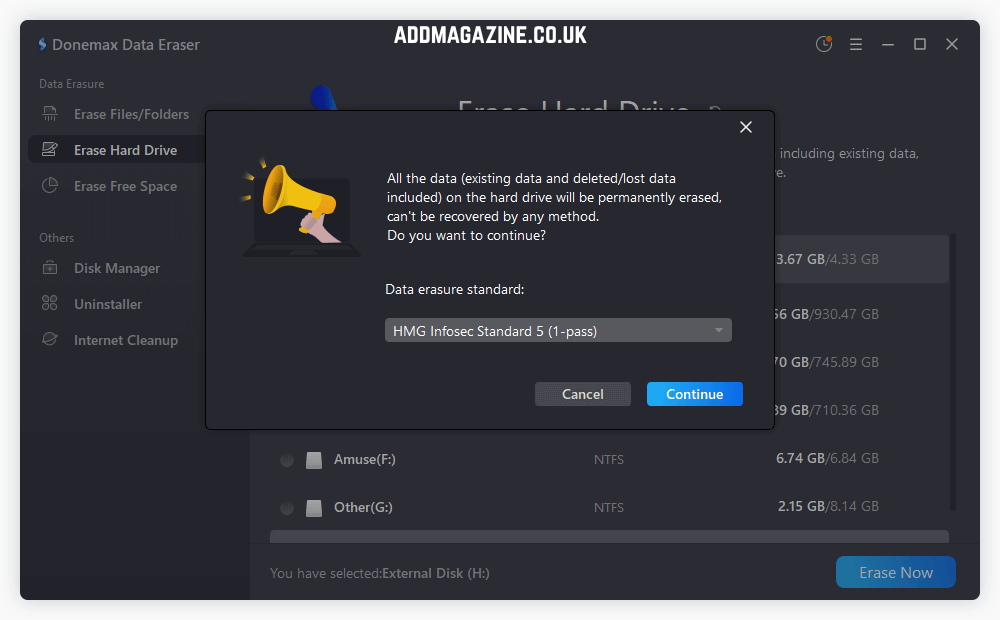
Step 4: Start Wiping Data
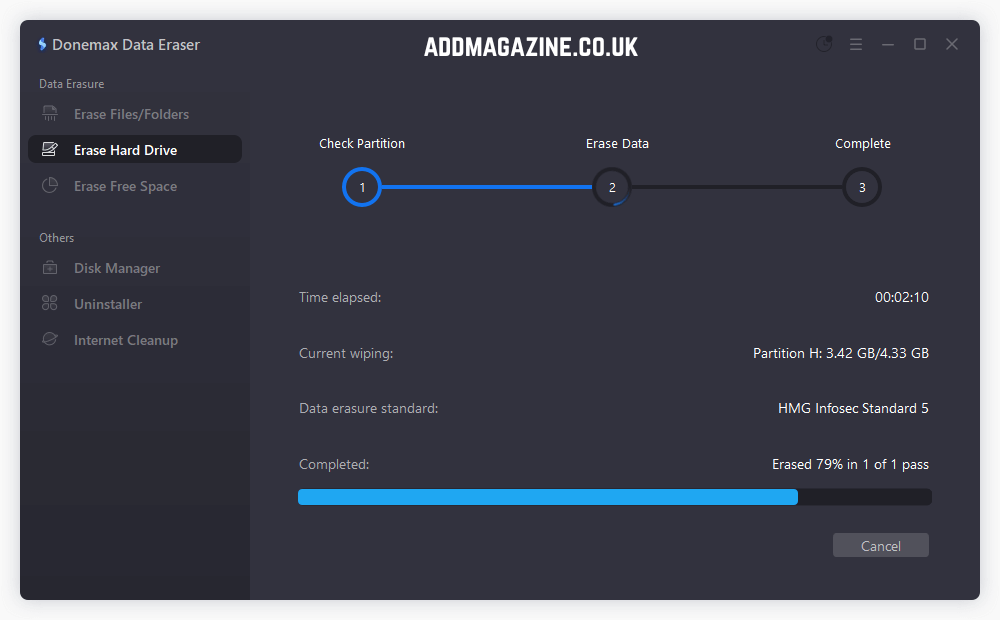
Once confirmed the data erasure standard, click Continue to start wiping, Donemax Data Eraser will execute the certified erasure algorithm, leaving the target data permanently unrecoverable.
Donemax Data Eraser Technical Specifications
| Capability Area | What You Get |
|---|---|
| Operating System Range | Broad Windows coverage from Windows 7 through Windows 11, plus Windows Server editions 2016, 2019, 2022, and 2025. On Mac, compatibility begins with macOS 10.9 and continues through newer versions, including Tahoe and Golden Gate. |
| Supported Media | Built to work with a wide variety of storage media, including HDDs, SSDs, USB flash drives, pen drives, SD/SDHC/SDXC cards, CompactFlash cards, and supported camera storage. |
| File-System Compatibility | Handles major Windows, Linux, and Apple file systems such as FAT12/16/32, exFAT, NTFS/NTFS5, ext2/ext3/ext4, APFS, HFS, and HFS+. |
| Non-Invasive Drive Handling | Operates without making physical changes to the storage device, helping preserve the original hardware while working with both traditional hard disks and solid-state storage. |
| Built-In Maintenance Features | Goes beyond core storage functionality with tools for removing browsing traces, managing disk formatting and repair tasks, and thoroughly uninstalling unwanted applications. |
| Plans & Pricing | Personal Edition: $49.95 for use on up to 2 PCs, including lifetime upgrades. Enterprise Edition: $299 for deployment across an unlimited number of PCs. |
Conclusion
Safeguarding personal data and corporate privacy requires reliable tools that go beyond standard file deletion. Donemax Data Eraser delivers an outstanding balance of military-grade erasure security, versatile wiping modes, and user-friendly operation. Whether you need to shred sensitive financial documents, clean up free disk space, or perform a total drive wipe before selling your PC, Donemax ensures that data recovery becomes completely impossible.
Combined with bonus utilities like internet activity cleaning and app uninstallation, Donemax Data Eraser is a highly recommended addition to any privacy-conscious user’s digital toolkit in 2026.