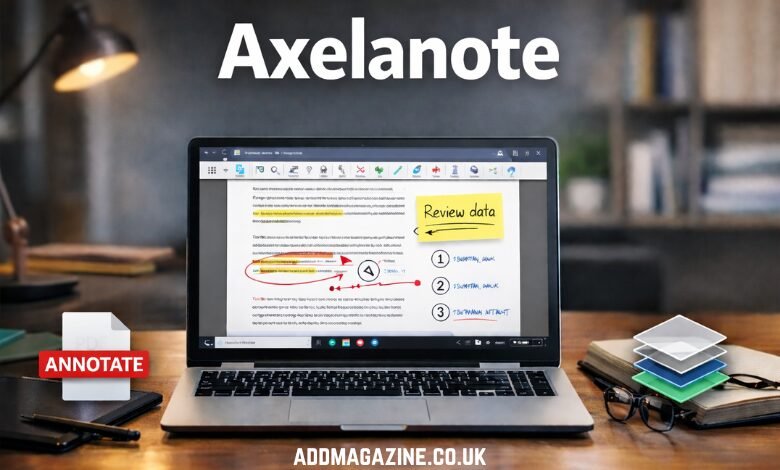
In an increasingly digital world, we rely heavily on software to manage and manipulate our work, from academic papers to corporate reports. Amidst the sea of tools available to us, Axelanote stands out as an innovative and versatile tool that redefines how we approach annotation, document management, and note-taking. Developed by TransRecog, this Windows-based software is more than just a PDF editor—it’s an intelligent system designed to merge the tactile joy of writing by hand with the convenience of digital records.
What is Axelanote?
At its core, Axelanote is a specialized annotation software built for professionals, students, and researchers. Unlike traditional PDF editors that alter the original document’s content, Axelanote uses an “overlay” model. Think of it as placing a transparent sheet over a printed page and writing on it with a marker. This method allows users to add notes, comments, and sketches without changing the underlying file, preserving the integrity of the original document.
This innovative overlay approach was born from a simple yet profound insight—the desire to capture the ease and flexibility of handwriting while preserving the permanence and accessibility of digital files. The software started with basic sketching tools but has grown into a robust suite offering professional-grade functionalities, making it an indispensable tool for a wide range of industries.
The Journey of Axelanote
Axelanote’s development stems from a desire to improve upon existing software tools that often hinder rather than facilitate workflow. When users would annotate or add notes to digital documents, they would often face cumbersome interfaces and limited capabilities. The goal was clear: create a solution that combines the freedom of handwriting with the efficiency of digital tools.
Over time, Axelanote evolved, integrating features such as CSV data extraction, multi-layer management, and seamless compatibility with Acrobat Reader. These additions reflect the increasing demand for smart, paperless solutions that prioritize user experience over software limitations. Today, it is a vital asset for anyone who needs to mark up digital content, whether for personal use or professional collaboration.
The Signature Features of Axelanote
Axelanote’s standout feature is its non-destructive annotation capability. When you add annotations using Axelanote, you create an independent layer over the document. This means that the original file remains unchanged, and users can add, hide, or share multiple annotation layers at will. A single PDF could have several different layers—each containing annotations for different purposes—without altering the original content. This allows for efficient and organized collaboration, where one document can be tailored for personal notes, team feedback, or client-facing comments, all without creating separate versions.
Moreover, many PDF editors struggle with secured or encrypted documents, often blocking the ability to annotate them. Axelanote circumvents this by respecting the security of the document. It doesn’t attempt to crack or modify encrypted files but instead works within the framework to ensure that annotations can still be added without breaching document security. This feature makes Axelanote particularly popular in fields like research and law, where users frequently deal with sensitive and protected content.
The Axelanote Experience: Precision and Flexibility
For professionals who rely on precision and detail in their work, Axelanote offers an experience that mimics writing on paper. The software is optimized for devices like Surface Pro and Wacom tablets, featuring pressure sensitivity and palm rejection that allow users to write, sketch, and mark up documents as if they were using a real pen. Whether you are drawing attention to a flaw in an engineering blueprint or grading an essay, Axelanote ensures the precision required for high-level tasks.
Another unique aspect of Axelanote is its automatic numbering tool. This tool generates sequential labels (like ①, ②, ③) on annotated items, making it easier to organize long lists, comments, or issues on a single page. This eliminates the risk of manual errors and speeds up the annotation process, saving valuable time for users who need to review and track large volumes of information.
Building an Efficient Workflow with Axelanote
Incorporating Axelanote into your daily routine can boost productivity, but mastering the software requires a bit of strategy. Here’s how you can make the most of this tool:
- Layer Organization: Start by understanding the power of layers. With Axelanote, you can create multiple annotation layers for different purposes. This means you can have a layer for personal notes, another for collaborative comments, and yet another for feedback from clients—without cluttering the original document.
- Integration with Other Tools: Axelanote doesn’t operate in isolation. It integrates seamlessly with other tools like Acrobat Reader, ensuring that users can leverage their existing digital workflows without disruption. Take advantage of the CSV data extraction feature to quickly extract data from complex tables and import it into your analysis tools.
- Device Optimization: For pen-enabled devices, make sure to calibrate Axelanote to ensure the best writing experience. This will enhance the precision and responsiveness, especially for tasks that require fine details.
- Efficiency Features: Make full use of Axelanote’s automation tools, such as the automatic numbering system and layer management features, to streamline your process. These tools can save time and reduce errors, especially when dealing with extensive documents.
Why Axelanote is Gaining Popularity
The growing adoption of Axelanote can be attributed to the increasing demand for smart document solutions that focus on user intent rather than software limitations. The ability to easily add annotations, create multiple layers, and manage digital content without altering the original file is a game-changer for industries like research, education, engineering, and law.
Moreover, Axelanote taps into a psychological need: the comfort and productivity that come from organized, aesthetically pleasing workspaces. By allowing users to create digital environments that mimic the simplicity and flexibility of physical paper, Axelanote reduces stress and increases focus, helping users to stay on task and work more efficiently.
The Environmental Impact of Axelanote
In addition to its productivity benefits, Axelanote also contributes to more sustainable practices. As the world grapples with environmental challenges, tools like Axelanote promote a paperless approach, which helps reduce the need for printing. By relying on digital annotations rather than paper-based note-taking, users contribute to a greener future and lower their overall environmental footprint.
Debunking Myths About Axelanote
Despite its growing popularity, there are several misconceptions surrounding Axelanote. One common myth is that it requires extensive training to use effectively. In reality, Axelanote’s interface is user-friendly, and with a bit of practice, anyone can master the basics within a short time. The tool is also designed to be flexible, adapting to various use cases from personal projects to professional collaborations.
Another myth is that Axelanote is only suitable for specific industries. While it certainly excels in high-accuracy fields like law and engineering, its versatility means it can be beneficial for anyone who deals with digital documents—whether you’re a student annotating notes or a writer marking up a manuscript.
The Future of Axelanote
Looking ahead, the future of Axelanote seems promising. As technology continues to advance, we can expect even more features to enhance the user experience. The integration of machine learning and artificial intelligence could further improve the software’s ability to automate tasks, such as summarizing annotations or offering smart suggestions for document edits. With an increasing reliance on digital workflows, tools like Axelanote will become even more integral to maintaining efficiency and collaboration in a fast-paced world.
Conclusion
Axelanote is more than just a PDF annotation tool; it is a productivity powerhouse that allows professionals, students, and researchers to interact with digital documents in a way that feels natural, intuitive, and efficient. Its unique overlay system, seamless integration with other tools, and innovative features make it an essential tool for anyone looking to streamline their workflow and improve document management.
As industries continue to evolve and the demand for paperless solutions grows, Axelanote stands poised to remain at the forefront of the digital annotation revolution, helping users achieve higher levels of productivity and sustainability. Whether you’re a student annotating academic papers, an engineer reviewing blueprints, or a lawyer working with sensitive documents, Axelanote is the tool you need to make your work smarter, faster, and more effective.