Remote work has changed nearly every aspect of how teams operate—but one problem it quietly created doesn’t get enough attention: inconsistent profile photos. When your team spans multiple cities or countries, organizing a group photo day is impossible. One person uploads a poorly lit selfie, another submits a cropped shot from a conference years ago, and suddenly your team page looks like a collage assembled by accident. These inconsistencies may go unnoticed internally, but they can erode professionalism when clients, candidates, or partners see it.
An AI headshot generator provides a practical solution. Instead of coordinating photography sessions or waiting weeks for edited images, remote employees can now produce polished, consistent portraits in seconds—from wherever they happen to be working.
Quick Reference Overview
| Feature | Details |
| Generation speed | Typically 6–15 sec per image (up to ~20 sec) |
| Input requirements | 1–4 photos accepted |
| Scene variety | 20+ professional and contextual options |
| Access model | Anonymous basic unlimited; registered advanced 4/day |
| Key limitations | Basic model may vary in likeness; smoothing sometimes heavy |
How the Technology Has Improved
A few years ago, AI-generated headshots were easy to spot. It was distracting—and obvious.
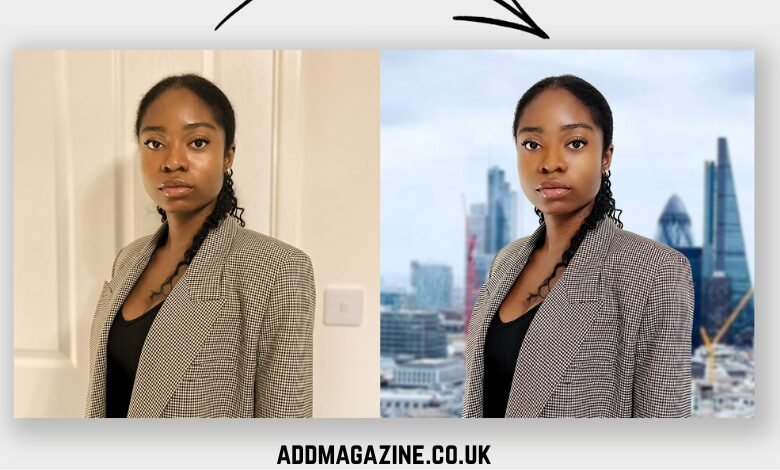
Today, that has changed. Modern AI tools have made meaningful progress in likeness accuracy, scene realism, and generation speed. A capable AI headshot generator can now take a single casual photo and produce a professional-looking portrait with natural lighting, coherent depth of field, and a clean background. The results aren’t perfect—but they’re consistently good enough for LinkedIn profiles, internal directories, email signatures, and video call avatars.
For remote teams, “good enough” is a real achievement. The goal isn’t magazine-quality photography—it’s visual cohesion across a workforce that may span twenty time zones and never meet in the same room. That level of consistency is now achievable without a centralized photography process.
What Makes a Reliable Tool in This Space
A few factors consistently separate practical solutions from frustrating ones.
Input flexibility is key. The fewer photos required, the easier it is for every team member to participate. Some employees may not have a recent professional image on hand, so the ability to start with a single casual photo is crucial.
Scene variety matters too. Different teams have different tones: a sales group, an engineering team, and a creative studio may each want a distinct visual style. Broad scene coverage reduces the need to juggle multiple tools.
Speed and access are equally important. Waiting several minutes per image isn’t realistic when processing a large group. Fast generation allows iteration, which is especially useful when photo quality varies. Access design plays a critical role—tools that let users start immediately without registration remove barriers that might prevent participation entirely.
Finally, output consistency rounds things out. The best tools minimize variation regardless of what each team member uploads, ensuring the overall look remains cohesive.
HeadshotMaster: A Closer Look
HeadshotMaster was built around low-friction access, making it a genuinely practical option for distributed teams.
The basic model—available as a standard AI Headshot Generator—offers unlimited use with no login required. Not a trial. Not a preview. Anyone visiting the platform can generate headshots anonymously. For managers needing twenty remote employees to update their photos before a rebrand, this is a game-changer: share a link, employees upload a photo, and they’re done.
Input requirements are minimal. The system accepts as few as one photo but can use up to four for improved likeness accuracy. Even a single smartphone image can produce a usable professional result. Adding more photos improves output, but the one-photo option keeps participation open for the entire team.
Scene variety is broad, with more than 20 options covering clean studio backgrounds and contextual professional environments. This allows individuals to match the tone of their industry without being locked into a single aesthetic. Legal teams may prefer something formal and understated, while a product team at a startup might choose modern and casual. Consolidating options in one place simplifies the process significantly.
Generation speed is fast—typically 6–15 seconds per image. If the first result isn’t quite right, regenerating takes only seconds. For teams working through a batch of headshots, that speed makes the process genuinely practical.
Registered users unlock an advanced model with four higher-quality generations per day. The experience accommodates both casual users who need one image quickly and more committed users who want additional control, without forcing either workflow.
Limitations are worth noting. The basic model’s likeness may vary depending on photo quality—poor lighting, unusual angles, or obstructions can reduce consistency. Skin smoothing can appear slightly over-processed, giving results a polished but somewhat unnatural look. For most professional scenarios, these issues are manageable with careful photo selection. In truth, the same was always true for traditional photography: better input generally produces better output.
Who Benefits
Remote teams are the most obvious beneficiaries, but the tool’s value reaches further. Managers building visual consistency across a distributed workforce can do so without organizing a photo day across multiple time zones. Freelancers and contractors also benefit when joining client teams temporarily, as they can generate a professional image without the cost or logistics of a full shoot.
Job seekers refreshing their LinkedIn presence and startup founders creating credible team pages before formal photography sessions find it surprisingly useful. Solopreneurs and consultants who need variations for different platforms or contexts benefit from the combination of broad scene options and rapid turnaround.
Implementation is simpler than expected. Share the platform link via Slack or email, provide brief guidance—photo type, preferred scenes, final file format—and each team member generates their own headshot on their own schedule. No IT overhead, no account provisioning. Teams using this approach report completing updates for large groups in a day or less, much faster than coordinating a traditional photoshoot.
Across all these cases, the common thread is the same: a professional image, generated quickly, without the overhead that conventional photography requires.
Conclusion
The profile photo challenge for remote teams is real, persistent, and now far more solvable. Distributed workforces need visual consistency, but traditional photography isn’t always feasible. Modern AI tools have matured to fill this gap, offering speed, flexibility, and reliable output.
HeadshotMaster addresses this effectively. Its anonymous, no-login basic model removes the largest adoption barrier for distributed teams. Its 20+ scene options cover a wide range of industries and roles. And its fast generation cycle—6 to 15 seconds per image— makes scaling practical rather than theoretical.
For remote team managers, freelancers, or anyone needing a professional photo without the hassle of a traditional shoot, an AI professional Headshot Generator is a straightforward tool to integrate into your visual workflow.