Repair corrupted PDF is the first thing you need when your important document suddenly stops working. You may try to open a file, but it shows errors or loads a blank page. This situation feels stressful, especially when the file contains important work, reports, or personal documents. The good news is that you can often fix corrupted pdf file problems without losing everything. In many cases, simple steps or tools can help you recover damaged pdf content quickly. You do not always need advanced skills. This guide explains why PDF files get damaged and shows easy ways to fix them.
Part 1: What Does a Corrupted PDF File Mean
Before attempting to repair corrupted pdf, it’s important to clearly understand what file corruption actually is. Because of this issue, the system fails to interpret the file correctly, leading to a PDF not opening problem.
A corrupted PDF can show different symptoms. Here are common signs:
- File cannot open at all
- Error messages appear on screen
- Missing images or text
- Blank pages or broken layout
- File opens but crashes quickly
Still, many users can repair corrupted pdf files using simple steps. This also means you may need corrupted pdf recovery. Always check the file again before assuming it is lost. In many cases, you can still recover damaged pdf content.
Part 2: Why PDF Files Become Corrupted
To understand corrupted pdf recovery, you should know the common causes. PDF files do not get damaged without reason. Many everyday actions can cause this issue.
Here are the main causes:
- Interrupted download
- System crash during saving
- Virus or malware attack
- File transfer errors
- Sudden power failure
When a download stops in the middle, the file becomes incomplete. This leads to a pdf file not opening issue. A system crash can also damage the file while saving. Viruses can attack files and make them unreadable. In this case, you will need a pdf repair tool to fix the problem. File transfer errors also cause problems, especially when you move files using USB or email. Knowing the cause helps you choose the right way to repair corrupted pdf and recover damaged pdf safely.
When a PDF file stops opening or shows errors, it can be frustrating. In this part, we will look at simple and practical methods to repair corrupted PDF files and recover your important data step by step.
Method 1: Try a Different PDF Reader
Sometimes, the problem is not the file but the reader. Many free tools are available. You can install another reader and test the file. Different readers handle files differently. One reader may fail, while another may open it easily. This is often the fastest way to repair corrupted pdf without tools.
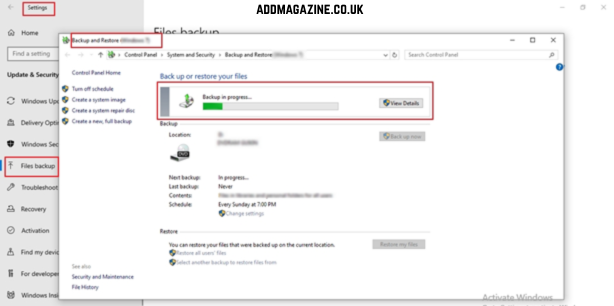
Method 2: Restore from Backup
If you have a backup, you can easily restore pdf file instead of repairing it.
Check these places for backup:
- Your computer backup folder
- Cloud storage
- Email attachments
- Previous versions
Restoring a backup is the safest way to recover damaged pdf. It avoids risk and saves time.
Method 3: Repair PDF Using Online Tools
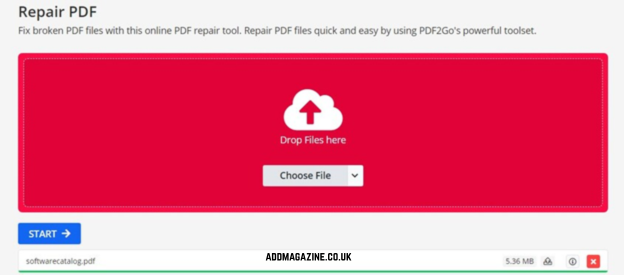
These tools upload your file and try to fix it.
Steps are simple:
- Upload the damaged file
- Wait for processing
- Download the repaired file
This method supports corrupted pdf recovery, but it has risks. Online tools may limit file size. Also, your file may contain private data. So, use this method carefully. Do not upload sensitive files. Online tools can help repair corrupted pdf, but they are not always safe for personal documents.
Method 4: Use Professional PDF Repair Tool
Tools like 4DDiG File Repair are often used to repair corrupted pdf files in a safer and more structured way. These tools scan the file carefully, detect damaged parts, and rebuild missing or broken data. This method is helpful when you face a pdf file not opening issue or when you need to recover damaged pdf content without losing important information. It is a reliable option for difficult cases of corrupted pdf recovery.
Key Features:
- Deep file scanning: Checks internal file structure to find hidden errors and helps in effective pdf file corrupted fix.
- High recovery success: Improves chances to repair corrupted pdf even when files are badly damaged or unreadable.
- Data protection: Tries to keep original content safe while you recover damaged pdf without overwriting important data.
- Supports multiple files: Works with different types of PDF damage cases, including complex corrupted pdf recovery needs.
- User-friendly process: Simple steps allow users to repair pdf online-style easily without technical knowledge.
A powerful repair utility is capable of dealing with severely damaged PDF files. It performs a deep scan of the document structure and attempts to reconstruct missing or corrupted elements, improving overall corrupted PDF recovery outcomes.
Step 1:
Download and install the version of 4DDiG File Repair that is compatible with your operating system.
Step 2:
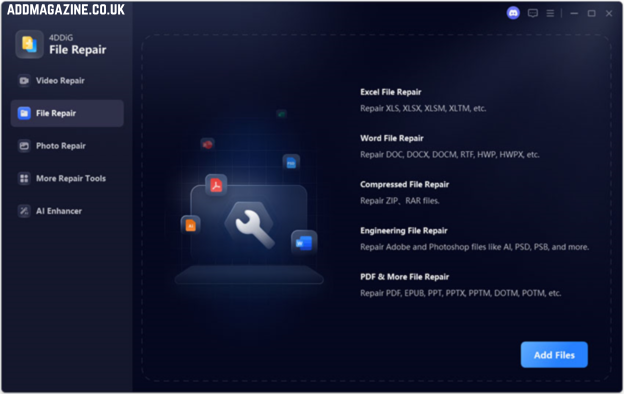
Open the software and choose the file repair feature to start restoring the damaged PDF.

Step 3:
Click Add File and import the PDF that is not opening or showing a corruption error message.
Step 4:
Click the Repair button to begin the process, and the software will automatically detect and restore any recoverable data from the file.

Step 5:
Preview the repaired PDF to check recovery quality, then save it in your preferred location.
This approach is most effective when:
- The PDF fails to open completely
- Pages appear blank or incomplete
- Certain sections of the document are missing
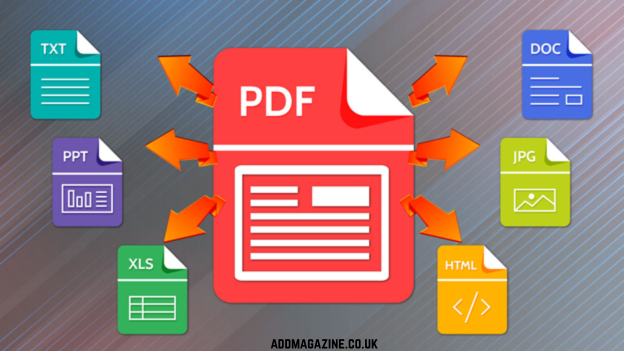
Method 5: Convert PDF to Another Format
Another practical solution is file conversion. Even when the file is partially corrupted, some data may still be recovered successfully.
Once the content is extracted, you can save it again as a PDF. This method serves as a simple corrupted PDF fix and works best when file damage is not severe.
Part 4: Important Tips Before Repairing a PDF
Proper handling can prevent further damage and make the repair process more effective.
- Do not overwrite the original file, as it may reduce recovery chances
- Always create a backup before trying any fix corrupted PDF method
- Avoid repeated failed attempts, which can worsen the PDF file not opening issue
- Use reliable tools such as 4DDiG File Repair for safer corrupted PDF recovery
Part 5: Common Mistakes to Avoid
Many users unintentionally make errors that reduce the chances of successful PDF repair. Avoiding these mistakes can protect your data and improve recovery results.
- Using untrusted or unsafe repair tools
- Uploading sensitive documents to unknown websites
- Skipping backups before attempting repairs
- Repeatedly opening a severely damaged file
Such actions can make corruption worse. Always follow a careful process and use a trusted PDF repair tool to fix corrupted PDF files effectively.
FAQ
Q1: Can a corrupted PDF file be repaired?
Yes, in many cases corrupted PDF files can be repaired using software tools, backups, or recovery methods.
Q2: What is the most effective way to repair a corrupted PDF?
Using a professional tool like 4DDiG File Repair is often the most reliable method for serious file damage.
Q3: Is there any risk of data loss while repairing the file?
A small amount of data may be lost depending on how severe the damage is, but in most cases, the majority of the content can still be restored.
Q4: Are online PDF repair tools safe to use?
Some are helpful, but not all are secure. It is better to avoid uploading sensitive documents and rely on trusted software.
Final Words
A corrupted PDF can interrupt important tasks and prevent access to critical information. Advanced tools like 4DDiG File Repair can help fix corrupted PDF files more effectively by restoring damaged data and improving recovery chances. With the right approach, you can often recover important content without losing valuable information.