
A year ago, picking a video generation API was easy: find the one with the flashiest demo and start building. That’s not true anymore. Five models now produce clips good enough to ship, and each one is better at a different job. Seedance 2.0 leans into native audio and multi-shot editing, HappyHorse 1.1 nails multilingual lip-synced dialogue, Kling 3.0 handles longer storyboarded scenes, Veo 3.1 leans cinematic for a single clean shot, and Grok Imagine adds reference-driven generation, feed it reference images and it keeps a character or style consistent without locking in a first frame. Selecting the wrong solution can force a complete integration rebuild within a few months, wasting both time and resources. Here’s how the main AI video generation APIs actually compare in 2026, and how to avoid locking yourself into one before you’ve tested the others.
What a Video Generation API Actually Does
A video generation API is an endpoint you send a prompt to, text, an image, or a short video clip, and it sends back a generated video. You send a request, wait a few seconds to a few minutes, and get a file or a URL back.
Most video generation APIs support at least two input modes. Text-to-video uses a written prompt to describe the scene. Some, like Grok Imagine, also accept a short video clip as a starting point and extend or modify it.
The output side varies more than people expect. Clip length, resolution, frame rate, and whether audio generates alongside the video all differ by provider. A model that caps out at five seconds per generation is fine for a social ad hook, but it won’t work for a training video that needs a continuous 45-second shot.
This is different from the text-to-video tools built for marketing teams, tools that wrap a video generation model in a no-code editor. A video generation API skips the editor. You’re calling the model directly, which means more control, but also more of the integration work lands on you.
Comparing the Top Video Generation APIs in 2026
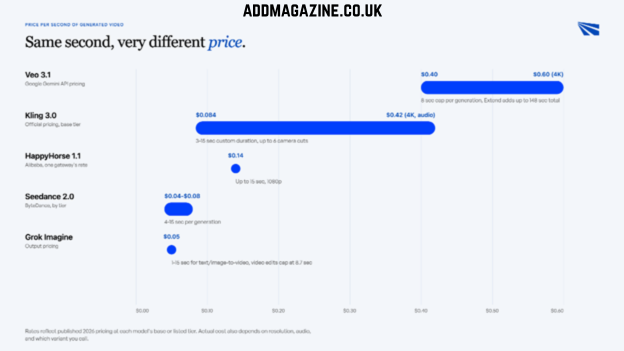
Every AI video generation API optimizes for something different, and picking one in 2026 means weighing cost against duration limits and input flexibility. Here’s how five of the most capable ones stack up, based on published pricing and documented specs, ranked by what’s currently topping the Artificial Analysis video leaderboard rather than by what was flagship a year ago.
| API | Best for | Input types | Price | Notable limit |
| Seedance 2.0 (ByteDance) | Native audio with in-generation camera control | Text, image, reference | $0.04-$0.08/sec by tier | 4-15 sec per generation |
| HappyHorse 1.1 (Alibaba) | Multilingual lip-synced dialogue | Text, image, reference (up to 9 images) | $0.14/sec, one gateway’s listed rate | Up to 15 sec, 1080p |
| Kling 3.0 | Multi-shot storyboarding, native 4K | Text, image | $0.084/sec at 720p (no audio) to $0.42/sec at 4K (with audio), base tier | 3-15 sec custom duration, up to 6 camera cuts per generation |
| Veo 3.1 (Google Gemini API) | Cinematic single-shot fidelity | Text, image | $0.40/sec at 720p-1080p, $0.60/sec at 4K | 8 sec hard cap per generation across all tiers; Extend adds 7 sec up to 20 times, 148 sec max, not available on Lite |
| Grok Imagine Video | Reference-driven generation | Text, image, video | $0.05/sec output | 1-15 sec for text/image-to-video; video edits cap at 8.7 sec |
Seedance 2.0 pairs native audio with real camera control, so multi-shot edits and camera moves happen inside the generation instead of getting stitched together afterward. ByteDance’s model currently tops the Artificial Analysis video arena for with-audio output, and it’s available across Mini, Fast, and Standard tiers at a flat per-second rate regardless of generation mode.
HappyHorse 1.1 takes the same audio-and-video-in-one-pass approach, which is why its lip-sync stays accurate across languages. It outperforms the earlier HappyHorse-1.0 release—the model that originally claimed Artificial Analysis’ top position—in both text-to-video and audio-enabled image-to-video generation.
If you’re looking at the Kling API’s video generation capabilities for multi-scene work, Kling 3.0 supports up to 6 continuous camera cuts per generation, custom durations from 3 to 15 seconds instead of fixed presets, and native 4K output. Official per-second pricing on the base Kling 3.0 tier runs $0.084 at 720p without audio up to $0.42 at 4K with audio, and Kling AI prices its Turbo and Omni variants on separate rate cards, so confirm which one you’re actually calling before you budget.
Veo 3.1 is the safer default for one clean continuous shot, but its duration limits are stricter than they look. A single generation caps at 8 seconds, and that cap applies across the Standard, Fast, and Lite tiers alike. Going longer needs Extend, which adds 7 seconds per call up to 20 times for a 148-second maximum, and Extend isn’t available on the Lite tier at all. Those rates are Gemini API pricing specifically, not Vertex AI’s, Google has historically priced Veo differently across its two platforms.
If you’re comparing the Grok video generation API on its own, its standout feature is reference-to-video mode: feed it reference images and it keeps a character or style consistent across a new generation, without locking that image in as the opening frame the way image-to-video does. Runway’s Act-Two and Kling’s own reference modes do something similar.
Runway itself isn’t in the table above, it’s fallen out of the Artificial Analysis top 10 as of mid-2026. But if you’re evaluating the Runway API for video generation specifically for its post-production tooling, Gen-4 Turbo and Gen-4.5 are still there, and Runway’s own platform now hosts Seedance 2.0 as one of its available models too.
What to Evaluate Before You Commit to One API
Price per second is the easiest thing to compare and the least useful one on its own. A cheaper API that caps out at five seconds, generates at low resolution, or takes ninety seconds to respond isn’t actually cheaper once you factor in retries and stitching.
| If your priority is… | Look at | Why it matters |
| Longest single continuous clip | Max duration per generation | Determines how much post-production stitching you’ll need |
| Lowest cost at scale | Price per second, not per video | Providers price differently by resolution and audio |
| Fastest iteration | Generation latency | Some APIs return in seconds, others take minutes per clip |
| Consistent characters across shots | Reference image support | Only some models accept multiple reference images |
| Content moderation risk | Published usage policy | Video moderation policies vary more than text or image models |
Latency is the one teams underestimate most. A model that’s cheap per second but takes two minutes to return a five-second clip will bottleneck any workflow that needs fast turnaround, like ad testing or social content calendars. Test actual response time with your own prompts, not the vendor’s demo prompts, before you commit.
Content moderation policy matters more for video than it did for text or images. Providers are still tightening what they allow, particularly around real people, copyrighted characters, and audio. A prompt that generates cleanly today can get rejected after a policy update.
Before you lock in a single provider, it’s worth checking how many of these APIs, Seedance, HappyHorse, Kling, Veo, Grok, sit behind a catalog of 400+ models you could test from one account instead of creating five separate ones.
Common Integration Challenges
Rate limits are the first wall most teams hit. Grok Imagine’s documented limit is 10 requests per second, which sounds generous until you’re running a batch job that needs thousands of clips overnight. Every provider throttles differently, and few publish burst limits clearly, so you find out the hard way, usually mid-production.
Latency is also inconsistent across providers, and even across requests to the same provider. A video generation API might return a clip in eight seconds on one call and ninety seconds on the next, depending on server load and generation complexity. If your app shows a loading state to a user, design for the slow case, not the average one.
Switching costs are real even when the API “just sends a prompt, gets back a video.” Prompt syntax, reference image formats, and output specs like codec, container, and frame rate differ enough between providers that a prompt tuned for Veo won’t produce the same result on Kling without rework.
Teams that build tightly around one provider’s quirks end up rebuilding that logic if they ever need to switch, whether because of a price change, a policy shift, or a model getting deprecated. OpenAI’s Sora 2 is proof this isn’t hypothetical: developers were notified in March 2026 that the Videos API and every Sora 2 model would be removed from the API on September 24, 2026. That risk is the one most teams don’t plan for until it happens.
Delivery mechanism is another gap that catches teams off guard. Video generation isn’t instant, so most APIs don’t return a finished file in the same response that accepts your prompt. Instead you get a job ID back, then either poll a status endpoint or wait for a webhook once the video is ready. Which pattern a provider uses isn’t always obvious from the docs, and building for only one means reworking your job queue the moment you add a second provider that expects the other.
How Infron Handles Video Generation API Access
Through Infron, you get Seedance 2.0, HappyHorse 1.1, Kling, Veo 3.1, Wan, and Grok Imagine Video behind one API key, so the comparison above doesn’t have to end in a single choice.
One integration, every video model. Instead of managing separate accounts, API keys, and billing dashboards for each provider, you send requests to a single endpoint and pick the model per call. Testing Kling against Veo for the same prompt becomes a parameter change instead of a new integration, and the API documentation stays consistent across all of them.
Consolidated billing across providers. Video generation costs add up fast once you’re testing multiple models side by side. It rolls usage across all of them into one bill instead of five separate invoices to track.
Built for production, not just demos. It runs on a 99.99% uptime SLA with automatic failover, so a single provider’s outage or rate limit doesn’t take your video pipeline down with it.
If that matters for your stack,Infron is worth a look.
Conclusion
There’s no single best video generation API, only the one that fits what you’re building right now. Seedance 2.0 wins when native audio and in-generation camera control matter most. HappyHorse 1.1 wins on multilingual lip-synced dialogue. Kling 3.0 wins on longer, multi-shot storyboarding. Veo 3.1 wins on fidelity when you need one clean continuous shot under 8 seconds. Grok Imagine wins on fast, reference-driven iteration.
The bigger mistake isn’t picking the “wrong” one today. It’s building your integration so tightly around one provider’s quirks that switching later becomes its own project. Test with your own prompts, measure real latency, and keep your integration flexible enough to swap models as pricing, quality, or policy shifts.
FAQ
What is a video generation API?
A video generation API is an endpoint that turns a text prompt, image, or short video clip into a new generated video. You send a request with your input and parameters, and the API returns a video file or a link to one. No model hosting or GPU management is required on your end.
How much does a video generation API cost?
Pricing is almost always billed per second of generated video, not per request. Rates range from about $0.04 per second on the cheaper end, like Seedance 2.0’s Mini tier, to $0.40-$0.60 per second for Google’s Veo 3.1 at standard and 4K quality. Actual cost depends heavily on resolution, whether audio is included, and how many seconds you generate.
What’s the difference between the top video generation APIs in 2026?
Seedance 2.0 and HappyHorse 1.1 currently lead the Artificial Analysis video arena, both generating audio and video together in one pass. Kling 3.0 supports the longest single generations, up to 15 seconds with custom duration and up to 6 camera cuts. Veo 3.1 is built for cinematic fidelity but caps at 8 seconds per generation unless you use Extend, and its rates are Gemini API pricing, not Vertex AI’s. Grok Imagine Video is built for reference-driven iteration, with clips from 1 to 15 seconds for text-to-video and image-to-video generation.
Does Infron support video generation models?
Yes. Infron provides API access to Seedance 2.0, HappyHorse 1.1, Kling, Veo 3.1, Wan, and Grok Imagine Video, alongside its broader catalog of 400+ models, through a single API key.