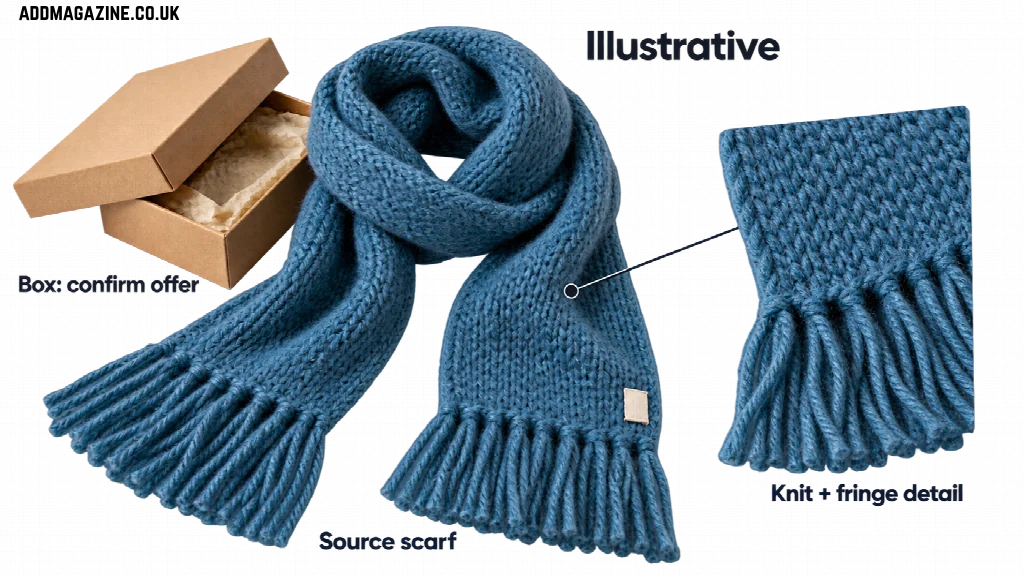
A sea-blue scarf going into a gift box gives Megan a Christmas video to plan. She runs Cove Knits, the fictional handmade knitwear brand in Cornwall used in this example. She hopes to have the clip ready in late November.
Her product promotional video needs one clear gift moment, a short script, a reviewed draft, and a final order date she can support. The job starts with the scarf she actually sells.
Choose One Gift Moment
Follow the scarf into the gift box. Show its details before packing it, and keep it visible among the decorations.
Use packaging that matches what the shop will supply. If the box is only a styling prop, avoid implying that it comes with every order. Check the planned wording against the actual offer.
Leave unrelated products and longer brand stories for another Christmas marketing video. Keep the review focused on this scarf, its packaging, and the order message.
Write a 15-Second Script Around the Scarf
Aim for a 15-second edit, not a promised generation length or platform requirement. Time the four beats aloud.
This illustrative script gives suggested timing. Megan must approve its words and packaging depiction.
| Suggested timing | Visual evidence | Illustrative spoken or displayed words |
| 0 to 3 seconds | Scarf beside the intended gift box | “A gift idea from Cove Knits.” |
| 3 to 7 seconds | Approved sea-blue scarf close-up | “A sea-blue wool scarf.” |
| 7 to 11 seconds | Verified scarf-into-box action, or an approved still | “See the scarf up close.” |
| 11 to 15 seconds | Readable end card; reserve room for the date | “Plan your Christmas order.” Add the final order date only after Megan confirms it. |
Read the lines while playing the proposed sequence. Hold the close-up long enough to see the knit, and give the final card its full reading time. Add the date after confirming it, leaving out any unsupported delivery promise.
Build the First Product Promotional Video Draft
Without a filming team, Megan can start with authorized product photographs and a checked script. A tutorial on creating a product promotional video describes preparing source material, planning shots, generating candidates, and reviewing the result. It provides a production method, with human checks between the stages.
Collect the clearest available views of the scarf, knit texture, label, and packaging. Mark which details must stay unchanged. Keep the approved script beside those files so that each proposed shot has a reference.
Illustrative source-material check: keep the sea-blue wool, knit, and fringe consistent, and confirm whether the box is part of the offer before using it in a candidate shot. No generated video is shown.
Start with restrained movement around the scarf, keeping its fringe and knit visible. Review that candidate before attempting the packing action. A photo of a scarf beside a box alone leaves the physical packing action unverified; if a generated movement looks wrong, replace it with a held photograph or obtain suitable real footage.
Build accurate text in an editor when needed. Product names, labels, and the final order date should come from Megan’s approved information. If the generation changes the item, an ordinary sequence of photographs and titles remains an option. Keep the gift sequence, using the approved photographs for any shot that fails review.
Verify the Product and Every Word
Review the candidate beside the actual scarf and approved shop information. Megan needs to check both what the video shows and what it says before calling it a usable draft. Use the real product for visual checks and the approved shop details for wording.
Compare Color and Knit Details With the Real Scarf
Look for sea-blue becoming teal, purple, or another shade. Compare the retained sequence with the real scarf and its approved photographs. Check the weave, fringe, proportions, and packaging too. New patterns or altered edges would misrepresent the product even if the motion looked smooth.
Inspect the movement into the box throughout the shot. Watch for fabric passing through an edge or changing shape between frames. Remove a sequence that invents the way the item behaves.
An inaccurate color can give a shopper the wrong impression of what will arrive. That is reason enough to fix it; this hypothetical campaign provides no evidence about returns or sales.
Check Text Against Approved Shop Details
Read the brand name and every visible product claim. If material or care instructions appear, match them to the current information for this scarf. Replace distorted generated lettering with verified text in the editor.
Approve the last order date separately. Megan must determine it from her production capacity, stock, dispatch arrangements, and shop policy. A draft may reserve space for it, but an unfilled date placeholder belongs outside the published version.
Check the rendered file after adding the words. Make sure the exported words are as readable as the text in the editing panel.
Prepare Versions for Each Placement
Approve one master version before adapting it for the channels Megan intends to use. A vertical version and a square version are possible planning choices, subject to the destination’s current requirements. Check those requirements before deciding how to crop and export.
Reframe each version around the scarf. Keep the gift-box action understandable and the end-card date clear. A crop that removes the fringe or hides part of the packaging needs revising, even when the master looked fine.
Preview the actual files on a phone and in the available posting preview. Check whether interface elements cover the product or the words. Watch each version from start to finish; selecting another aspect ratio is only one part of adapting a social media video.
Retain the approved files separately from rejected drafts. Record the placement and version beside each one. Check that photos, music, and other assets are licensed for the intended use, and review the chosen tool’s current commercial-use terms before publishing.
Schedule Around the Last Order Date
Work backward from the shop’s confirmed deadline. Allow room for color review, text corrections, channel versions, and a final check before the planned release. If the production or delivery arrangements change, review the wording and schedule together.
Megan’s late-November release remains a plan in this fictional example. She would publish only after the product details and final order message are ready. A shop deadline should explain when orders close; it should not become an unsupported guarantee of arrival before Christmas.
Keep the video ending consistent with the current shop page. If the deadline changes, correct scheduled assets before they go live. Leave time to review the replacement file too.
Today, confirm a workable final order date for your own shop and prepare the wording for the video ending. If the date still needs checking, assign that decision before scheduling the finished clip.