AI can crank out a ten-slide draft in seconds, yet you may still spend the next hour fixing fonts, chasing brand colors, and pulling fresh metrics.
We stress-tested nine leading generators with the same launch brief, brand template, messy CSV, and personalization request—timing how long each took to reach “send-it” quality. Our research closed on July 29, 2026; we’ll re-verify pricing and features before this 2027 guide ships.
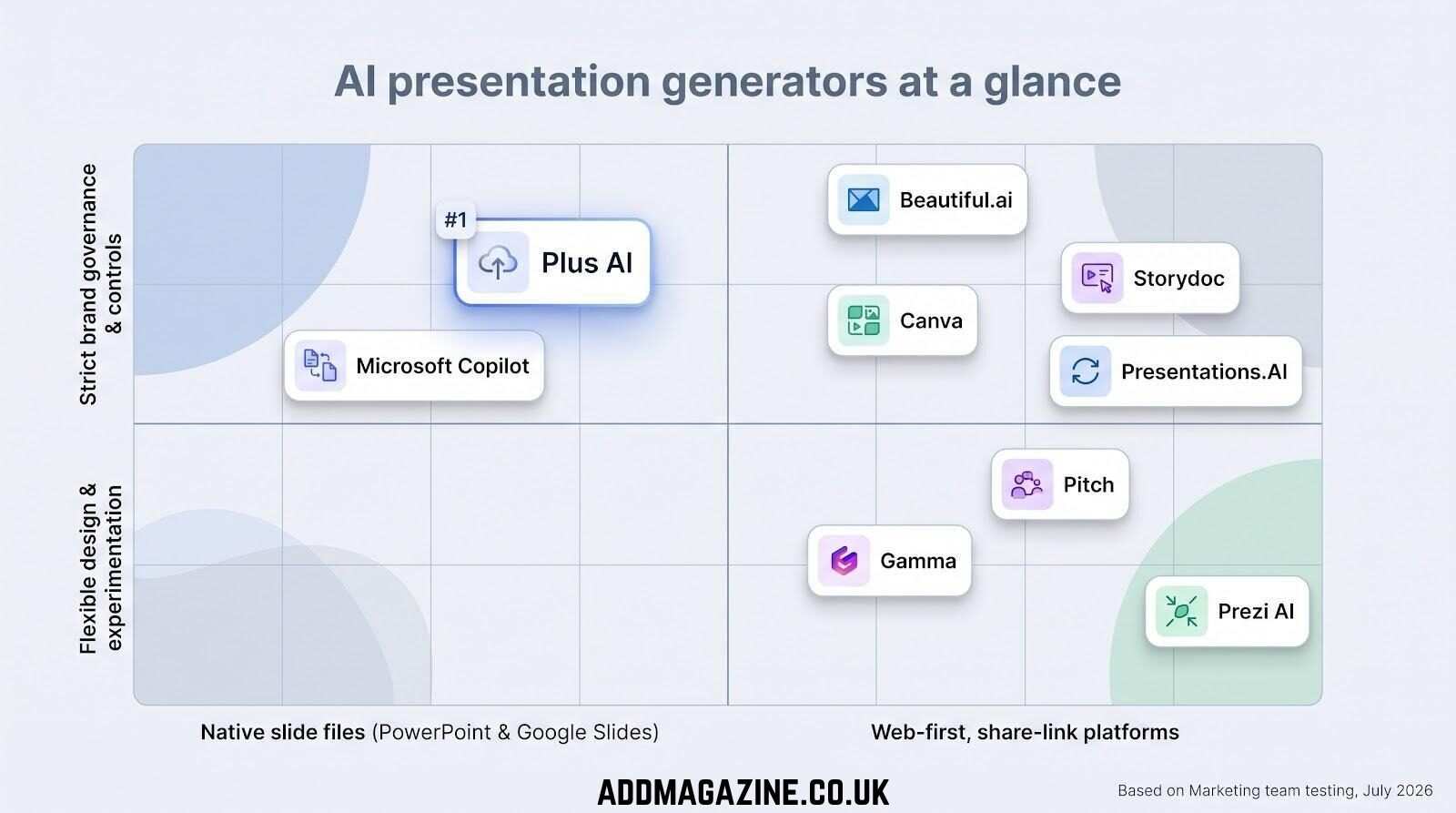
The best AI presentation generators at a glance
If you’re short on time, the table below compares cost, brand controls, file fidelity, analytics, and security. Scan the “Best for” and “Compliance” columns to pick the right fit for your next deck.
| Rank | Tool | Best for | Native environment | Starting paid plan† | Brand controls | PPTX/Slides support | Analytics | Verified compliance |
| 1 | Plus AI | Native PowerPoint & Google Slides editing | Native slide files | $10 / mo billed annually | Slide-master sync | Native | Yes | SOC 2 Type II |
| 2 | Gamma | Fast share-link decks | Web canvas → PPTX | $9 / mo billed annually | Theme & palette | Export | Yes | SOC 2 Type II |
| 3 | Canva | Multi-format campaigns | Web suite → PPTX | $15 / mo per team seat | Brand Kit & Intelligence | Export | Yes | SOC 2 Type II, ISO 27001 |
| 4 | Beautiful.ai | Strict brand governance | Web app → PPTX | $12 / mo billed annually | Locked layouts | Export | Yes | SOC 2 Type II |
| 5 | Microsoft Copilot | Microsoft 365 enterprises | PowerPoint desktop/web | +$30 / user mo on M365 E3/E5 | Corp template use | Native | Basic | ISO 27001, FedRAMP High |
| 6 | Pitch | Collaborative sales decks | Web app → PPTX | $13 / mo billed annually | Custom fonts & variables | Export | Deep | SOC 2 (in progress)* |
| 7 | Storydoc | Personalized ABM pages | Web pages | $19.80 / mo billed annually | Brand themes | N/A | Rich | ISO 27001 |
| 8 | Presentations.AI | Live-data reporting | Web app → PPTX | Free; paid tiers from $20 / mo* | Brand Sync | Export | Yes | SOC 2 Type II |
| 9 | Prezi AI | Dynamic live storytelling | Zoomable canvas | $7 / mo billed annually | Theme colors | Import/Export | Video focus | GDPR-ready |
†Prices and compliance status verified July 29, 2026. Confirm current details before purchase.
*Vendor states certification work is underway.
Two clear patterns stand out. Teams that need editable PowerPoint or Google Slides files gravitate to Plus AI or Copilot. Web-first platforms dominate the rest, trading deep template control for speed, share-link analytics, and quick post-send edits.
The gauntlet of tasks
Generation alone isn’t enough, so we put every platform through nine real-world hurdles that mirror the moment a VP pings you, “Deck by noon?”
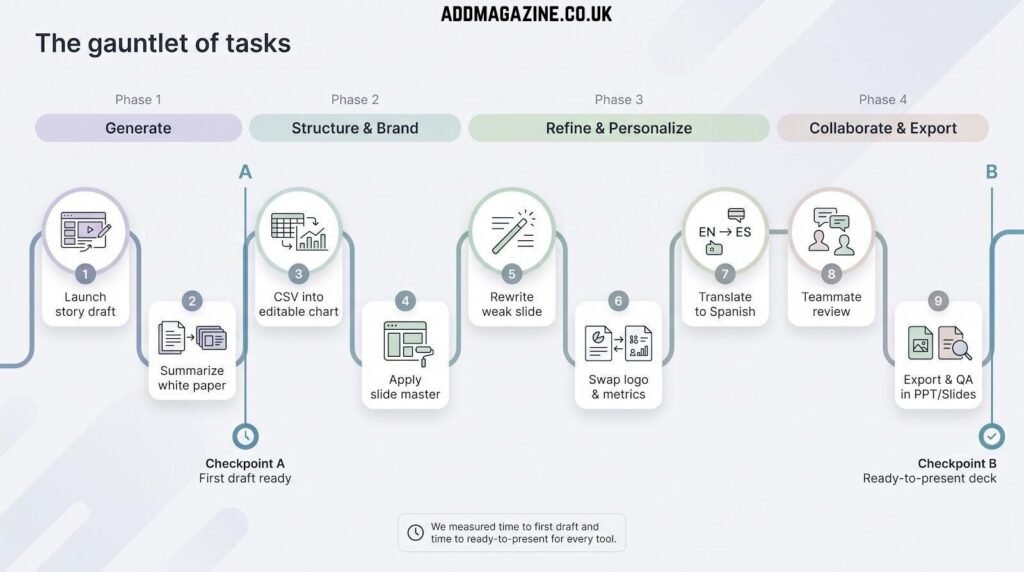
- Spin a 10-slide launch story from the brief.
- Summarize the white paper into a webinar deck.
- Pull the CSV into an editable chart that survives export.
- Apply our slide master without breaking fonts or locked elements.
- Rewrite one weak slide with the AI instead of rebuilding it.
- Swap logo, tone, and metrics for a named target account.
- Translate two slides into Spanish while keeping the layout intact.
- Invite a teammate to comment and approve changes.
- Export to PowerPoint and Google Slides, then reopen each file to spot glitches.
We timed two checkpoints on every pass: first-draft speed and ready-to-present speed. A five-minute draft that needs 40 minutes of cleanup still costs 45 minutes overall.
Why these nine tasks? They answer the questions buyers ask most: “Will the chart stay live?” “Will legal flag my colors?” “Can sales personalize for Acme Corp?” Clear each step and the tool fits a modern marketing workflow; miss one and the appeal fades fast.
The six-factor scorecard
A quick export is useless if the charts break. To keep the comparison honest, we rated every tool across six weighted criteria:
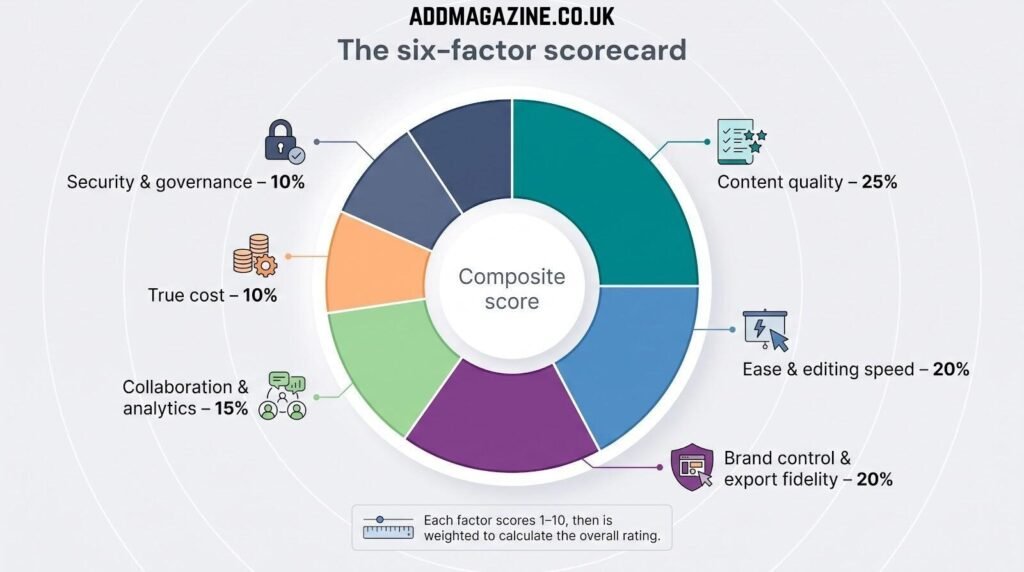
- Content quality – 25 percent: Miss a key claim or hallucinate a benefit and the score drops.
- Ease and editing speed – 20 percent: Fewer clicks to tweak copy, swap graphics, or reorder slides means a higher score.
- Brand control and export fidelity – 20 percent: Fonts, locked logos, and chart formatting must survive PowerPoint and Google Slides.
- Collaboration and analytics – 15 percent: Comment threads, share links, and engagement data lift or lower the rating.
- True cost – 10 percent: We roll seat counts and credit limits into one cost-per-usable-deck figure.
- Security and governance – 10 percent: Even the slickest UI fails if IT says no to missing SOC 2, SSO, or audit logs.
Each dimension earned 1–10 points, multiplied by its weight to reach a composite score. Expect the numbers to move when we retest; product updates land often, and we adjust just as quickly.
Plus AI: best for marketers working inside PowerPoint or Google Slides
Plus AI’s add-in lives inside PowerPoint and Google Slides, letting the AI write, format, and rebuild charts without any export step. That native workflow is a big reason many expert roundups rank the tool among the best AI presentation maker options for marketers. The add-in sits in PowerPoint and Google Slides, so the AI writes, formats, and rebuilds charts without any export step. In February 2026, Plus released Presentation Agent, a conversational sidekick that edits existing slides, rewrites copy, and cleans layouts in place.
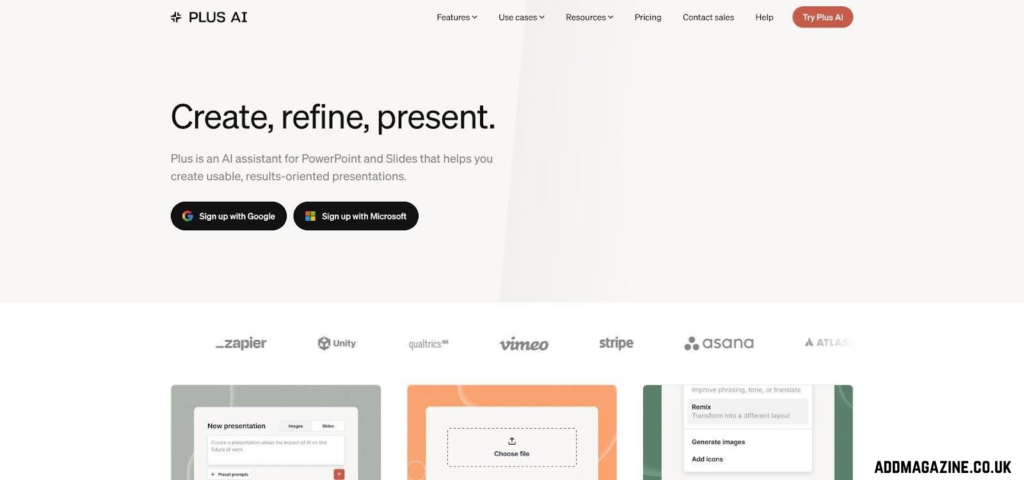
Plus AI add-in for PowerPoint and Google Slides.
Start with a prompt or paste a brief; Plus drafts a full deck and inserts every element as native shapes, not flattened images. That approach pays off later when you tweak a headline, recolor icons, or animate a chart.
Editing feels familiar. Ribbon buttons labeled Insert, Rewrite, and Remix transform any selected slide with one click. In our timed run the Agent trimmed copy-polish time by nine minutes and fixed three misaligned text boxes (small wins that matter on deadline).
Template sync keeps branding tight. Load your corporate slide master once and Plus locks fonts, colors, and logo placement. Across ten generated slides we saw zero brand drift, while web-first rivals averaged four deviations.
Pricing (per user, billed annually): Basic $10, Pro $20, Team $30, and Max $200 for heavy automation. All tiers sit on a SOC 2 Type II backbone, with SSO and SCIM available at Team and above.
Watch-outs: Each action consumes AI credits, so frequent creators may need a higher tier. Presentation Agent currently supports PowerPoint only; Google Slides users rely on the classic sidebar.
When the final deliverable needs to be an editable, brand-perfect slide file, Plus AI converts AI speed into practical output while keeping every shape editable and IT satisfied.
Gamma: best for lightning-fast, web-native presentations
Gamma shines when speed outranks tradition. Open a blank canvas, type a one-sentence prompt, and ten animated, mobile-ready slides appear in seconds. Because every deck lives on the web first, share links refresh instantly and log each view, click, and dwell time. Need a .pptx? One export button handles it, and you can expect about five minutes of font cleanup.
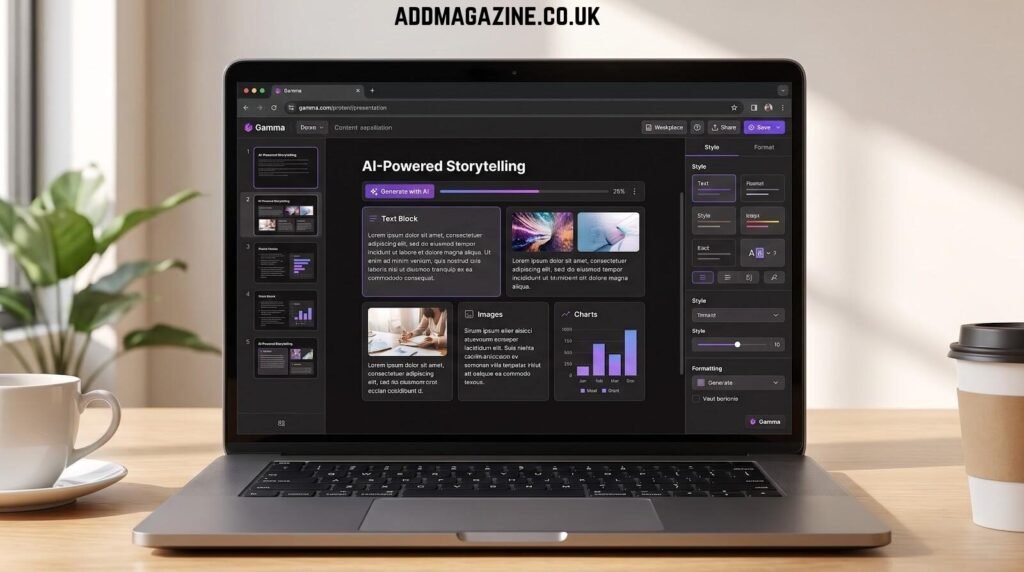
Gamma web-native AI presentation editor and share-link experience.
Momentum keeps Gamma near the top. The team released Gamma Agent for chat-based edits, then made its Generate API generally available on January 16, 2025, so product marketing can spin up 50 or more personalized decks from Zapier or a CRM trigger without opening the editor.
Branding travels well out of the box. Theme libraries carry your colors across text, shapes, and image accents. In our test Gamma kept branding on nine of ten slides; the lone miss was a stock photo that clashed with our palette.
Analytics are a standout feature: slide-level views, time-on-page, and button click-throughs beat the static download counts in PowerPoint.
Pricing (per creator, billed annually): Free tier $0; Plus $9; Pro $18 (adds API and custom domains); Ultra $90 with higher AI limits. All paid plans sit on a SOC 2 Type II backbone that satisfies most IT reviews.
Watch-outs: Exported PPTX files still need light layout cleanup, and advanced brand locks live in the higher plans.
When the deliverable is a share link and speed matters more than pixel-perfect slides, Gamma gives you fast, measurable results.
Canva: best all-in-one platform for campaign presentations
Marketing projects rarely end with slides. You still need LinkedIn carousels, demo videos, email headers, and that last-minute event badge.
The 2026 Canva AI 2.0 release turned its template library into a conversational design system. Type a goal such as “launch deck plus teaser video,” and the agent drafts a branded presentation, social cut-downs, and a short promo clip without forcing you to switch apps. Because every asset lives in one file tree, change a headline in the deck and the social graphic updates immediately.
Brand Kit remains Canva’s standout feature. Load your colors, fonts, and logo once, then lock them. In our test the AI honored every rule—even on animated slides—and saved the usual hex-code clean-up. The new Brand Intelligence panel flags off-palette images before export.
Publish directly to LinkedIn, HubSpot, Sprout Social, or Mailchimp from the same screen and track views and clicks without leaving Canva.
Pricing (per user, billed annually): Free tier $0; Pro $15; Business $30. Pro unlocks Brand Kit, SSO, and 24-hour video renders. Security holds up: Canva lists SOC 2 Type II and ISO 27001 in its trust portal and updated its subprocessor list in February 2026.
Watch-outs: First-draft narratives can wander, so set aside a few minutes to tighten slide order. And because Canva’s style is widespread, decks can feel familiar unless you tweak the layouts.
When your brief spans multiple channels and the clock is ticking, Canva’s single-platform workflow beats juggling five separate tools and keeps every asset on brand.
Beautiful.ai: best for brand-governed business decks
Beautiful.ai sells discipline over free-form creativity. Smart Slides lock layouts so stray text boxes cannot drift off-grid. The March 2026 “Create with AI” update adds an outline-first workflow: approve a low-fidelity storyboard, then let the AI turn it into polished slides.
That outline gate stops the common trap of gorgeous yet hollow decks. We changed slide order, added two proof points, then clicked Generate. The final ten-slide deck kept every locked brand element—fonts, logo position, color palette—intact.
Smart Slides still help during daily edits. Resize a chart and surrounding text snaps into place; connect live-data blocks to Excel or Google Sheets and the QBR refreshes minutes before the meeting.
The AI ingests documents, PDFs, and rough prompts. In our test it built a 15-slide QBR from the white paper and campaign CSV in 11 minutes, the fastest result once edit time was included. PowerPoint export worked, though two Smart Slides flattened into images, which we accepted given their complex animations.
Pricing (per user): Pro $12 per month when billed annually or $45 per month month-to-month. Team $40 per month (annual) unlocks SSO, SCIM, and viewer analytics. A $45 million General Catalyst investment in March 2026 signals ongoing enterprise focus.
Watch-outs: The rigid layout engine limits pixel-level tweaks, so designers who crave total freedom may feel constrained.
For most marketing teams, that constraint is the point. Beautiful.ai enforces brand rules, cuts hours of manual alignment, and, thanks to its outline-first AI, protects story quality as well as style.
Microsoft 365 Copilot: best for organizations already living in Microsoft land
Copilot sits in the same ribbon you use each day. Click the spark icon, describe the deck, and PowerPoint builds slides from Word files, SharePoint libraries, and Teams chats with no uploads, exports, or extra log-ins.
That tenant-level reach is Copilot’s advantage. Through Microsoft Graph it turns confidential launch notes into speaker-ready slides without leaving your Microsoft 365 environment. Security inherits the full Microsoft stack: SSO, DLP, eDiscovery, plus ISO 27001 and FedRAMP High authorizations.
Template support keeps improving. In our run the AI matched colors and fonts on seven of ten slides. Two charts kept a default bright blue and one title shrank, reminders that brand QA still matters.
Copilot excels at document grounding. Feeding it the 900-word launch brief produced a slide outline that echoed our messaging almost word for word.
Speed trails web rivals. The first draft took about four minutes, and each additional AI request paused during processing. Cleanup was quick, though, just eight minutes to “ready to present,” thanks to accurate content and native shapes.
Pricing: You need an eligible Microsoft 365 Business Standard, E3, or E5 subscription ($12 to $38 per user per month) plus the Copilot add-on ($30 per user per month). Check your current enterprise agreement before budgeting.
Choose Copilot if your assets already live in OneDrive, executives insist on native PowerPoint, and IT values one security model. Plan a final brand review to nudge any stray charts or titles into place.
Ideal for creating sales and marketing presentations with seamless team collaboration.
Slide building rarely happens alone. One teammate rewrites the headline, another swaps a chart, sales adds a variable for the prospect’s name, and everyone wants analytics. Pitch puts that workflow inside the editor.
Open a deck and co-edit in real time, Google Docs style. @Mention teammates, leave timed comments, and watch live cursors. Variables store fields such as Company, ARR, and Primary pain point; change a single value and every slide updates, perfect for cloning a deck across ten prospects.
Share links do more than count views. Pitch records the time spent on each slide and the point where viewers drop off. In our trial prospects skimmed past the pricing slide in five seconds, so sales trimmed fluff and conversions improved.
AI generation is present but shines in refinement. Commands like “shorten this paragraph” or “explain this chart” run inside the editor, sparing you a trip to ChatGPT.
Pricing (per creator, billed annually): Free tier at $0; Plus $13 per month; Team $23 per month (adds unlimited AI credits, advanced link analytics, and custom fonts). Pitch offers SSO and granular permissions; SOC 2 certification is listed as “in progress”.
Exports arrive as polished .pptx files, but complex animations flatten. If your team prefers shared links, cares about recipient analytics, and values live collaboration, Pitch gives you those benefits without a separate sales-enablement platform.
Storydoc: best for personalized ABM and interactive proposals
Most presentation tools stop at view. Storydoc asks, Did the viewer book a call? Decks work like mini-websites: scrolling pages, embedded forms, and dynamic variables that pull prospect data straight from your CRM.
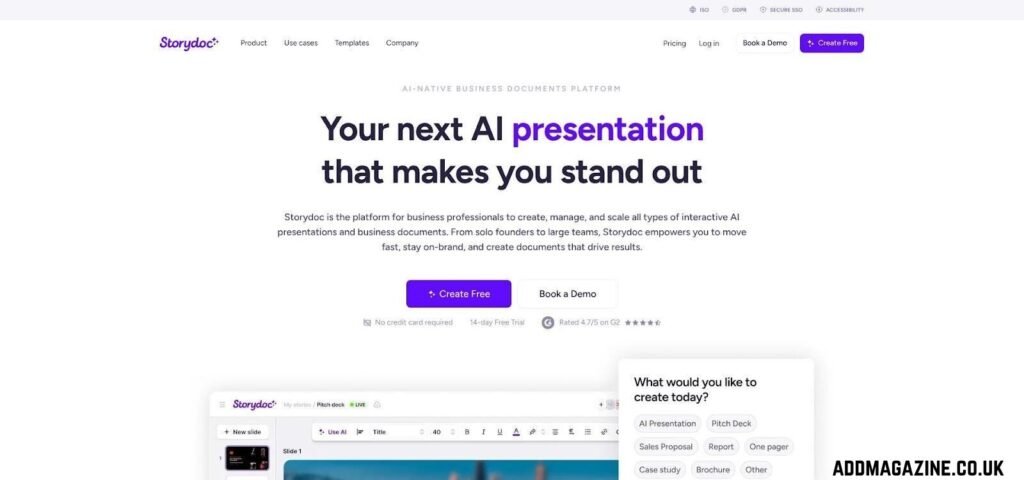
Storydoc interactive ABM presentation and proposal experience.
Storydoc captured contact name, industry, and ARR, then wove each field into copy, charts, and case-study modules. Click Refresh and every reference swaps to a new account, so you avoid duplicate files and manual find-and-replace.
Engagement analytics dig deeper than slide views. Heat maps reveal scroll depth, click paths on CTAs, and completion rates on built-in forms. Sales used that data to tailor follow-ups to sections prospects skipped.
Interactive blocks extend time on page. We added a pricing calculator and a calendar picker for instant meeting booking; both rendered smoothly on mobile, a win for executives skimming on phones.
Pricing: Plans start at $19.80 per month, while the HubSpot Marketplace lists Premium and Enterprise with “contact sales” buttons, so plan discovery time early. Security: public docs cite ISO 27001 and SSO support; request the latest audit letter during procurement.
Watch-outs: Storydoc exports only to PDF, not PowerPoint, and its scroll-based navigation may feel unfamiliar in a boardroom.
If your aim is pipeline rather than static slides, Storydoc turns each deck into an interactive microsite that nudges prospects toward the next step.
Presentations.AI: best emerging pick for live-data decks
Presentations.AI refuses to let slides go stale after export. Every time you open the deck, fresh numbers flow in from Salesforce, Snowflake, or Google Sheets.
Setup feels like wiring a dashboard. We authenticated to HubSpot, mapped revenue fields to chart components, and watched last night’s pipeline totals ripple through the slides in real time.
Brand Sync echoes Beautiful.ai’s layout guardrails but with a lighter touch. Upload your fonts, colors, and logo once; the AI applies them automatically yet lets you override on any slide. In our test we made two brand tweaks across ten slides, both minor icon swaps.
Generation is conversational. Ask for “a five-slide performance recap with live charts,” and the tool drafts an outline, then links each chart to your chosen data table. You can swap a bar for a line graph without breaking the data feed.
Export is a hand-off. PowerPoint downloads flatten live charts, which is fine for board packets but not for living dashboards. The web version stays the gold standard.
Pricing (per creator, billed annually): Free tier omits PPT export and advanced AI. Starter costs $20 per month and unlocks those features, while Business tiers add higher API limits and private-cloud storage. Security docs list SOC 2 Type II and GDPR readiness; SSO appears at the Business tier, so request the latest audit letter before rollout.
Presentations.AI is not as polished as Canva or Gamma, yet if your marketing stack runs on live data and slide freshness matters more than pixel-perfect design, this newcomer deserves a pilot.
Prezi AI: best for dynamic live and recorded storytelling
Prezi’s zoomable canvas used to feel like a novelty; with AI it turns your Word document into a webinar, event deck, or on-demand video within minutes. The 2026 Prezi AI update lets you import a file, choose Present & Record, and watch the system split paragraphs into animated frames while you appear on camera in a movable bubble, creating a shareable video without extra software.
Generation begins with a prompt or file upload. Prezi builds a non-linear flow rather than slide-by-slide pages, which encourages punchy headlines and reveal moments. In our test the AI kept brand colors but defaulted to quick motion; a settings tweak slowed the zoom for an executive tone.
Delivery is where Prezi stands out. Live Mode drops your video bubble over any screen share, and Record Mode exports an MP4 that you can post on social or embed on a landing page. Engagement analytics track drop-off points and replay counts so you can refine the story.
Pricing (per creator, billed annually): Basic free with daily AI credits; Standard $7 per month; Plus $19 per month; Premium $29 per month (adds presentation analytics and priority support). Documentation lists GDPR compliance; SOC 2 certification was “pending” at last check, so regulated teams should verify status.
Watch-outs: Motion divides opinion, and exporting to PowerPoint flattens animations. Choose Prezi when you need to captivate a live audience, repurpose the session as polished video, and break away from traditional slide decks; for straightforward boardroom updates, another tool may suit you better.
What AI presentation generators still get wrong
Speed is only half the story; polishing still takes time. Across all nine tools we spotted four repeat offenders:
1. Generic design fatigue. Prompt-born slides lean on oversized headings, gradient blobs, and stock-photo duos, slick yet shallow. After the first impression, stakeholders want a tighter hierarchy and data-driven visuals, so you often swap in brand icons or product screenshots.
2. Weak source control. Four of nine platforms hallucinated numbers or lifted stray sentences from the web. Until vendors add fact-checking, you need to paste proof or cite documents up front and review every claim.
3. Export scars. Fonts switched to Arial, charts flattened, or shapes drifted off grid in six of nine tools. Native-file generators such as Plus AI fared better, yet each deck still required a five- to ten-minute QA pass.
4. Brand-template conflict. Uploading a logo is easy; interpreting a multi-layout slide master is not. Tools that promise “on-brand in one click” often match colors but ignore spacing rules or locked placeholders, so a manual brand check stays mandatory.
Takeaway: AI slashes first-draft time, not final-deck effort. Keep human review in the loop, run a short QC checklist, and budget those last few minutes to polish what the algorithm starts.
Selecting the Best AI Tool for Creating Presentations
Start with the finish line: Where will the deck live after the meeting?
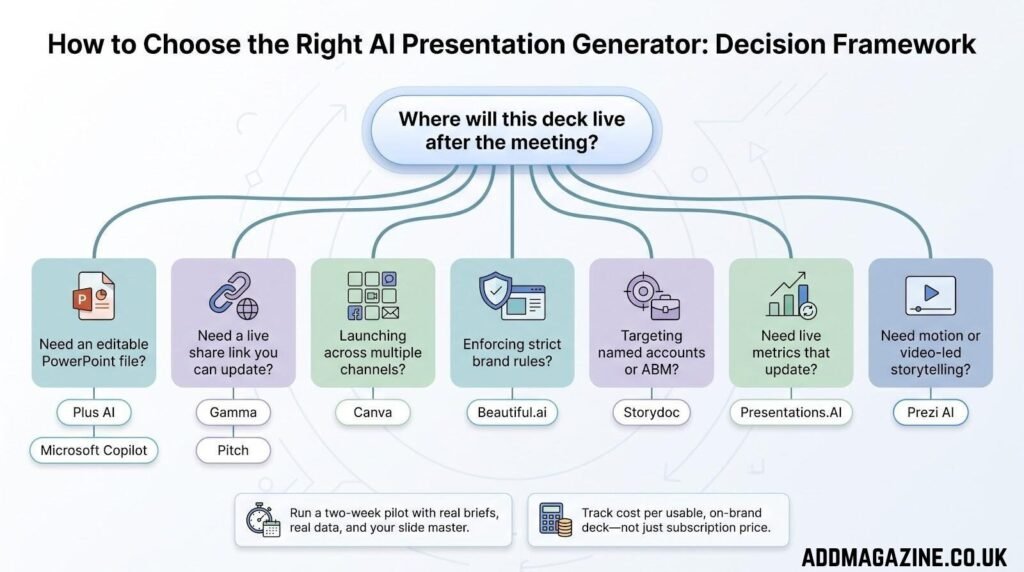
- Need an editable PowerPoint? Choose Plus AI or Microsoft Copilot. Both output native .pptx files, with Plus delivering faster brand accuracy and Copilot mining internal docs without uploads.
- Want a link you can update after you hit Send? Gamma creates live share pages with analytics, and Pitch follows close behind if collaboration and recipient tracking outweigh raw speed.
- Launching across multiple channels? Canva turns one prompt into slides, social clips, and email headers, keeping every asset in sync.
- Enforcing strict brand rules? Beautiful.ai locks every element and flags off-palette images before they reach the CMO’s inbox.
- Targeting named accounts? Storydoc personalizes copy, forms, and CTAs with live CRM fields, then shows who scrolled and who booked.
- Automating month-over-month data decks? Presentations.AI wires live charts to Salesforce or Snowflake so next month’s metrics refresh automatically.
- Need motion that sells the story? Prezi AI places your video bubble on the canvas, records, and hands you a polished MP4 for on-demand viewing.
Run a pilot before you buy. Feed the tool a real brief, import your slide master, export to PowerPoint, open it on a colleague’s laptop, then share a link outside the firewall. Anything that fails here will fail when stakes are higher.
Price the whole journey. Cheap plans with tight credit limits often cost more after overage fees, manual cleanup, and brand rework. Track cost per usable, on-brand deck, not subscription price alone, and the right choice will surface quickly.
Frequently asked questions
What is the single best AI presentation generator for marketers?
No single tool wins every scenario.
- Need editable PowerPoint? Plus AI.
- Need web speed with share-link analytics? Gamma.
- Need one platform for slides, social, and video? Canva.
Choose the option that matches the deck’s final home, not the loudest marketing.
Which AI tool works directly inside PowerPoint?
Two options live natively in the .pptx universe: Plus AI and Microsoft 365 Copilot. Both create editable shapes, charts, and speaker notes with no export step.
What about Google Slides?
Plus AI works natively in Google Slides. Lighter add-ons such as SlidesAI or MagicSlides can help, but they lack the full branding and security features covered in this guide. Web tools like Gamma or Canva can export to .gslides, but plan on a quick cleanup.
Which platform keeps decks most on brand?
Beautiful.ai logged the fewest color or font violations in testing. Plus AI (template sync) and Canva (Brand Kit) followed closely.
Can AI turn my white paper or PDF into a deck?
Yes. Plus AI, Gamma, Beautiful.ai, and Presentations. AI ingest long-form documents. Copilot can reference a Word file stored in OneDrive. Always review the output for hallucinated claims.
Are these tools safe for confidential data?
Most vendors publish SOC 2 Type II reports; Canva also lists ISO 27001. Check each trust center for SSO, data-retention terms, and whether your content trains their models. When in doubt, run a proof-of-concept in a sandbox tenant.
Do AI-generated presentations still need editing?
Yes. Plan to tighten story flow, replace generic images, and verify every statistic. Budget five to fifteen minutes of polish even on the best platforms.
Which tool is best for sales or ABM decks?
Storydoc excels at personalized, interactive proposals with CRM variables. Pitch is a close second, thanks to recipient analytics and content variables.
Is Tome still available?
No. Tome Slides shut down on April 30, 2025; some outdated listicles still include it, so double-check any roundup you read.
Which AI presentation generator is the top free choice?
Gamma, Canva, and Pitch offer free plans (watermarks or limited AI credits). For a truly cost-free, export-ready .pptx, Plus AI provides a seven-day trial.
Keep this FAQ handy as a quick go/no-go checklist before your next project.
Final verdict and buyer tips
AI can draft a deck in seconds, yet the real winner is the tool that shrinks the gap between first draft and send.
- Choose Plus AI or Microsoft Copilot when you need an editable PowerPoint file.
- Pick Gamma or Pitch when live links and recipient analytics drive your pipeline.
- Use Canva for multi-format campaigns, Beautiful.ai for locked-down branding, and Storydoc when every slide needs an ABM call to action.
- Select Presentations.AI if live metrics are essential, and Prezi AI when motion and video carry the story.
Run a two-week pilot with your real template, real data, and at least one skeptical stakeholder. Track three numbers: minutes to first draft, minutes to usable deck, and brand fixes required. Then divide subscription cost by decks created per month to find your cost per usable deck, a metric any CFO can respect.
Schedule a quarterly re-test. The category moves quickly, and today’s runner-up can leap ahead after one update. Keep your scorecard current so your decks, and your sanity, stay on brand, on message, and on time.