Sampling packs fail on the kitchen table, not in the design file. A UK brand can print four hundred sachets, then lose the legal claim because someone rebuilt the face in a fresh layout and shifted the badge. An ai image translator run helps only when the job is to keep the same die and swap the words.
Production editors do not need another all-in-one pitch. They need a pass that does not invent a second flash on a carton that already has one. The homepage currently lists GPT-2-Image at 10 credits. The help text splits a wording-first engine named Aimslate from a layout-first engine. That split is the only model choice this desk should argue about before anyone presses Translate.
Why A New Layout Breaks The Pack
A sample pack is a small legal object. The claim on the face has to match the claim on the insert. The flavour line has to match the carton flap. If a designer retypes those lines into a new file, the badge moves, the flash grows, and the kitchen-table photo no longer matches the artwork the brand signed.
That miss is expensive in a boring way. The printer still invoices the first run. The agency still owes a replacement sleeve. The brand still has a box of packs that cannot go to a sampling night because the on-pack line now disagrees with the insert. Stiff wording is a later edit. A second object on an approved face is the stop.
So the first reject is visual, not linguistic. If the die line moved, stop. If a new starburst appeared next to the old one, stop. If the flap date became a smear, stop. Those three checks decide whether the file can leave the desk. Wording polish comes after the object still looks like the same pack.
What The Desk Locks Before Anyone Uploads
Lock the source before the tool sees it. Shoot the carton square, or export the approved face as a clean PNG. Do not upload a phone photo of a crumpled sachet unless that crumpled sachet is the only legal source. Soft type on a curved pouch will come back softer. Fix the photo first.
Write the already-approved English line on a sticky next to the screen. The tool can suggest a Spanish or French line. The desk still has to paste the line legal already signed. If the prompt box is empty, the model will invent tone. If the prompt box repeats the locked line, the pass has a chance to stay inside the brief.
Keep The Same Die Line And Flap
Put the source and the result side by side at the final crop, not in a tiny preview. Read the flap. If the date that legal wrote is now a grey smudge, treat the file as a pretty still and keep it off the table. A sampling night that cannot show a date cannot ship.
Check the corners of the flash. Inpainting that rebuilds a background can also grow a second edge around the old badge. One extra rim is enough to reject. The kitchen table will photograph that rim. Readers will think the brand printed a new logo.
How The Upload Stays Inside The Artwork
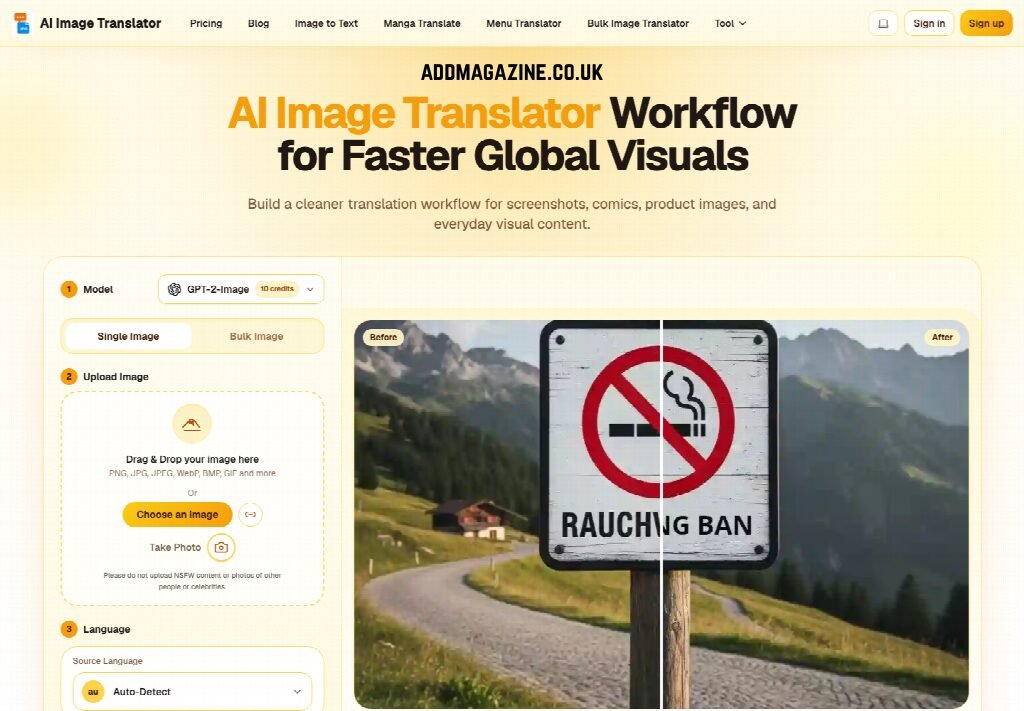
The public flow is four boxes: model, upload, language, Translate. Do not add a fifth box that the page does not have. Do not invent a download step the homepage does not name. Stay inside those four, then judge the still.
Choose Model And Single Image First
Leave the mode on Single Image. A sample face is one legal object, not a folder. GPT-2-Image is the model the homepage currently prices at 10 credits. If wording is the risk, the help text points at Aimslate. If the badge geometry is the risk, it points at the layout-first option. For a signed carton, pick the layout-first read. A prettier sentence that moves the flash still fails the kitchen table.
Upload The Pack Then Set Language
Drag a PNG, JPG, JPEG, WebP, BMP, or GIF into the second box, or use Choose an image. Take Photo exists for a phone capture of the physical pack. Do not upload other people’s faces or celebrity stills; the upload line already blocks that class of file. Set Source to Auto-Detect only when the on-pack language is obvious. Set Target to the market language legal already named. Then press Translate.
AI Image Translator will spend those 10 credits on one face. If the first still invents a second badge, do not burn a second pass on the same crooked photo. Recrop the source. Lock the line in the prompt box. Run once more. Two sloppy passes cost the same as one clean pass plus a wasted hour of sleeve talk.
Errors That Waste The Next Print Slot
The common waste is rebuilding the pack in a new document because the first pass looked “almost right.” Almost right is how a second flash gets approved. The next print slot then prints the invented object at scale.
Another waste is feeding a hero crop that already cut the flap. The tool cannot restore a date that the crop deleted. The desk then argues about flavour copy while the legal date is gone. If the flap matters, the source must include the flap.
A third waste is mixing two markets in one still. A bilingual face is a different job from a single-language swap. If the carton must stay English on one panel and become French on the other, split the file or leave the English panel as typed text. One pass that tries to rewrite both panels often smears the panel you were meant to keep.
- Reject any still that adds a second badge, flash, or starburst.
- Reject any still that loses the flap date or the insert claim.
- Reject any still that moves the die line more than a hair at final crop.
- Keep the source if the photo is soft; do not ask the model to sharpen legal type.
How The Kitchen Table Judges The File
The last judge sits on a real table: a photo of the printed sleeve beside the insert. If the claim on the sleeve and the claim on the insert disagree, the pack is a complaint waiting for a sampling night.
| Check | Pass | Stop |
| Face claim | Same words legal signed | New slogan or extra flash |
| Flap date | Readable at final crop | Grey smear or missing digits |
| Badge count | One badge, one rim | A second rim or invented mark |
Use the table as a reject sheet, not as a style guide. The three rows are enough. If all three pass, the still can go to print. If one fails, the file stays on the desk.
Read The Claim At Final Crop
Open the result at the size the printer will use. Do not approve from a thumbnail. A date that looks fine in the pane can collapse when the sleeve is 40 mm tall. An ai image translator still is only useful after that crop check. If you cannot read the claim without zooming, the kitchen table cannot read it either.
When the still passes, export it and leave the rest of the pack alone. Do not “improve” the English panel. Do not restyle the flavour chip. AI Image Translator did the language swap. The die stays the die.
What The Pack Should Still Prove
This path fits a UK sampling desk that already owns a signed carton and needs one market language on the same object. It does not fit a team that wants a new campaign look. A new look belongs in the design file, with legal in the room.
Keep Aimslate for copy-heavy inserts if wording is the fight. Keep the layout-first read for the face that has to survive a kitchen-table photo. AI Image Translator is the workspace for that swap, not a replacement for the insert text legal already locked.
If the first still grows a second badge, stop the print slot. Recrop. Rerun once. A pack that still looks like the signed carton is the only result worth sending to the table.