In a world driven by digital communication, the ability to share polished, professional documents in seconds has become essential. Whether you are a student submitting assignments, a freelancer sending proposals, or a business professional sharing reports, you often need to convert files into PDF format.
PDFs have become the global standard for document sharing because they preserve formatting, work across devices, and provide strong security features.
Many people still believe they must install complex software to convert documents into PDFs. Traditional programs like Adobe Acrobat can be expensive, time-consuming to install, and sometimes restricted on work or school computers.
Fortunately, there is a much easier solution.
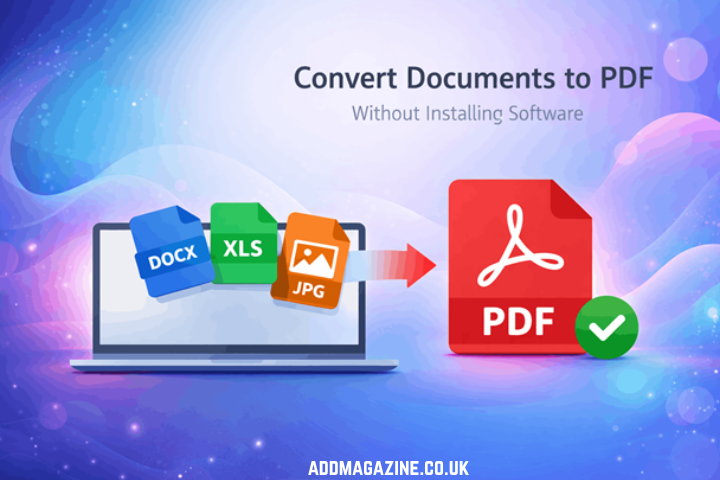
Today, you can convert documents to PDF directly in your browser without installing software. Modern online PDF converters make the process fast, simple, and accessible from almost any device.
This guide provides instructions on converting documents to PDF format without the requirement of software installation, explains why PDFs continue to be the preferred file format, and describes how online tools facilitate the process of document conversion.
Why PDF Is the Most Popular Document Format
Before exploring how to convert documents, it helps to understand why PDF has become one of the most widely used formats in the world.
The Portable Document Format (PDF) was originally developed by Adobe to ensure that documents look identical on every device and operating system. Over time, it has become the preferred format for professional communication, academic work, and business documentation.
Consistent Formatting Across Devices
One of the greatest strengths of PDF files is their ability to preserve document formatting. Regardless of where the file is opened, the layout remains exactly the same.
This means:
- Text stays properly aligned
- Images remain positioned correctly
- Fonts appear exactly as intended
When you send a Word or PowerPoint file, formatting may change depending on the recipient’s device or software version. With PDFs, however, the document always appears exactly as designed.
Universal Compatibility
Another major advantage is that PDFs work almost everywhere. Most devices already include built-in PDF viewers, making the format extremely convenient.
PDFs can be opened on:
- Windows computers
- Mac systems
- Android devices
- iPhones and iPads
- Modern web browsers
Because of this universal compatibility, PDFs are ideal for sharing documents with a wide audience.
Professional and Secure
PDFs also offer advanced security options that make them suitable for business and legal documents. Users can add:
- Password protection
- Document encryption
- Digital signatures
These features make PDFs particularly useful for contracts, invoices, official reports, and confidential documents.
For these reasons, PDF remains one of the most trusted and widely used document formats worldwide.
The Problem with Installing PDF Software
Although traditional PDF software still exists, it often creates unnecessary complications for users who simply want to convert a file quickly.
Software Installation Takes Time
Many PDF programs require large downloads and lengthy installation processes. Some applications consume significant storage space and take several minutes to set up.
For users who only need to convert a file occasionally, installing software can feel excessive.
Compatibility Issues
Not all PDF tools work across every operating system. Some applications are designed exclusively for specific platforms.
For example:
- Certain tools only support Windows
- Others require macOS
- Some desktop programs cannot run on mobile devices
This lack of compatibility can create problems for users working across multiple devices.
Restricted Work or School Computers
Many organizations limit software installation on company or university computers for security reasons. As a result, users may not have permission to install new applications.
In such cases, converting documents with traditional software becomes impossible.
Updates and Maintenance
Installed programs require ongoing updates to remain secure and functional. These updates consume time, internet bandwidth, and storage space.
Because of these limitations, many users now prefer online PDF converters that work directly in a web browser.
What Is an Online PDF Converter?
An online PDF converter is a web-based tool that allows users to convert files into PDF format without installing any software.
These tools operate entirely in your browser, making them accessible from any device connected to the internet.
How Online PDF Converters Work
Most online converters follow a straightforward process:
- Upload your document.
- The system processes the file and converts it to PDF.
- Download the converted document.
Supported File Types
Modern conversion tools can handle numerous file types, such as:
- Word documents (DOC, DOCX)
- Excel spreadsheets (XLS, XLSX)
- PowerPoint presentations (PPT, PPTX)
- Image files (JPG, PNG, BMP)
- Text files (TXT)
This versatility allows users to convert nearly any document into a professional PDF.
Step-by-Step Guide: Convert Documents to PDF Without Installing Software
Converting documents to PDF online is surprisingly simple. The process can be completed through a short and straightforward sequence.
Step 1: Open an Online PDF Converter
Begin by visiting a reliable online PDF conversion tool in your web browser.
Because these tools run in the browser, they work on desktops, tablets, and smartphones.
Step 2: Upload Your Document
Then, select and upload the file you’d like to convert. Most tools allow you to upload documents directly from your device.
Some platforms also support uploads from cloud storage services.
The upload process usually takes only a few seconds, depending on the file size.
Step 3: Start the Conversion
Once the file has been added, select Convert to begin. The system will handle the file automatically and generate a PDF version for you.
Behind the scenes, powerful servers handle the conversion quickly and efficiently.
Step 4: Download the PDF
Once the conversion is complete, simply download the newly created PDF file.
In most cases, the entire process—from upload to download—takes less than a minute.
Types of Documents You Can Convert to PDF
One of the biggest advantages of online converters is their ability to handle multiple file formats.
Word Documents
Word files are among the most commonly converted formats. Converting a Word document to PDF ensures that formatting remains consistent and prevents accidental edits.
Excel Spreadsheets
Excel spreadsheets often contain complex tables and calculations. Converting them to PDF preserves their layout, making them easier to share with colleagues or clients.
PowerPoint Presentations
PowerPoint presentations can also be converted into PDFs. This allows recipients to view slides even if they do not have presentation software installed.
Image Files
Image formats such as JPG and PNG can easily be converted into PDF documents. This feature makes it easier to organize scanned documents, image-based archives, and collections of visual work.
Text Files
Even simple text files can be converted into professional-looking PDF documents for easier sharing.
Advantages of Converting Documents Online
Online PDF converters offer several clear advantages over traditional software.
No Installation Required
Perhaps the greatest benefit is that no software installation is necessary. Everything happens directly in the browser, eliminating the need for downloads or setup.
Works on Any Device
Online converters are compatible with nearly every modern device. Whether you are using a laptop, tablet, or smartphone, you can convert files easily.
Fast and Efficient
Online tools process documents quickly. In most cases, conversions are completed within seconds.
Simple for Beginners
Each tool focuses on straightforward use, allowing users to work with minimal effort. Even users with minimal technical experience can convert documents without difficulty.
Security and Privacy Considerations
When using online tools, security naturally becomes a concern. Fortunately, reputable PDF converters take strong measures to protect user data.
Secure Encryption
Most platforms use HTTPS encryption to secure file transfers between your device and their servers.
This protects your data during both upload and download.
Automatic File Deletion
Many trusted tools automatically delete uploaded files after a certain period. This ensures that documents are not stored indefinitely.
Secure Cloud Processing
Online converters often rely on secure cloud infrastructure to process files efficiently and safely.
To protect your documents, always use reputable and trusted PDF conversion services.
Real-Life Use Cases for Online PDF Conversion
Online PDF converters are useful in many everyday situations.
Students
Students frequently convert assignments, essays, and notes into PDF format before submitting them through learning management systems. This ensures teachers see the document exactly as intended.
Businesses
Companies regularly convert documents such as invoices, reports, and contracts into PDF format. This maintains professionalism and ensures consistency across devices.
Freelancers
Freelancers often send proposals, portfolios, and invoices as PDFs. Doing so presents information clearly while preventing unwanted edits.
Content Creators
Bloggers and creators sometimes convert guides or checklists into PDFs to offer as downloadable resources for their audience.
How to Improve PDF Conversion Quality
To ensure high-quality PDF output, follow these simple tips.
Review Formatting Before Conversion
Check your document’s layout and formatting before converting it to PDF. This helps create a polished final file with a clear and well-organized appearance.
Use High-Quality Images
Make sure any images included in your document are clear, sharp, and of high quality. Low-quality images may appear blurry after conversion.
Check the Final PDF
Once the conversion is complete, check the PDF thoroughly to make sure everything appears correctly. Make sure every element is displayed properly and in its intended position.
Compress Large Files When Needed
If the PDF file is too large, consider compressing it. Reduced file sizes make sending documents through email and chat services quicker and more convenient
Conclusion
Converting documents to PDF no longer requires complicated software or expensive tools. With modern online solutions, you can convert documents to PDF instantly without installing anything.
Online PDF converters allow users to:
- convert files quickly
- access tools from any device
- avoid software installations
- Maintain professional document formatting
Whether you are a student, freelancer, or business professional, using an online PDF converter can simplify your workflow and save valuable time.
The next time you need to convert a document, try using an convertpdf.ai and experience just how easy document conversion can be. Once you see how simple the process is, you may never need traditional PDF software again.