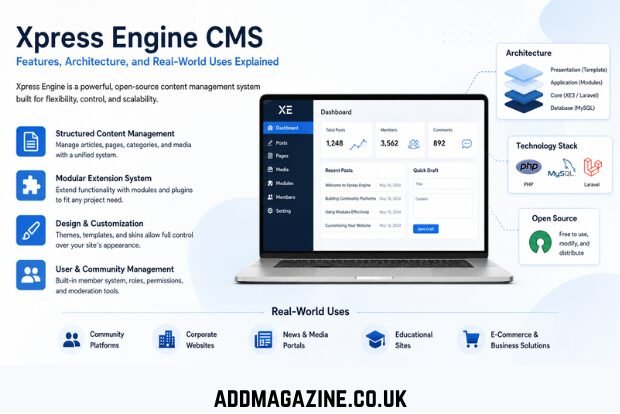
Xpress Engine is a content management system built to help users create and manage websites without building every component from scratch. It sits in the same broad category as other CMS platforms, but its development history and design direction make it closely tied to Korean web infrastructure and community-driven publishing systems.
At its core, Xpress Engine focuses on structured content management. That means pages, posts, user accounts, navigation menus, and extensions are all handled through a unified system rather than separate custom-built code. It is designed for developers who want flexibility and for administrators who want control over day-to-day content updates.
Unlike many modern website builders that prioritize simplicity over control, Xpress Engine positions itself in the middle: it provides a ready framework but still expects a level of technical understanding from its users.
Origins and Development Background
The development of Xpress Engine is closely linked to early internet community platforms in South Korea. Before modern CMS tools became common, online communities were often built using bulletin board systems. One of the most influential of these was Zeroboard.
Zeroboard allowed users to create discussion boards and manage members with relatively simple tools. It became widely adopted in Korea during the early expansion of web forums and online communities. However, as websites became more complex and required more than simple discussion threads, the limitations of bulletin-board-only systems became clear.
Xpress Engine emerged as an evolution of that environment. Instead of focusing only on posts and comments, it introduced a full CMS structure capable of handling pages, modules, and complex site layouts. This shift marked a transition from community boards to structured web platforms.
Over time, Xpress Engine became a reference point in Korean web development culture, particularly for developers building community-based or content-heavy websites.
Core Architecture and Technology Stack
Xpress Engine is built primarily using PHP, a widely used server-side programming language in web development. PHP’s compatibility with most hosting environments made XE accessible to a large number of developers and organizations.
A typical Xpress Engine installation runs on:
- PHP-based server environment
- Relational databases such as MySQL or MariaDB
- Standard web hosting infrastructure (Apache or Nginx)
The system is modular, meaning core functionality is separated into independent components such as:
- Content modules
- User management system
- Template engine
- Extension/plugin system
This modular structure allows developers to extend or replace parts of the system without rewriting the entire application.
Transition to XE3 and Modern Architecture
The newer direction of Xpress Engine, often referred to as XE3, represents a shift toward modern application architecture. This version integrates concepts from the Laravel ecosystem.
Laravel is known for its structured MVC architecture, routing system, and reusable components. By aligning XE3 with Laravel principles, Xpress Engine improved its scalability and made it more compatible with modern PHP development practices.
This change also made it easier for developers familiar with contemporary frameworks to work with the system, reducing the learning gap between CMS development and application development.
Content Management Approach
Xpress Engine is built around a structured content model. Instead of treating all content as static pages, it organizes data into manageable units that can be controlled through an administrative interface.
Typical content functions include:
- Creating and editing articles
- Organizing posts into categories
- Managing page structures and menus
- Handling media files such as images and documents
- Scheduling or controlling publication visibility
This structure allows websites to grow without becoming disorganized. For example, a blog can expand into a news portal or community platform without changing the core system.
Content is not just stored—it is organized with rules that define how it is displayed, who can access it, and how it interacts with other site components.
Design System and Customization
One of the important aspects of any CMS is how it handles design. Xpress Engine separates content from presentation, allowing developers and designers to work independently.
It supports customization through:
- Themes
- Layout templates
- Skins for modules
- Custom CSS and HTML structures
This separation means that the same content can be displayed in multiple formats depending on the design layer applied.
For businesses, this is useful because branding can be maintained consistently across different pages. For communities, it allows identity and user experience to evolve without changing the underlying data.
However, customization in Xpress Engine often requires technical knowledge, especially when modifying templates or integrating advanced layouts.
Extension System: Modules and Plugins
Xpress Engine uses a modular extension system that allows additional features to be added without changing the core software.
Common extensions include:
- Forum and bulletin board modules
- Membership and authentication systems
- Contact forms and inquiry tools
- Multimedia handling tools
- E-commerce or custom business features
This approach makes the platform adaptable to different use cases. A basic installation can function as a blog, while extended configurations can support full-scale community portals or corporate systems.
The extension system also allows developers to build and distribute custom modules, contributing to a wider ecosystem around the platform.
Use in Community Platforms
Xpress Engine has strong roots in online community development. Its structure supports user interaction features such as:
- Member registration
- Posting and commenting systems
- Moderation tools
- User role management
These features make it suitable for forums, discussion sites, and interest-based communities.
Community platforms built with Xpress Engine often emphasize structured interaction rather than informal social networking. Administrators can define rules, control access levels, and manage content visibility with precision.
This makes it suitable for organized communities such as educational groups, professional forums, or niche interest networks.
Business and Corporate Use Cases
Beyond community platforms, Xpress Engine is also used for corporate and business websites. Companies use it to:
- Publish product or service information
- Manage corporate news and updates
- Handle customer inquiries
- Maintain multi-page organizational websites
One of its advantages for business users is operational independence. Once the system is set up, non-technical staff can update content without requiring constant developer support.
This reduces long-term maintenance costs and allows faster content updates, especially for marketing and communication teams.
However, businesses with minimal technical resources may require initial developer assistance for setup and customization.
Open-Source Model and Community Contribution
Xpress Engine is open-source, meaning its source code is available for modification and redistribution under specific licensing conditions.
This provides several advantages:
- Transparency in system design
- Ability to customize deeply
- Community-driven improvements
- Reduced dependency on proprietary systems
Developers can inspect how the system works internally and modify it for specific needs. This is particularly useful for organizations that require tailored solutions.
However, open-source platforms also depend on community engagement. The strength of the ecosystem often depends on how active contributors are in maintaining documentation, plugins, and updates.
SEO and Content Structure Considerations
Search engine optimization (SEO) is not built into a CMS as a guarantee of ranking, but the structure of Xpress Engine supports SEO-friendly practices when used correctly.
Key SEO-related advantages include:
- Organized URL structures
- Category-based content grouping
- Consistent page formatting
- Template-driven metadata control
These features help search engines understand site hierarchy and content relationships.
However, actual ranking performance still depends on external factors such as:
- Content quality
- Page speed
- Mobile responsiveness
- Backlink profile
- User engagement
A technically well-structured site built on Xpress Engine still requires strong editorial strategy to perform well in search results.
Performance and Optimization
Website performance is influenced not only by the CMS but also by how it is configured. Xpress Engine websites can be fast or slow depending on implementation.
Common optimization practices include:
- Using efficient hosting environments
- Minimizing unnecessary plugins
- Compressing images and media
- Enabling caching mechanisms
- Optimizing database queries
Poorly managed extensions or heavy templates can slow down performance significantly. For this reason, system maintenance is an important part of running an XE-based website.
Security and Maintenance
Like any web platform, Xpress Engine requires regular maintenance to remain secure. Vulnerabilities can appear through outdated software components or poorly written extensions.
Key security practices include:
- Keeping the CMS updated
- Updating all installed modules and plugins
- Using strong authentication methods
- Removing unused components
- Monitoring server logs for unusual activity
Security is shared responsibility between the platform and the site administrator. The CMS provides tools, but proper configuration and maintenance determine real-world safety.
Limitations and Practical Challenges
Despite its flexibility, Xpress Engine has some limitations:
- Steeper learning curve compared to beginner website builders
- Smaller global community compared to mainstream CMS platforms
- More documentation available in Korean than in English
- Requires technical understanding for advanced customization
These factors make it less suitable for absolute beginners. However, for developers or technically capable users, these limitations are often acceptable trade-offs for increased control.
Conclusion
Xpress Engine represents a structured, flexible approach to website development rooted in Korean internet infrastructure. It evolved from early bulletin board systems into a full CMS capable of supporting blogs, corporate websites, and community platforms.
Its strength lies in modular design, open-source flexibility, and adaptability to different project sizes. While it may not be the simplest platform for beginners, it remains a practical tool for developers and organizations that need control over both content and structure.
In modern web development, Xpress Engine continues to serve as a functional option for projects that require customization, scalability, and a clear separation between content and design.