Meta AI makes it easier to experiment with AI-generated videos, animate images, and create shareable visual content. Its Vibes experience supports creating, remixing, and sharing AI-generated videos, making it appealing to creators who want a quick way to explore new ideas. However, if you need more control over storytelling, editing, character consistency, or long-form production, you may want to explore other tools.
1. MagicLight.AI: A Practical Tool for Creating AI-Powered Stories and Videos
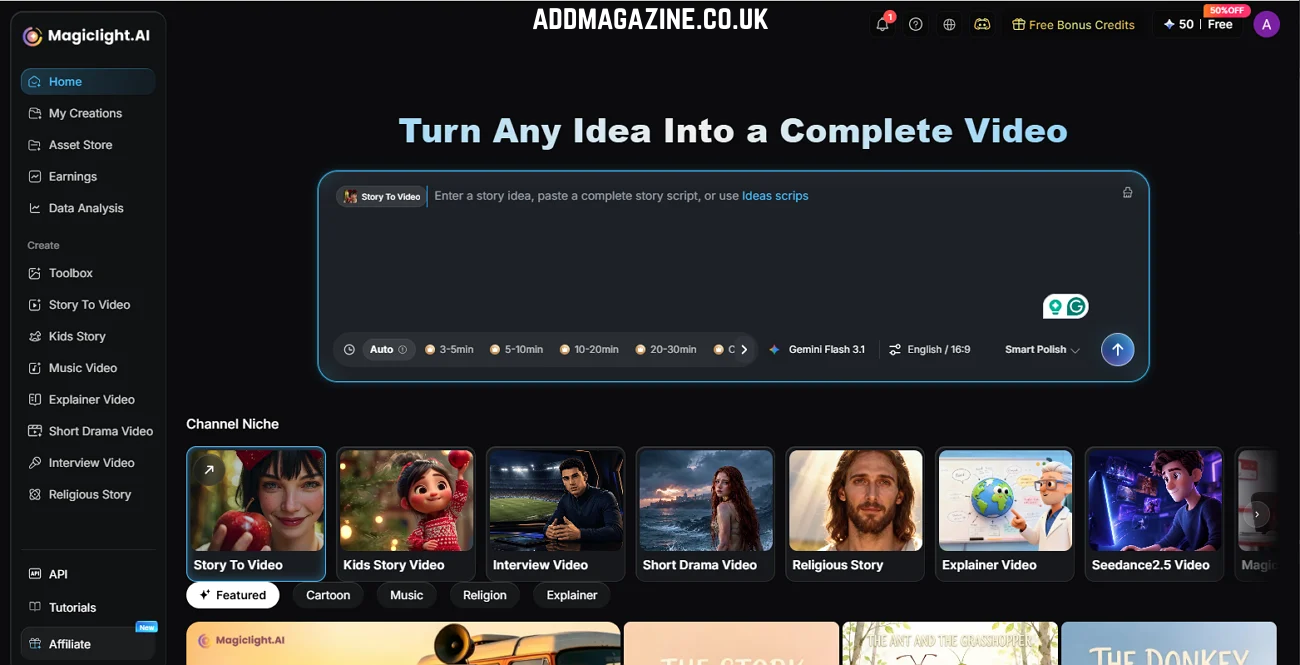
MagicLight.AI is an AI video creation platform designed for creators who want to turn ideas, scripts, and visual concepts into complete videos. Rather than focusing only on short, isolated clips, it provides a workflow for planning scenes, developing characters, generating narration, and producing longer narrative content
What Makes MagicLight.AI Different?
One of its main advantages is its focus on the entire production process. Depending on the project, creators can work from an initial idea or an existing script, develop a storyboard, establish a visual style, and generate scenes that fit together into a coherent video.
MagicLight.AI supports several content formats, including story videos, short dramas, children’s stories, religious stories, explainers, and interviews. Its character and style consistency features can also help creators maintain a recognizable visual identity across multiple scenes.
How MagicLight Agent Simplifies Creation
MagicLight Agent adds a conversational workflow to the production process. Instead of configuring every detail yourself, you can describe what you want to create and let the agent help plan the next steps.
The workflow can include:
- Idea development: Turn a basic concept into a more structured video direction.
- Script writing: Develop a narrative or organize information into a suitable script.
- Storyboard creation: Break the video into scenes with visual direction.
- Character and style setup: Prepare recurring characters and choose an appropriate visual style.
- Production planning: Select a suitable generation approach based on quality and production needs.
- Video generation: Move from the approved plan to the finished video.
MagicLight.AI also offers reusable creative assets, such as characters, visual styles, voice emotions, and polish skills. These resources can help streamline repeat production.
Best for: YouTube creators, storytellers, educators, and anyone who needs structured video production rather than just short AI clips.
Keep in mind: MagicLight.AI is not simply a replacement for every feature in Meta AI. Its strongest use case is structured, story-driven video creation. Check the current plan for credits, export options, and commercial usage terms.
2. Runway: Best for Creative Control and Video Editing
Runway is an AI-powered creative platform for generating and refining visual content. It is worth considering if your workflow involves more than generating a clip from a single prompt.
Why Creators Choose Runway
Runway offers AI-powered video creation alongside editing features that help users develop their projects from initial concepts to finished content. Depending on the available model and features, creators can experiment with different visual styles, generate footage, and refine results to suit a project. This flexibility is useful for marketing campaigns, short films, concept videos, and projects that require a specific visual direction.
When Should You Use Runway?
Runway is a good option when you want to experiment with visual concepts and integrate AI-generated footage into an edited video. This option works well for users who have a clear creative direction and prefer to build their videos by producing each scene separately.
Best for: Filmmakers, designers, marketers, and creators who want AI generation alongside a more flexible creative workflow.
Keep in mind: Available models, editing features, generation limits, and pricing can change. Review the current offering before committing to a plan.
3. Kling AI: Best for Dynamic Motion and Cinematic Clips
Kling AI is another alternative for creators who want to generate video from text prompts or visual references. It is particularly relevant when motion and the appearance of a scene are central to the project.
What Can You Create with Kling AI?
Depending on the available model and workflow, Kling AI can help generate scenes involving people, objects, camera movement, and changing environments. It can be useful for cinematic experiments, product concepts, short-form videos, and visual storytelling.
How Does It Compare with Meta AI?
Meta AI is convenient for creators who want to experiment with short, shareable content within Meta’s ecosystem. Kling AI is worth testing when you want to focus more closely on generated motion and the visual details of a particular scene. Neither tool guarantees perfect results. Complex movements, object interactions, and continuity can still require several attempts.
Best for: Creators making cinematic clips, dynamic scenes, and visually engaging short videos.
Keep in mind: Check the current access options, supported formats, and generation limits in your region.
4. InVideo AI: Best for Turning Prompts into Complete Videos
InVideo AI is an AI-powered video creation platform that helps creators turn text prompts and ideas into videos. It is worth considering if you want to produce content without manually assembling every scene from scratch.
Create Videos from Simple Prompts
Depending on the available workflow, InVideo AI can help organize a video around a topic or script and combine elements such as scenes, voiceovers, subtitles, and background music. This makes it useful for creators who regularly produce explainers, marketing videos, educational content, or social media posts.
When Should You Choose InVideo AI?
InVideo AI is a practical option if your priority is turning an idea into a publishable video with less manual editing. It can be especially useful for content creators who produce videos frequently and need a repeatable workflow. Compared with MagicLight.AI, which emphasizes storytelling, character consistency, and structured narrative production, InVideo AI is worth exploring for prompt-based video assembly and general content creation.
Best for: YouTube creators, marketers, educators, and social media teams producing videos from scripts or prompts.
Keep in mind: Available AI models, generation limits, watermarks, pricing, and export options may vary by plan. Check the current terms before choosing a subscription.
5. Canva: Best for Beginner-Friendly Social Media Videos
Canva is a popular design platform that offers video editing and AI-assisted creative features. It is worth considering if your main goal is to produce social media content quickly without learning a complex editing application.
Create Videos for Different Platforms
Canva combines design templates, text, images, video editing, and other content tools in one workspace. AI-powered tools can support different stages of creative work, with the available options varying according to your account’s features. You can build promotional videos, social media posts, presentations, and branded content, then add text, transitions, music, and other design elements.
What Are the Limitations?
Canva’s biggest strength is accessible design and content assembly, rather than necessarily producing the most advanced AI-generated motion. If your project requires complex character actions or a cinematic scene generated from scratch, a specialized video generator may be a better fit.
Best for: Beginners, small businesses, social media managers, and creators who need polished content with minimal editing complexity.
Meta AI vs. Its Alternatives: Which Should You Choose?
Your ideal option will vary based on your project goals and the level of involvement you want in creating the final result.
| Tool | Best use case | Main advantage |
| MagicLight.AI | Story-driven and long-form videos | Script, storyboard, characters, and production in one workflow |
| Runway | Creative video production | Flexible visual experimentation and refinement |
| Kling AI | Dynamic and cinematic clips | Focus on generated movement and visual scenes |
| Adobe Firefly | Design and marketing projects | AI visuals within a broader creative workflow |
| Canva | Social media and branded content | Accessible editing and ready-made design tools |
These are practical starting points, not a universal ranking of video quality. Output depends on the model version, prompt, project requirements, and available plan.
Before choosing a platform, consider four questions:
- The ideal production method depends on your video’s runtime and whether you’re creating a quick social media clip or a story with multiple scenes.
- How much editing do you want to do? Some tools prioritize quick generation, while others support more detailed creative refinement.
- Do you need recurring characters? When producing multiple episodes, keeping the characters recognizable and the visual presentation uniform helps the entire series feel connected.
- What is your budget? Compare free credits, subscription fees, export quality, and commercial usage rights.
Conclusion
Finding the right alternative to Meta AI for video creation comes down to the type of content you want to produce and how much control you need over the process. Runway and Kling AI provide creative tools for generating engaging visuals, while Adobe Firefly appeals to creators working on design-led projects. Canva offers a simpler way to put together videos for social media and everyday marketing. MagicLight.AI stands out for creators looking to turn initial concepts into fully developed video projects. With its MagicLight Agent, users can bring together scriptwriting, scene planning, character creation, visual direction, and production preparation in a more connected workflow, making it easier to move from an early idea towards a finished video.
Frequently Asked Questions
- What is the best Meta AI video generator alternative in 2026?
Every creator follows a different path, so the right choice depends on their individual goals, needs, and creative vision. MagicLight.AI is worth considering for story-driven video production, Runway for creative workflows, Kling AI for motion-focused clips, Adobe Firefly for design-related projects, and Canva for accessible social media content.
- Is Meta AI a video generator?
Yes. Meta AI offers AI video creation experiences, including Vibes, which lets users create, remix, and share AI-generated videos. Available features and access may vary by product, account, and region.
- Which Meta AI alternative is best for YouTube videos?
The best option depends on your format. MagicLight.AI offers a creative solution for video makers looking to bring engaging stories, informative visuals, and consistent characters to life. Other tools may be more appropriate if your workflow focuses on generating individual clips and editing them separately.