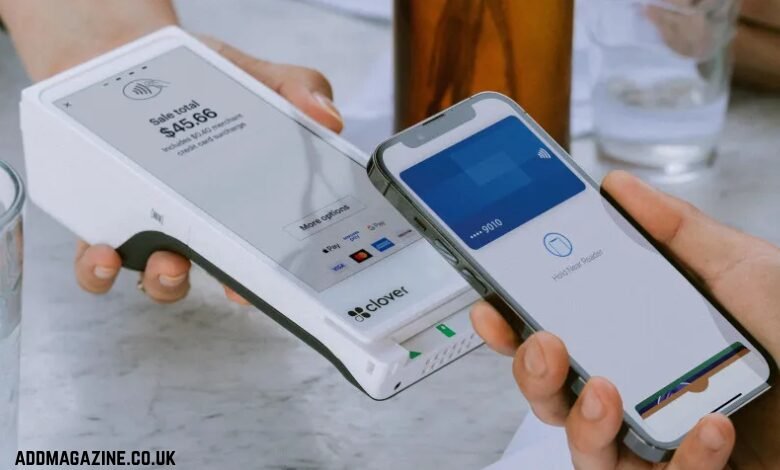
Two devices. Completely different jobs. The Clover Flex POS is a self-contained Android terminal — touchscreen, built-in thermal printer, cash drawer support, 7-inch display, 2.1 lbs on the counter. Clover Go is a Bluetooth card reader that weighs 0.15 lbs and does nothing without a phone or tablet attached to it. So the question isn’t “which one is better” — it’s “which one matches how your business actually takes money.” Get that wrong and you’re either overpaying for hardware you don’t use, or you’re stuck at a farmers market with a device that can’t handle a line.
What the Clover Flex Actually Does at the Counter
Flex runs on Android. It processes payments directly on the device — no paired phone, no secondary app, no dependency on someone’s personal iPhone having a charge. The built-in thermal printer means receipts print right there. Connect a cash drawer and you have a full register setup without bolting three pieces of hardware together.
The 7-inch touchscreen is large enough for a real item catalog, modifier screens, and customer-facing prompts. That workflow doesn’t work on a card reader.
Where Flex earns its place:
- Fixed retail counters where you need a real register, not a workaround
- Restaurants running tableside orders that need a self-contained device per station
- Service businesses (salons, repair shops) that print job tickets or service receipts on the spot
- Any operation where the person taking payment shouldn’t also be handing over their personal phone
Check before you deploy Flex: Does your space have a reliable Wi-Fi or LTE connection? Flex handles offline scenarios, but reporting syncs when connectivity restores — if your location drops signal constantly, that’s a workflow you need to plan around, not ignore.
Clover Go: What It Is and What It Isn’t
Clover Go is a Bluetooth 4.0 card reader. Full stop. It connects to a phone or tablet running the Clover app and lets that device process payments. Chip, tap, swipe — covered. But the Go itself doesn’t run apps, doesn’t store a menu, doesn’t print anything. All of that lives on whatever mobile device you pair it with.
At 0.15 lbs, it fits in a jacket pocket. That’s the point. A vendor working a weekend pop-up market doesn’t need a 2.1-lb terminal with a thermal printer. They need something that clips to a keychain, pairs in seconds, and processes a tap payment before the customer changes their mind.
Go works well when:
- You’re at a pop-up, market, or event where the “counter” is a folding table
- You’re doing delivery or mobile services where the transaction happens at the customer’s door
- You need a low-overhead backup payment method for an existing setup
- You’re testing a new revenue stream before committing to full POS hardware
The catch is the dependency chain. Go needs a charged phone, an active Clover account, a working Bluetooth connection, and mobile data or Wi-Fi on the paired device. If any link in that chain breaks — dead phone, dropped signal, app update that misbehaved — you’re not taking cards. I’ve seen this exact scenario kill a vendor’s afternoon at an outdoor festival. Not great.
Flex vs Go: Where the Real Differences Hit
Processing architecture: Flex processes on-device. Go processes through the paired phone’s app. That’s not just a hardware difference — it affects how you handle voids, refunds, and end-of-day reporting. On Flex, your manager can run a close-out report directly at the terminal. On Go, that all happens in the app on whoever’s phone is paired.
Reporting is where this matters most in practice. At 9pm close, if your Flex terminal has been running all day, the transaction history is right there — split by payment type, itemized, ready to reconcile. With Go, you’re pulling that data from the Clover dashboard on a mobile device. Not broken, just a different workflow.
Receipt printing: Flex has a built-in thermal printer. Go has nothing. If your customers expect printed receipts — restaurant guests, retail buyers, anyone who needs a paper record for expense reporting — Go doesn’t solve that without adding a separate Bluetooth printer to the mix. That starts to erode the “simple and cheap” advantage pretty fast.
Cash drawer support: Flex supports it. Go doesn’t. If you run any cash transactions at all, this matters.
Edge cases to watch: On Flex, a voided transaction after batch close needs to be handled as a refund on the next business day — same as most terminals. On Go, if the paired phone loses connectivity mid-transaction, you can get a pending auth that doesn’t resolve cleanly. Check your Clover dashboard for unresolved transactions after any connectivity interruption.
Picking the Right Device for Your Operation
Here’s the honest framework. Ask yourself three questions:
1. Are you primarily mobile or just starting out? Go makes sense. Low hardware cost, zero counter space required, and it handles the payment types customers actually use in 2026.
2. Do you need inventory management or detailed reporting at the device level? That’s a Flex conversation. Go offloads all of that to the app — workable, but not optimized for high-volume operations.
Some businesses run both. A restaurant with a fixed bar counter on Flex and a server walking the patio with Go on their work phone. That’s a legitimate hybrid — just make sure your Clover account structure and reporting are set up to handle split terminals before you go live, not after your first busy Saturday.
If you’re evaluating the lightweight end of the Clover lineup, the Clover Go card reader is worth a close look for mobile-first use cases — delivery, events, service calls, or as a secondary device for an existing setup.
Practical Verification Checklist Before You Commit
Before ordering either device, run through this:
- Check your connectivity: Flex needs Wi-Fi or LTE at the install location. Verify signal strength before setup, not after.
- Check your receipt workflow: If customers need paper receipts, Go alone won’t cover it. Budget for a paired printer or switch to Flex.
- Check your cash handling: Any cash drawer requirement points to Flex. Go doesn’t support it natively.
- Check your reporting needs: If your accountant wants daily terminal reports, Flex gives you that on-device. Go requires pulling from the dashboard app.
- Check your volume: High-transaction environments — busy retail, lunch rush restaurants — stress-test the paired-device model. Flex handles that load independently.
- Check your staff’s devices: If Go is your plan, confirm the paired phones are business-owned or at least consistently available and charged. Personal devices as payment hardware create operational fragility.
The right device isn’t the one with more features. It’s the one that doesn’t create a bottleneck on your busiest day. Flex handles complexity at a fixed location. Go handles simplicity in the field. Know which problem you’re actually solving and the choice is obvious.