Anyone who works with visual media knows the bottleneck is rarely a lack of ideas. The real bottleneck is the sheer volume of raw material you have to sift through to find what works. Whether you are dealing with a server full of 8K raw footage or trying to nail down a specific on camera look for talent, the process of trial and error eats up massive amounts of time and budget.
Artificial intelligence has finally moved past the gimmick stage in these areas. We are seeing practical tools that handle the tedious filtering work. This allows professionals to focus on actual decision making.
Shifting the Heavy Lifting in Post Production
Let’s talk about the reality of modern video pipelines. The ratio of shot footage to final cut has exploded over the last decade. Because digital storage is relatively cheap, production crews shoot absolutely everything. They leave cameras rolling between takes. They capture multiple angles of entirely mundane actions. When that drive lands on an editor’s desk, the immediate problem is just figuring out what actually exists in the folders.
Historically, an assistant editor would spend days watching every clip in real time. They would add markers, create subclips, and write detailed notes to make the project searchable. Now, machine learning handles the bulk of this initial organization. We use tools that automatically transcribe audio and sync it directly to the editing timeline. You can search for a specific word an interview subject said and jump right to that exact frame.
But transcription only covers dialogue. A massive portion of any commercial or documentary project is b-roll. Managing that non verbal footage requires an entirely different approach to metadata tagging.
Sorting Footage Without Losing Your Mind
When you have hours of silent environmental shots, searching for a specific visual becomes a nightmare. You might need a shot of a red car driving past a brick building at sunset. If that metadata was not manually logged by someone on set, you have to scrub through everything manually. That burns through expensive post production hours and stalls the creative momentum.
This is where computer vision completely alters the workflow. Running an AI video scene finder on your raw media changes how you build a timeline. The software analyzes the pixel data and automatically creates cuts or markers whenever the camera angle changes, the lighting shifts, or a new subject enters the frame.
It tags objects and environments without any human input. You tell the system to show you all clips containing a coffee cup or a specific architectural feature, and it pulls them instantly. This removes days of manual logging from the schedule. You spend your afternoon actually pacing the story rather than playing hide and seek with your own media assets. The machine does the sorting, and you do the crafting.
Bridging the Gap Between Screen and Reality
Visualization problems do not stop at the editing bay. Pre production, casting, and styling require just as much guesswork. This is especially true when prepping talent for the screen or helping a client rebrand their public image. Physical changes carry a lot of financial and scheduling risk.
In the past, pitching a new look meant relying heavily on reference photos and mood boards. You would pull pictures of celebrities or models and ask the client to mentally bridge the gap. That often led to expensive misunderstandings on set. A look that works under harsh studio lighting on a fashion model might look completely wrong on an executive or an actor.
Hair, makeup, and wardrobe tests take up valuable studio time. They require paying day rates to an entire crew just to see if a concept works in the real world. Machine learning generation has practically eliminated this guesswork by allowing us to test concepts digitally first.
Testing Looks Before Committing
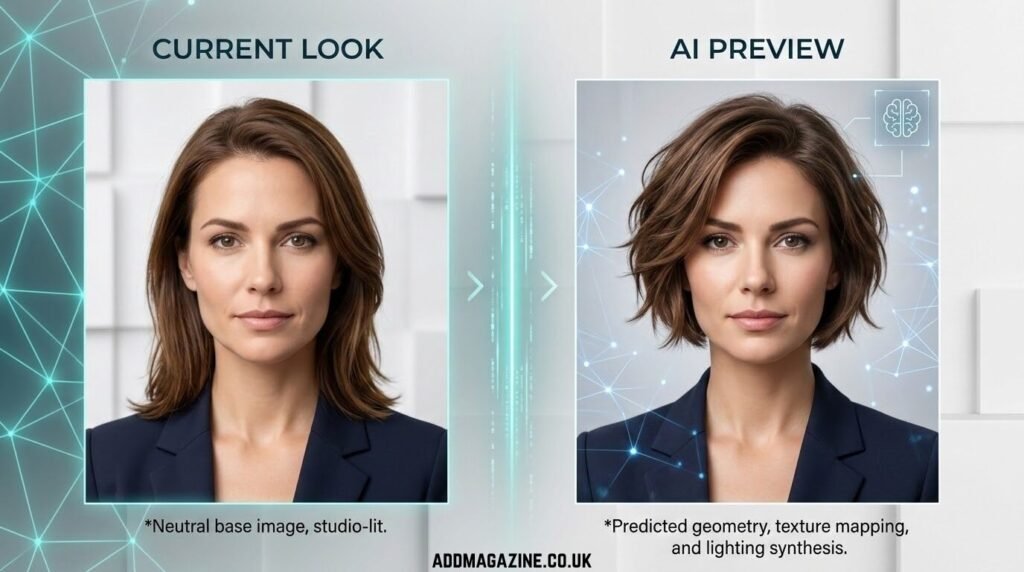
We now use predictive generation to create highly accurate mockups of physical changes before a single pair of scissors or styling tool is touched. If a project requires a drastic change in appearance for an actor or a brand spokesperson, you simply feed a neutral, well lit headshot into the system.
Say a client is considering a major hair change for an upcoming commercial campaign. Instead of hoping for the best and risking a meltdown in the makeup chair, they can use an app for a short hairstyle preview to see exactly how that cut frames their specific face shape.
The rendering engine accounts for hair texture, density, and how studio light interacts with the new volume. It is not like the clunky digital stickers from a decade ago. The outputs look incredibly realistic. This allows producers, stylists, and talent to have an objective conversation about visual direction without any permanent consequences. If the rendering looks bad, you scrap it and move on to the next concept without having wasted a single dollar on a physical test shoot.
Making the Output Actually Useful
The goal of integrating these tools is never to let the computer make the final creative call. The technology is just a very fast, very efficient assistant. It filters out the noise and visualizes the possibilities so you can make informed choices.
When you apply these systems to your workflow, you need to keep the parameters tight. Do not let the software dictate the pacing of your edit just because it flagged a scene change perfectly. Do not adopt a styling choice just because the digital rendering looks polished.
Use the generated options to eliminate bad ideas quickly. Clients today expect rapid turnarounds and lean budgets. They do not care how many terabytes of footage you had to dig through or how hard it was to lock down a wardrobe choice. They just want the deliverable. The commercial value of artificial intelligence right now is purely in speed and risk reduction. You get to the starting line faster, you communicate visual ideas more clearly, and you make far fewer expensive mistakes along the way.