Most businesses using generative tools for their content are hitting the same wall right now. Production volume is up, but reader engagement is flat. You can usually spot an automated blog post, marketing email, or internal memo within the first three sentences. The vocabulary is slightly too formal. The paragraphs are perfectly symmetrical. The actual point of the piece takes way too long to arrive. We need to look at how to get these systems to produce drafts that actually sound like your team wrote them.
Stop Relying on the Blank Box
Content generation fails when you treat the chat interface like a basic search engine. Typing a quick request for a blog post about supply chain logistics gives you exactly what you asked for. You get a generic average of everything the model has ever read on the internet about logistics. To get a specific, authoritative voice, you have to feed the system strict context.
This is why having a curated AI prompt collection is incredibly valuable for marketing and operations teams. Instead of hoping a junior writer remembers to ask the model to use simple language and active voice, you build a shared library of tested instructions. You give the system your exact style guidelines. You provide examples of past company work that performed well. You set strict rules about what words to avoid entirely.
When you standardize the input phase across your department, the output stops sounding like a generic college essay and starts aligning with your actual brand identity. It saves hours of manual editing on the back end.
Edit for Rhythm and Breath
Machines love visual symmetry. They naturally default to writing paragraphs that are all exactly three or four sentences long, using words of similar length. It makes the text look balanced on a screen, but it makes reading it out loud feel like listening to a metronome. Real human communication is erratic. We use short sentences to make a hard point.
Then we follow up with a much longer, more detailed explanation that provides the necessary background data to back up the claim we just made. We change our pacing based on the importance of the information.
When you review an automated draft, your first pass should involve breaking up the visual monotony. Chop a few sentences in half. Combine others to create a longer thought. Give the text some breathing room. If you read a paragraph out loud and run out of breath before the end, fix the punctuation. Readability is highly dependent on how the text flows visually and rhythmically.
Strategic Tool Usage for Refining Drafts
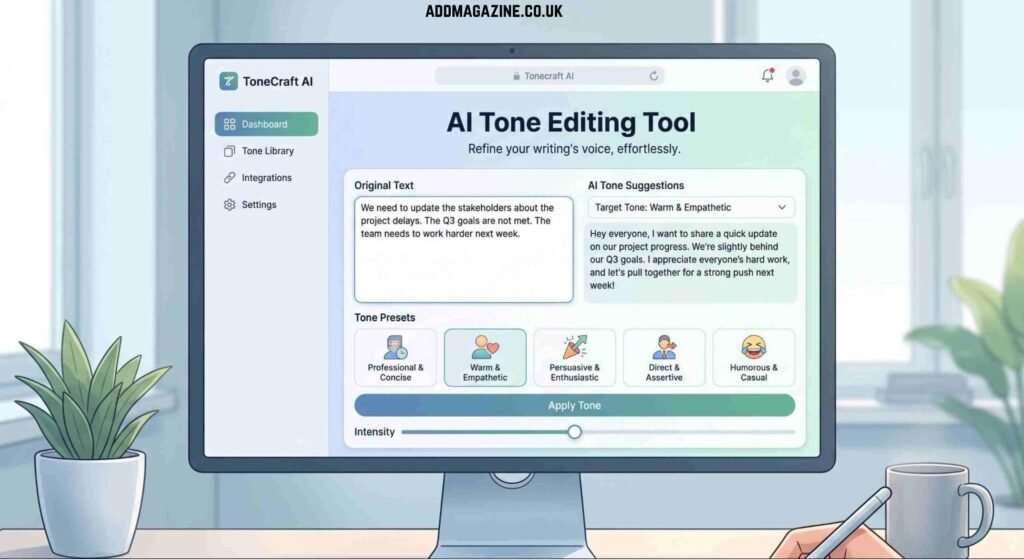
Sometimes you get a draft that contains all the right technical facts but carries the wrong energy. It might sound too academic for a consumer newsletter. It might sound too casual for a quarterly stakeholder report. Rewriting the entire document manually defeats the purpose of using automated tools in the first place, and starting over with a new prompt doesn’t always guarantee a better result.
This is a practical time to use an online AI tone rewriter to adjust the text. The trick is to be highly specific with your settings or follow up instructions. Don’t just select a generic professional filter from a menu. Tell the software to adopt the exact voice of a senior project manager explaining a timeline delay to a preferred client. Tell it to sound like a software engineer documenting a new feature for the internal sales team. You want to adjust the attitude of the text without losing the core information or the specific numbers you already verified.
Demand Concrete Operational Details
The biggest tell of automated text is a heavy reliance on abstract nouns and generic business terminology. The system doesn’t know the specifics of your warehouse layout, your latest software update, or your current staffing levels, so it uses broad terms to cover the gaps.
You have to force the issue and inject reality into the copy. If the draft says a new process will improve efficiency, rewrite that sentence. Make it say the new routing protocol cuts deployment time by two hours. Replace vague references to client satisfaction with a specific retention metric or an actual procedural change your team implemented last quarter. Concrete nouns ground the text in reality.
If your text relies on words like synergy or optimization, you are hiding the actual work. Tell the reader exactly what happened, who did it, and what it cost. That level of detail is something a machine cannot generate on its own.
Control the Formatting
Automated models love lists. If you ask for a strategy document, you will almost certainly receive a list of ten bullet points with bold headers and two sentences of explanation for each. This structure is useful for scanning, but it makes every single piece of content look identical.
Break this habit by rewriting lists into standard paragraphs when the information doesn’t actually require a list format. Only use bullets when you are outlining sequential steps or comparing distinct data points. Force the text to flow like a narrative rather than a slide deck.
Kill the Summary
Automated models are trained to be relentlessly helpful. This usually translates into a desperate need to summarize everything. They love to wrap up every single section with a neat little conclusion. They almost always finish every article with a paragraph telling you what you just read.
You rarely need this. If your text is clear, the reader already understands the point. Just delete the final paragraph entirely. Cut the transition sentences that try to seamlessly bridge two clearly related thoughts. Readers appreciate brevity, and stopping abruptly when the information runs out is a highly human trait.
The Final Read
Before you publish anything, look closely at the vocabulary. Strip out words nobody in your office actually says out loud. If you see phrases like navigating the complexities or a testament to, hit backspace immediately. Look for a passive voice and flip it.
The goal is not to trick people into thinking a human typed every single word from scratch. The goal is to produce information that your target audience actually wants to read and can use to make decisions. If you focus on clarity, accuracy, and specific operational details, a natural voice follows automatically.