The past eighteen months have seen an explosion of AI models, each promising to redefine what’s possible in image generation, video synthesis, music composition, and voice synthesis. A typical workflow might require bouncing between OpenAI’s Sora for video, Google’s Veo for alternative takes, Suno for soundtracks, and a dozen other specialized tools for image editing. The subscription costs stack up. The tabs multiply. The creative flow fractures.
This is precisely the gap that Nanobanana maker claims to fill, not by building another model, but by aggregating a wide range of AI capabilities under a single subscription and, more importantly, a single interface. After spending considerable time testing the platform against real-world creative tasks, what emerges is a tool that doesn’t just consolidate access but fundamentally changes how quickly and seamlessly ideas can move from prompt to polished output.
The Integration Argument: Why One Platform Makes More Sense Now Than Ever
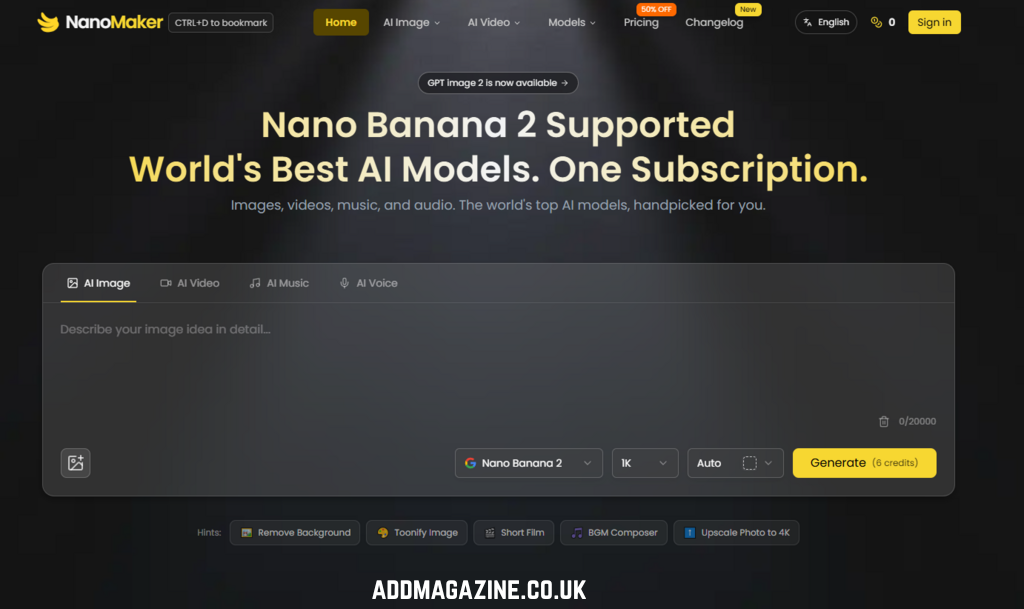
The promise of an all-in-one creative suite isn’t new, but the execution has historically fallen short. Platforms that aggregate multiple AI models often sacrifice depth for breadth, offering mediocre versions of everything rather than excellent versions of anything. This platform takes a different approach. Instead of building its own models from scratch, it integrates leading models, Nano Banana for images (powered by Google Gemini Flash), Gemini Veo and Sora 2 for video, Suno for music, and ElevenLabs for audio. The value proposition is straightforward: pay once, access everything, and never leave the page.
From a practical user perspective, this integration matters more than the marketing copy suggests. The real friction in AI creation isn’t just the cost of individual subscriptions, it’s the cognitive overhead of switching contexts. When an image needs to become a video that needs a soundtrack, the natural creative impulse is to iterate, not to export, switch tabs, re-upload, and hope the context carries over. The platform’s single-page workflow addresses this directly. Generate an image, turn it into a video, add background music, then export, all without refreshing or navigating away. This sounds trivial until you experience it.
Testing the Core: Image Generation and Editing with Nano Banana
The Figurine Transformation: From Flat Photo to 3D Character
The first test I ran was the photo-to-3D-figurine transformation, one of the platform’s showcased capabilities. The task was straightforward: upload a standard portrait and request a stylized 3D caricature with “expressive facial features, playful exaggeration, rendered in a smooth, polished style with clean materials and soft ambient lighting”.
The result was surprising in its restraint. Many AI tools that promise “3D stylization” produce results that are either too cartoonish—losing all resemblance to the subject—or too literal, failing to commit to the style. Nano Banana struck a balance. The facial structure remained recognizable, the proportions were exaggerated just enough to read as a figurine rather than a distorted photograph, and the material rendering (smooth, with soft lighting) gave it the feel of a collectible toy rather than a cheap filter.
The platform generated these elements, but the box design and screen content were generic rather than matching the specific character. This is a common constraint with AI image generation—the model understands the concept but struggles with precise, brand-specific details. For social media avatars and casual creative projects, this is entirely acceptable. For client work requiring exact replication of specific assets, it would require additional iterations or manual refinement.
The LinkedIn Profile Photo: Identity Preservation Under Pressure
The LinkedIn profile photo generator presented a more demanding test. The prompt specified strict requirements: preserve facial features exactly, maintain professional attire, use a clean solid-color background (not blurred), ensure even professional lighting, and keep the subject looking directly at the camera with a genuine smile.
This is where Nano Banana’s identity preservation capability became evident. The model maintained facial consistency remarkably well—the same person, same bone structure, same skin tone—while upgrading the setting and styling. The background was clean and sharp as requested, the lighting was even without harsh shadows, and the framing (head and shoulders, face taking up roughly 60% of the frame) followed the brief precisely.
The weakness emerged in the finer details. The “genuine smile” sometimes read as slightly forced, and the professional attire occasionally included subtle artifacts around collars and lapels.
Style Transfer and Creative Transformations
The platform’s style transfer capabilities were tested across several categories: line drawing conversion, emoji generation, coloring pages, and retro photography. Each produced results that were usable and often impressive, but with varying degrees of success.
The line drawing conversion (black and white sketch, clean lines, no shading) performed exceptionally well. The model stripped away color and shading while preserving composition and pose, producing minimalist linework that could serve as a base for further illustration or coloring.
The emoji generator transformed images into simplified, rounded designs on pure white backgrounds. The results were clean and recognizable, though the “expressive” quality varied—some emojis captured the intended emotion clearly, while others landed somewhere between neutral and confused.
The coloring page generator produced black-and-white line drawings suitable for printing on standard paper. The “fresh and simple” style was consistent, and the inclusion of a small colored reference version in the corner was a thoughtful touch for users who might need guidance on coloring.
The Video and Audio Dimension
While image generation is the platform’s most prominently featured capability, the integration of video and audio models adds a layer of utility that distinguishes it from pure image generators.
In testing, the video generation (powered by Gemini Veo and Sora 2) produced results that were competent but not revolutionary. The platform does not outperform dedicated video models in isolation—rather, it makes them accessible within a unified workflow. This is an important distinction. The value is not in beating Sora at its own game but in making Sora usable alongside Nano Banana and Suno without leaving the page.
The platform’s process is refreshingly direct:

Step 1: Enter Your Prompts
Describe your desired edits in natural language. The system’s understanding of complex instructions is one of its stronger attributes. In testing, prompts that included multiple requirements (style changes, background modifications, specific object placements) were generally interpreted correctly, though complex scenes with many distinct elements sometimes required refinement.
Step 2: Get Instant Results
Results appear quickly, though the actual generation time varies depending on the complexity of the request and the specific model being used. The system emphasizes “perfect character consistency and scene blending”—a claim that held up reasonably well in testing, though consistency was not always perfect across multiple generations of the same subject.
The Pricing Reality: What You Actually Pay For
The pricing structure is transparent. This is enough for a small number of test generations—each Nano Banana image generation typically consumes 5 credits—but is primarily a trial mechanism rather than a sustainable free tier.
- Basic: $4.9/month ($58.8/year) for 3,000 credits annually
- Standard: $7.9/month ($94.8/year) for 12,000 credits annually
The credit system is worth understanding: 3,000 credits translates to approximately 600 images, 176 videos, 150 songs, or 300 audio generations, depending on model usage. This is not a simple “one credit equals one image” system—different models consume different credit amounts, and usage varies by model and generation type.
The “50% OFF” and “Cancel anytime — Unused credits roll over” messaging suggests a flexible approach that values retention. The commercial use license is particularly significant for professionals who need to use generated content in client work or commercial products.
The Platform in Context: A Comparative View
Real Limitations: What to Keep in Mind
Any honest assessment must acknowledge the constraints. First, prompt quality significantly affects output quality. The system’s understanding of complex instructions is strong, but vague or poorly structured prompts produce vague or poorly structured results. This is not a limitation specific to this platform—it is a fundamental characteristic of all generative AI—but it bears repeating for users expecting magic from minimal input.
Second, complex scenes with multiple distinct elements may require multiple generations. The figurine transformation with the Blender screen and branded box is a case in point: the model understood the concept but filled in generic details rather than executing the specific request perfectly.
Generating the same subject multiple times may produce variations in facial expression, lighting, or background details. For most creative applications, this is acceptable—variation can even be desirable. For applications requiring absolute consistency (such as brand assets with strict guidelines), additional iteration or manual refinement may be necessary.
Fourth, the platform’s video generation capabilities, while integrated and convenient, do not outperform dedicated video models in isolation. The value is in integration, not in surpassing best‑in‑class standalone tools.
Who Benefits Most from This Approach
Designers and artists can accelerate their creative workflow with AI‑powered concept art and rapid design iterations, spending less time on repetitive tasks and more time refining ideas. E‑commerce sellers can create professional product photography and lifestyle shots without expensive studio sessions.
For each of these groups, the platform’s value is not in replacing human creativity but in removing friction. The creator who spends hours switching between tools can now stay in one flow. The marketer who needs a video but doesn’t have video editing skills can generate one from an image. The designer who needs to explore 20 variations of a concept can generate them in minutes rather than hours.
User feedback reflects this pragmatic value. One user notes that “one subscription gets me access to Nano Banana, Veo, Sora, and all the top AI models—I used to pay for these separately”. A freelance designer adds that “the consistency across edits is legit.

The Verdict: A Pragmatic Tool for a Fragmented Landscape
NanoMaker does not claim to be the best image generator, the best video generator, or the best music generator. What it does offer, and what testing bears out, is a seamless way to access all of these capabilities in a single workflow. The strength is integration, not isolation. It is for creators who value flow over feature lists, who want to move from idea to output without context‑switching, and who recognize that the sum of well‑integrated tools can be greater than the parts.
The limitations are real: prompt quality matters, complex scenes may require iteration, and consistency is good but not perfect. For professional work requiring absolute precision, additional refinement may be necessary. But for the vast majority of creative tasks—social media content, marketing materials, concept exploration, personal projects—the platform delivers on its promise of making professional‑grade AI creation accessible, affordable, and above all, fluid.
In a landscape crowded with AI tools that each demand their own subscription, their own interface, and their own learning curve, a platform that consolidates access without sacrificing quality is not just convenient—it is increasingly essential. The question is no longer whether AI can create, but whether the tools we use to create with AI can keep up with the speed of our own ideas. On this measure, this platform earns its place in the creative toolkit.